Introduction
Worried your Canvas grade is slipping and you might fail the class?
Many students in the U.S. face this exact stress every semester. You check your dashboard and see a low score, but don’t know what to do next. Understanding how to improve grades in Canvas can feel confusing, especially when assignments are weighted differently.
The truth is, your current grade doesn’t tell the full story. You may still have time to recover if you act early. Knowing the required grade to pass a class and planning ahead can make a huge difference.
In this guide, you’ll learn how to recover grades in Canvas step by step. You’ll also see how to calculate the exact scores you need and build a simple recovery plan. By the end, you’ll feel more in control and ready to improve your course grade with confidence.
If you’re unsure where you stand, try using a Canvas Grade Recovery Calculator. It quickly shows what scores you need to pass or improve.
Understanding Your Current Grade in Canvas
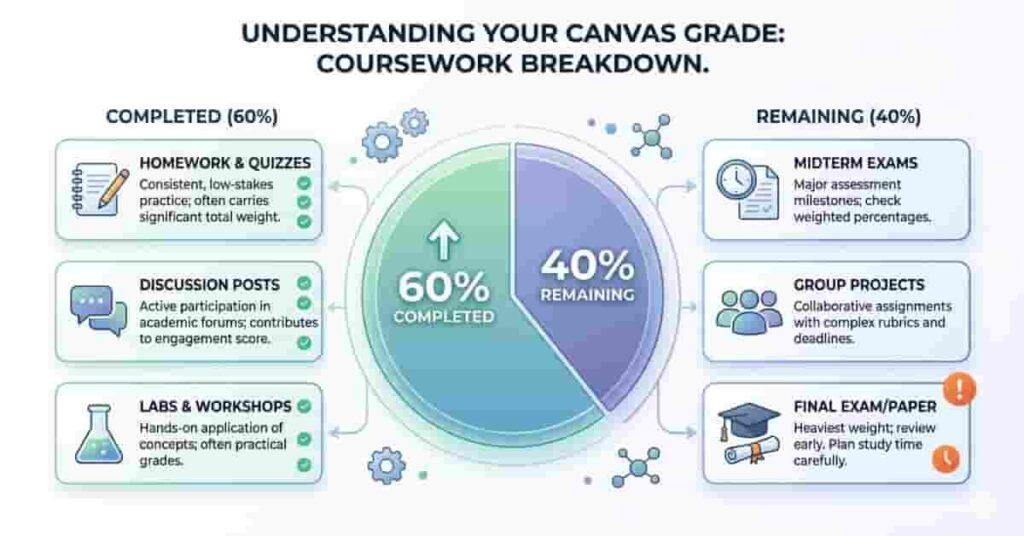
Your Canvas grade can be confusing at first. Many students see a percentage and think it’s final. Often, this number reflects only completed work, not your full course performance.
In most cases, Canvas shows your current grade based only on completed assignments. This means that missing work or future tasks are not yet fully included. That’s why your grade may look higher or lower than expected. To improve the course grade in Canvas, you need to understand what’s already graded and what’s still left.
Let’s break it down with a simple example. Imagine your current grade is 68%, but you have completed only 60% of the course. The remaining 40% still has a big impact on your final result. This is where planning becomes important, especially if you’re asking, “What score is needed to pass Canvas?”
Canvas also uses weighted categories in many courses. For example:
- Homework: 20%
- Quizzes: 30%
- Final Exam: 50%
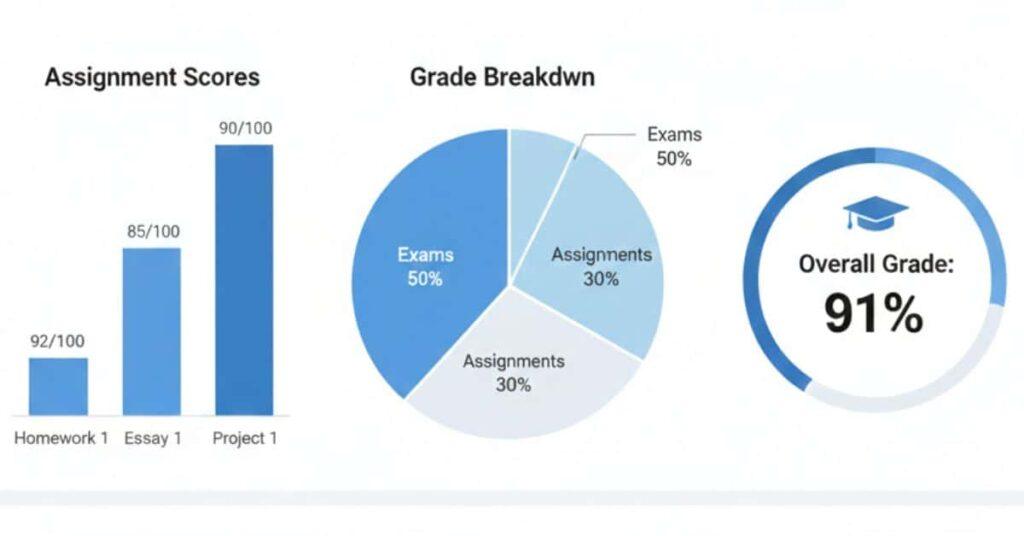
A low score on a high-weight exam can impact your grade more than small assignments. Knowing these weights helps you focus on what matters most.
Takeaways:
- Your current grade may not reflect your final outcome.
- Remaining assignments can significantly change your result.
- Weighted categories decide which scores matter most.
Pro Tips
Always check your syllabus for assignment weights. First, focus on tasks with the biggest impact to boost your grade.
Now that you have a plan, the next step is simple. Use a raise my grade calculator to confirm your targets and start improving today.
Using the Canvas Grade Recovery Calculator
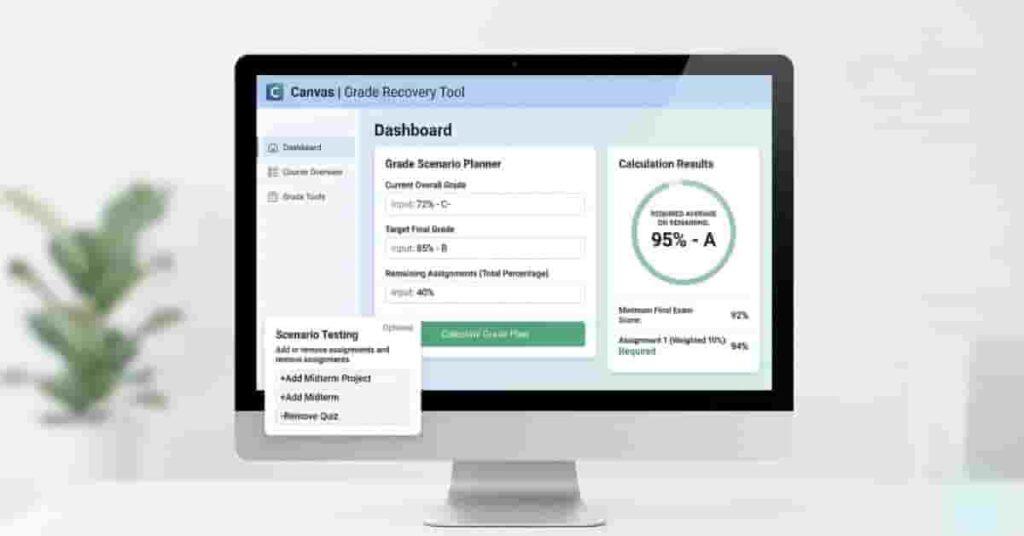
If you have a low grade, use a canvas grade recovery calculator for clear direction. Stop guessing and find out exactly what scores you need to improve. Let this tool give you a simple plan you can follow.
Step 1: Enter Your Current Grade
Start by adding your current Canvas percentage. This is usually based solely on completed work. Make sure the number is accurate, because all future calculations depend on it.
Step 2: Add Remaining Assignments
Next, include all pending work. This may include quizzes, homework, projects, and the final exam. Add their weights or total points if available. This step shows how much of your grade is still up for grabs.
Step 3: Set Your Target Goal
Now choose your goal grade. For example, you might aim for 75% to pass or 85% for a B. This is where a raise-my-grade calculator becomes powerful. It adjusts everything based on your target.
Step 4: Calculate Required Scores
Click calculate to see your required scores. The tool will tell you what the average is for the remaining work. This answers the big question: “What do I need to score from here?”
Step 5: Test Different Scenarios
Test different inputs to see what works. For example, what if you score higher on the final?
- Improve your quiz performance and see the effect.
Use a grade comeback calculator to test these scenarios safely. Find the easiest path to your goal.
Takeaways
- You get a clear roadmap instead of guessing.
- Required scores help you stay focused.
- Scenario testing shows the best recovery strategy.
Pro Tips
Focus on high-weight assignments when testing scenarios. Small improvements there can boost your grade faster than low-weight tasks.
Still confused about your numbers? A quick check with a grade recovery calculator can give you a clear target in seconds.
Creating a Personalised Grade Recovery Plan
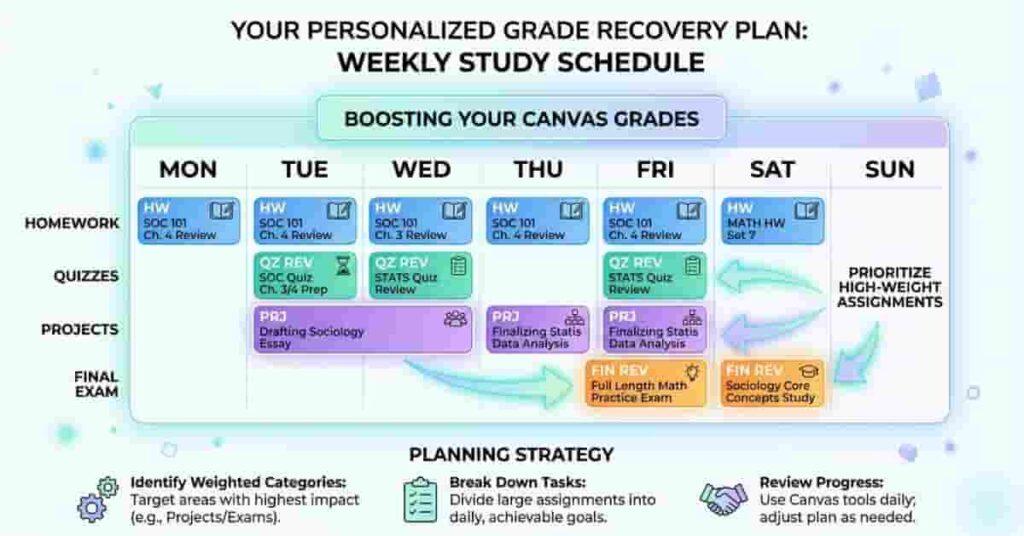
Once you know your required scores, it’s time to map out your victory path. A grade improvement calculator gives you numbers, but your success is fueled by how you use them to move confidently toward your goals each week.
To get started, break your remaining work into simple categories. Most Canvas courses include:
- Homework
- Quizzes
- Projects
- Final Exam
Now turn this into a weekly focus plan. Instead of doing everything randomly, assign priority based on weight and difficulty. This creates a weekly study plan for a better GPA that actually works.
For instance, if your final exam is worth 40%, it should get more attention than smaller homework tasks. At the same time, easy assignments can boost your grade quickly. Striking a smart balance between the two is key.
Let’s look at how to structure your plan:
- Homework (Low weight, easy): Complete all on time for quick grade boosts
- Quizzes (Medium weight): Review mistakes and aim for steady improvement
- Projects (High weight): Spend extra time planning and checking quality
- Final Exam (Highest impact): Start early and revise weekly
You also need to match effort with the required scores. If your calculator shows you need 85% on the final, you must increase your study time. Treat harder targets with more focused hours.
Think of this as your personal path to academic victory. You’re not just studying more; you’re unlocking your ability to succeed smarter and achieve the grades you deserve.
Takeaways
- Plan your week based on assignment type and weight.
- Focus more on high-impact tasks, such as exams and projects.
- Use required scores to guide your effort and time.
Pro Tips
Don’t underestimate small assignments! They are the quickest wins for boosting your results. Combine these with your focus on high-impact work, and celebrate each step forward. Your effort truly counts!
Study Hours vs Grade Improvement
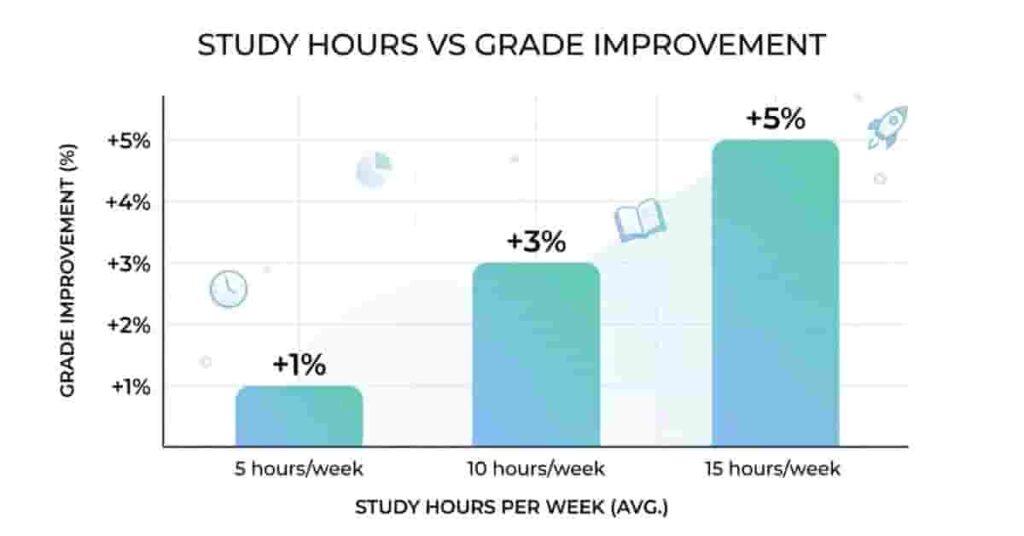
Many students ask, “How many hours should I study to improve my grade?” The answer depends on how you use your time. A smart increase-course-grade strategy focuses on both hours and the quality of study.
Generally, a more focused study leads to better results, but gains aren’t always equal. Even small increases in study time can boost grades if used well.
Here’s a simple way to understand it:
- 5 hours/week → ~+1% grade improvement
- 10 hours/week → ~+3% improvement
- 15 hours/week → ~+5% improvement
These are not fixed numbers, but they give a realistic direction. Your actual results depend on your focus, the difficulty of the subject, and the assignment weight.
This is where your calculator’s Smart Insights come into play. Instead of guessing, you can match study hours with required scores. For example, if you need a big jump, your weekly hours must increase accordingly.
A good study plan isn’t just about more time. It’s about studying the right topics at the right time. Focus first on weak areas, then review high-weight assignments.
Let’s say you are struggling in quizzes but doing well in homework. In that case, extra study hours should be devoted to preparing for the quiz. This targeted approach improves results faster.
Takeaways
- More study hours can improve grades, but focus matters more.
- Small weekly increases can lead to steady grade growth.
- Match your study time with your required scores.
Pro Tips
Use time blocks, not long sessions. Study 1–2 hours with focus, then take a short break. This keeps your performance high and avoids burnout.
Want to see how your effort translates into results? Try the calculator to match your study hours with required scores.
Tips & Strategies to Improve Canvas Grades Fast

You can boost your Canvas grade quickly with smart planning and steady effort. By focusing on strategies that make a real difference, you’ll see your hard work pay off, and your confidence grow.
Start by tackling high-weight assignments. Giving your best effort on final exams, major projects, or large quizzes can lead to rapid improvements. Remember, every big step forward puts you closer to your goal!
Beat procrastination and take charge. Break large assignments into smaller pieces and set weekly deadlines—it’s empowering to see yourself make steady progress!
Track your weekly progress to celebrate wins along the way. Use your Canvas dashboard or a planner to check off completed work and see how close you are to your goals. Staying accountable helps you adjust and succeed!
Match your study hours to each challenge! Devote more time to the tough assignments and see them as opportunities to learn and shine. By spending your energy where it counts, you’ll maximise your results efficiently.
Understanding how final exams affect course grades is crucial. Often, the final counts for a large percentage of your overall grade, so performing well can help you recover from earlier low scores. Similarly, knowing exactly how to recover from a failing grade fast relies on targeting these high-impact areas first.
Takeaways
- Prioritise assignments that carry the most weight.
- Track progress weekly to stay on course.
- Adjust study hours based on difficulty and importance.
Pro Tips
Use your grade recovery calculator each week to see how your choices make a real difference. This keeps you motivated and shows you what’s possible—you can achieve your goals!
Conclusion
In this guide, we covered how to understand your current grade, use a Canvas grade recovery calculator, and create a personalised plan. You also learned how to study more effectively, prioritise assignments, and use smart strategies to boost your performance quickly.
A grade raise calculator or grade improvement calculator makes this process simple. It shows exactly what scores you need and helps you focus on high-impact tasks. Using these tools early gives you the best chance to recover or improve your grade efficiently.
Don’t wait—take control of your grades today. Try the calculator now to see your required scores and start your path to academic success. Track your progress, adjust your plan, and watch your Canvas grades improve.
“Try the Canvas Grade Recovery Calculator Now.”

We are the Canvas Academic Team, a developer team focused on building simple and practical tools that help students succeed academically. This platform was created specifically for Canvas LMS students to make grade tracking, GPA calculations, exam planning, and academic management easier and more efficient.
Our focus is on creating fast, accurate, and student-friendly educational tools along with helpful learning resources that improve productivity and reduce academic stress.
Through CanvasGradeCalculator.com, our goal is to continue building useful resources that help students study smarter, stay organized, and achieve better academic results.