
Canvas Missing Assignments Calculator | See Zero Grade Impact on Your Final Score Instantly

This tool helps students clearly understand how missing assignments affect their overall Canvas grade and what a single zero score can do to their final percentage. Built for accuracy and simplicity, it instantly shows the real impact of missed coursework so you can make better academic decisions.

What Happens If You Miss an Assignment in Canvas?

Missing an assignment in Canvas can dramatically reduce your grade, especially when that task holds significant weight in your course. Many students overlook that a “zero” not only subtracts points—it drags down your average. This often creates confusion and stress as grades abruptly decline. You might notice your Canvas dashboard and wonder:
 
“Why did my grade fall so sharply after one missed task?”
The reason is clear: Canvas uses weighted scores, so missing a major assignment can markedly affect your grade.
That’s where this calculator helps. Instead of guessing, you can use this interactive tool to instantly see how a missing or zero-scored assignment affects your final grade in real time. It gives you a clear breakdown of your current performance and the exact penalty for any missed coursework.

🔵 Benefits & Live Impact Calculator (Canvas Missing Assignments)

A missing assignment calculator instantly reveals how incomplete work damages academic performance. No more guessing—just clear, actionable data.

🚫 Avoid Surprise Grade Drops

  • Instantly see how missing or zero assignments affect your final grade.
  • Prevent unexpected GPA or percentage drops.
  • Detect hidden grading penalties in Canvas LMS.

📊 Plan a Smarter Recovery Strategy

  • Understand exactly how much your grade has dropped.
  • Focus on high-impact assignments first.
  • Make smarter decisions about where to invest effort.

⚡ Understand Zero Impact Instantly

  • See the exact effect of a single zero score in real time.
  • Visualize how much weight each missing assignment carries.
  • Remove guesswork from grade calculations.

🎯 Improve Academic Decision-Making

  • Decide whether to submit late work or move forward.
  • Track performance trends more effectively
  • Reduce stress by knowing your real academic standing.

🔵 Try the Missing Assignment Impact Calculator

Quickly see how missing or zero-scored assignments alter your Canvas grade. Get a real-time breakdown to understand your standing and each assignment’s impact.

⚡ Instant Grade Impact Visualization

  • Current grade before the missing assignment
  • Updated grade after applying zero score
  • Live percentage drops instantly.

📊 Before vs After Comparison

🟢 Before: Original course grade
🔴 After: Grade with missing assignment counted as zero

📉 Percentage Loss Breakdown

  • Total grade reduction percentage
  • Weighted impact of missing work
  • Overall performance changes instantly

💡 Visual Feedback (UX Focus)

🟢 Green = Current grade
🔴 Red = Grade drop impact
⚠️ Warning: “Zero score detected impact” appears when applicable
This calculator eliminates confusion around missing assignments in Canvas. Experience instant clarity and precise results every time.

Canvas Missing Assignments Impact Calculator

See exactly how missing assignments affect your Canvas grade — and what it will take to recover.

Current Grade
--
Add assignments
After Missing
--
No data yet
Grade Drop
--
No data yet
Course Weights
Total weight: 100%
Grade Comparison
0%
Current
0%
After Missing
0%
Recovery
Recovery Simulator

No missing assignments to simulate recovery for.

Expected score on missing work 75%
0%50%100%
Predicted grade
0.0%
--
Recovery gain
0.0%
from missing grade
Current
--
After Missing
--
Drop
--

🔵 How to Use the Canvas Missing Assignments Impact Calculator (Step-by-Step Guide)

Follow these simple steps to understand exactly how missing assignments affect your Canvas grade and what you need to recover your score. This guide helps you get accurate results and make smarter academic decisions.

🟢 Step 1: Check Your Current Grade

Canvas missing assignments impact calculator dashboard showing current grade, after missing grade, and grade drop analysis for Canvas LMS students

Start by looking at your Current Grade shown at the top of the calculator.

  • This is your present overall performance in the course
  • It includes all completed assignments so far
  • It acts as your baseline for comparison

👉 This step helps you understand where you currently stand before any missing work impact.

🟢 Step 2: Review Missing Assignment Impact

Canvas grade calculator course weights section showing homework, quiz, and project percentage distribution for accurate grade calculation

Now check the “After Missing” and “Grade Drop” section.

  • “After Missing” shows your grade after missing assignments are included
  • “Grade Drop” shows how much your score decreases
  • Even small missing tasks can affect weighted grades

👉 This step shows the real impact of zero or incomplete assignments in Canvas.

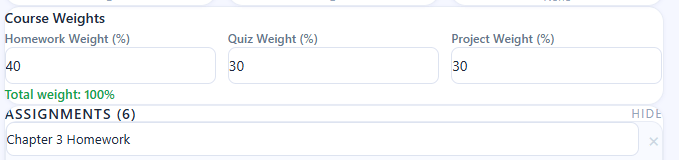
🟢 Step 3: Understand Course Weight Distribution
Canvas assignments list showing homework, quizzes, and projects with missing and zero score indicators affecting overall grade impact

Scroll to Course Weights section.

  • Homework, Quiz, and Project weights define your final grade
  • Higher weight = bigger impact on final score
  • All weights must total 100%

👉 This step is important because Canvas grades depend heavily on category weight.

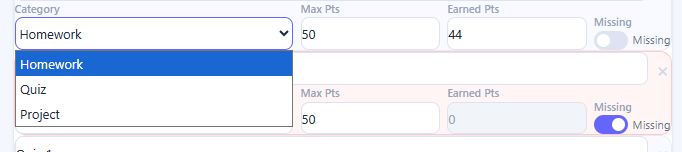
🟢 Step 4: Analyze Individual Assignments
Before and after grade comparison in Canvas missing assignments calculator showing current grade versus grade after zero score impact

Check the Assignments list (Homework, Quiz, Project, etc.)

  • Each assignment has Max Points and Earned Points
  • Missing assignments are marked as “0” or “Missing”
  • These directly affect your category average

👉 This helps you identify exactly which task is hurting your grade most.

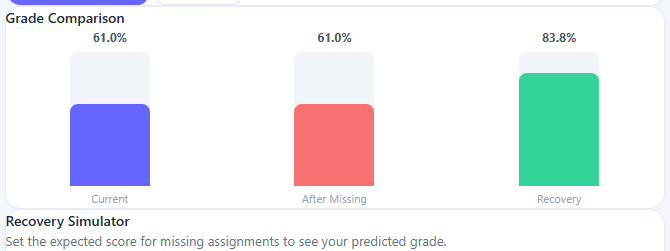
🟢 Step 5: Use Grade Comparison Section
Canvas grade recovery simulator showing predicted grade improvement after completing missing assignments with percentage recovery gain

Now check Grade Comparison panel.

  • Current Grade vs After Missing Grade
  • Shows how much your score has changed
  • Helps you visually understand grade difference

👉 This is where you clearly see the impact of missing work.

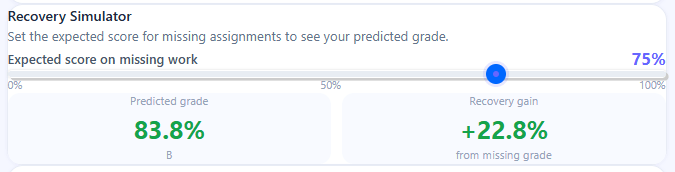
🟢 Step 6: Try Recovery Simulator
Smart insights panel in Canvas missing assignments calculator showing grade risk warning and recommendations for improving academic performance

Go to Recovery Simulator section.

  • Set expected score for missing assignments (e.g., 75%)
  • Instantly see predicted grade improvement
  • Check “Recovery gain” percentage

👉 This step helps you plan how to recover your lost marks.

🟢 Step 7: Read Smart Insights

Canvas missing assignments calculator smart insights section showing grade risk warning, affected assignments analysis, and improvement suggestions for better academic planning

Finally, check the Smart Insights box.

  • Shows which assignments are affecting your grade most
  • Suggests improvement potential
  • Warns if your grade is at risk

👉 This gives you AI-like guidance for better academic planning.

💡 Pro Tip (Important for Better Grades)

If your grade is dropping due to missing assignments, always prioritize high-weight tasks first (Projects > Quizzes > Homework). Even improving a few missing high-value assignments can recover your grade much faster than focusing on small tasks.

🔵 H2: Why Missing Assignments Hurt Your Canvas Grade So Much

Missing assignments in Canvas don’t just remove points—they instantly distort your average and can devastate your final score. Grasp this logic now to avoid surprise grade drops.

⚙️ Weighted Grading System Explained

Canvas grades are weighted, so each group (homework, quizzes, exams) counts for part of your final score.
So when an assignment is missing:
  • That category’s average decreases immediately.
  • The overall course percentage is recalculated.
  • Even one low or zero score affects the full weight of that section.
This is exactly what leads to a noticeable drop in Canvas grade to zero.

📉 Why Zero Scores Are So Damaging

A missing assignment is recorded as 0—a zero devastates your average.
Here’s why:
  • A zero is not just “no score” — it is treated as a complete loss of points.
  • It is included in the grade calculation like any other score.
  • It drags the total average down much faster than a low score would
That’s why students often notice a sudden drop and search for a Canvas grade penalty calculator to understand the impact.

⚠️ Small Assignments Can Have Big Impact

Even small tasks can significantly affect your grade because:
  • Every assignment contributes to category averages.
  • Multiple small zeros add up quickly.
  • Lower-weighted tasks still influence final percentages.
So even a minor missed homework can stealthily devastate your overall performance.

🎯 Key Insight

In Canvas, your grades hinge on what you miss. Every gap multiplies through weighted math—taking action early is crucial if you want to recover.

🔵 H2: Can You Recover From Missing Assignments?

Yes, most students can make up missed assignments, but it depends on your course rules, the timing, and how fast you act. Don’t ignore the issue—find out your options and use the right method to catch up.

⏰ Late Submission Policies (First Recovery Option)

Many teachers let you turn in late work, which can help limit the harm from missing assignments.
  • Some courses accept late work with a small penalty.
  • Others allow partial credit even after deadlines.
  • In strict courses, late submissions may not be accepted at all.
👉 This is why checking your syllabus is critical when dealing with late or missing assignments in Canvas situations.

🎁 Extra Credit Opportunities

Extra credit can help balance out lost points from missing work:
  • Bonus quizzes or activities
  • Participation marks
  • Optional assignments
  • Project extensions with added tasks
These options can slowly raise your grade if you use them wisely.

📊 Grade Recovery Strategies

Even if you’ve missed assignments, you still have plenty of chances to boost your final score and demonstrate your progress.
  • Prioritizing high-weight assignments next
  • Submitting all future work on time
  • Requesting makeup work if allowed
  • Focusing on categories that carry more grade weight
A missing work grade calculator can help you see how much you need to improve to reach your goal.

🎯 Key Insight

Recovery is possible, but timing matters. The faster you deal with missing assignments, the easier it is to avoid harm and get your grade back on track.

🔵 H2: Real Examples of Missing Assignment Impact

Here are examples that show how missing different assignments can affect your final grade.
A single zero can change your grade, depending on how much the assignment counts.

📊 Missing Assignment Impact Examples

Quiz (Missed)Low–Medium-5% dropNoticeable dip in overall average
Homework (Missed)Low-2% dropSmall but consistent reduction
Major AssignmentHigh-15% dropSignificant grade decline

📉 What This Means in Real Life

  • Missing a quiz might not seem serious, but it can still significantly reduce your overall performance.
  • Missing homework tasks creates a gradual grade loss over time.
  • Missing a major assignment, such as a project or exam that tests comprehensive understanding, can heavily damage your final score in one step.
⚠️ Key Insight: The impact of a missing assignment depends entirely on its weight in your grading system. This explains why students often see unexpected drops and use a calculator to analyze the consequences before making decisions.

🔵 H2: Who Should Use This Calculator?

This calculator helps Canvas LMS users see how missing or zero assignments change their final grade. Use it to track performance and avoid grade drops.

🎓 High School Students

  • Track homework and quiz performance easily
  • Understand how small missing tasks impact final grades.
  • Avoid surprise drops in report cards.

🎓 College Students

  • Manage weighted grading systems more effectively.
  • Plan recovery strategies for missed coursework
  • Calculate how one assignment affects the overall GPA or course percentage.

💻 Online Learners (Canvas LMS Users)

  • Stay on top of self-paced courses.
  • Quickly identify grade risks from missing submissions.
  • Improve progress tracking in digital classrooms.

👩‍🏫 Teachers for Grade Forecasting

  • Simulate student performance scenarios.
  • Demonstrate the impact of missing assignments.
  • Help students understand grading transparency.
This tool is for anyone who wants to predict, understand, or improve their Canvas grades before small mistakes become major losses.

🎯 Estimate Your Grade Impact Now

Don’t wait until your final grade drops unexpectedly—take control of your academic performance today. Use the Canvas Missing Assignments Impact Calculator to instantly see how zero or missed assignments affect your overall grade and understand exactly where you stand in your course.

With just a few inputs, you can:

  • View real-time grade changes
  • Identify how much a missing assignment is costing you
  • Plan your recovery strategy before it’s too late

🚀 Take Action Now

Choose an option below and start analyzing your grade instantly:

📌 Frequently Asked Questions :

What happens if I get a zero in Canvas?

If you get a zero in Canvas, that assignment is counted as a complete loss of points. Since Canvas uses weighted or average-based grading, a zero can significantly lower your overall grade, especially if the assignment has a high weight. This is why even one missing task can create a noticeable drop in your final percentage.

No, a missing assignment does not automatically mean you will fail the course. However, it can reduce your grade depending on how important that assignment is in your grading structure. If multiple assignments are missed, it can become much harder to pass without recovery strategies or extra credit.

The impact of a zero depends on the assignment’s weight in your course. A small homework might cause a minor drop, while a major exam or project can significantly lower your overall grade. In weighted systems, even a single zero can change your final percentage more than students expect.

Yes, it is possible. Canvas recalculates your grade based on all submitted and missing assignments. If the missing task has meaningful weight, even one zero can reduce your overall average and affect your final grade noticeably.

Canvas itself does not apply penalties, but your instructor’s grading rules do. In most cases, incomplete assignments are marked as zero or partial credit, which acts as a penalty in your grade calculation. The exact impact depends on your course syllabus and grading policy.

Scroll to Top