
Canvas Attendance Impact Calculator | See How Missing Classes Affect Your Grade Instantly

Instantly see how missing classes affect your Canvas grade with real-time impact analysis based on your course settings and attendance weight.

Built for students using the Canvas LMS grading system to understand exactly how attendance influences final grades.

✔️ No signup required • Instant results • 100% free attendance analysis
Enter your attendance details and instantly discover how your classes are affecting your final Canvas grade, including real-time loss and recovery predictions.
It tracks your attendance and predicts how it affects your performance, showing grade change and recovery potential.
 

🚀 Feature Highlights:

  • 📊 Calculates your attendance impact on final grade in real time
  • 📉 Shows exact grade change based on missed or attended classes
  • 🔄 Provides scenario simulation (What if you attend more classes?)
  • 📈 Analyzes your attendance rate and overall performance
  • 🧠 Gives smart insights, warnings, and recovery suggestions
  • 📊 Displays visual charts comparing attendance vs grade impact
Canvas Attendance Impact Calculator

Canvas Attendance Impact Calculator

See how missing classes affects your Canvas grade — instantly with visual insights

🎓 Course Setup
📅 Attendance Tracking
Future Attendance Prediction
80%
Advanced Mode
LOW IMPACT
Your attendance is not affecting your grade significantly
Current Grade
Final Grade (After Attendance Impact)
Grade Change
Due to absences
📊 Attendance Rate
Attended of classes
📉
Each missed class = −0.0% grade impact
Based on your attendance weight and total sessions
📈 Attendance vs. Grade Impact
Grade Curve Your Position Perfect Attendance Future Prediction
🔄 Scenario Simulator — "What If?"
of the remaining sessions
New Attendance %
Projected Grade
Grade Recovery
🧠 Smart Insights
🎯 Actionable Strategy

    🧭 How to Use the Canvas Attendance Impact Calculator

    Using this Canvas LMS attendance tool is quick and simple. Instantly see how each attendance record changes your final grade, so you understand the direct effect on your overall performance as you enter or review your data.

    Step 1: Enter Your Course Details
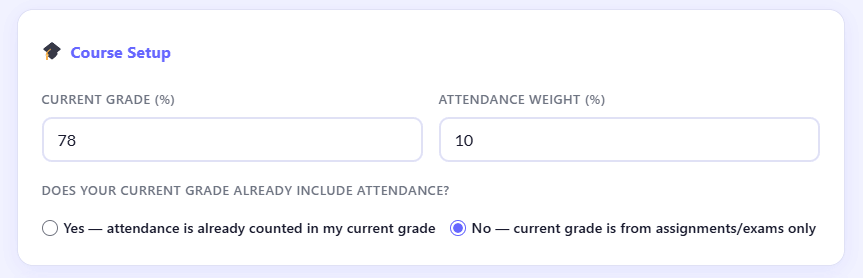
    Entering course details in Canvas attendance impact calculator including grade and attendance weight settings

    Start by entering your basic academic information:

    • Current Grade (%)
    • Attendance Weight (%)
    • Whether attendance is already included in your grade

    👉 This helps the calculator correctly understand your grading structure before processing results.

    Step 2: Add Your Attendance Record
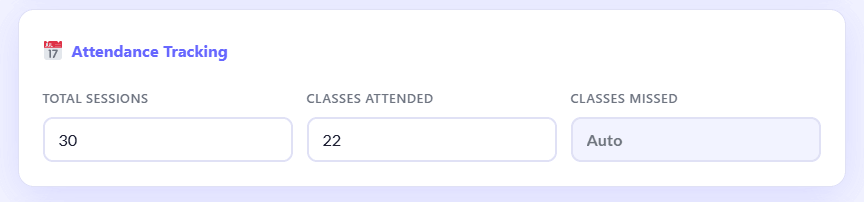
    Adding attendance data in Canvas LMS calculator showing attended and total classes input fields

    Now input your attendance data:

    • Total number of sessions/classes
    • Classes you attended

    👉 The system automatically calculates missed classes and attendance percentage.

    Step 3: Configure Advanced Options (Optional)
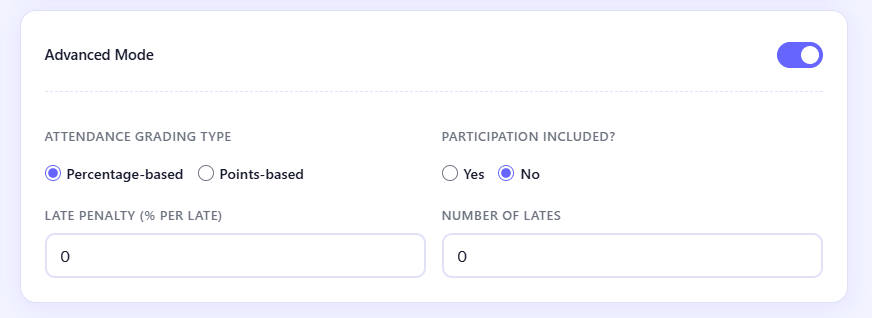
    Advanced settings section of Canvas attendance calculator with grading type and participation options

    For more accurate results, you can customize:

    • Attendance grading type (Percentage-based or Points-based)
    • Participation inclusion (Yes/No)
    • Late submission penalty settings
    • Number of late submissions

    👉 These settings refine your final grade accuracy.

    Step 4: Set Future Attendance Prediction

    Future attendance prediction input in Canvas calculator showing expected attendance percentage slider

    Enter your expected future attendance rate:

    • Helps simulate upcoming performance
    • Predicts possible grade improvement or decline

    Step 5: Click “Calculate My Grade Impact”

    Calculate grade impact button in Canvas attendance calculator generating instant results

    With one click, the calculator instantly shows:

    • Your current attendance rate
    • Final grade after attendance impact
    • Exact grade change (loss or gain)

    Step 6: View Your Complete Grade Breakdown
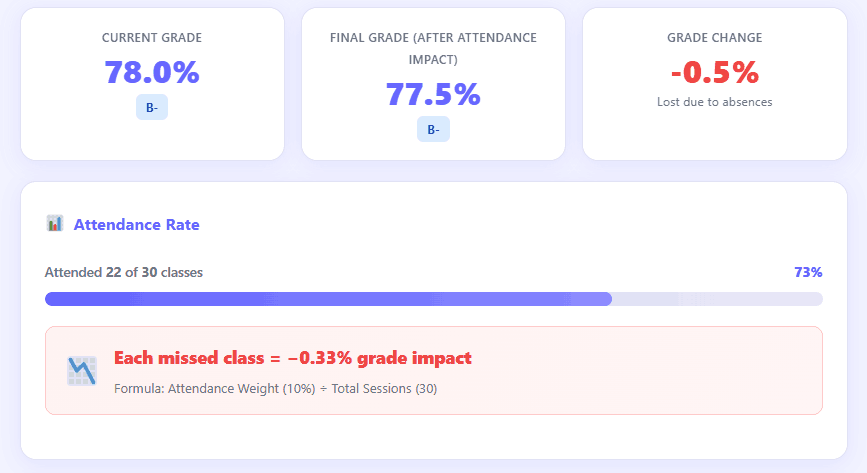
    Results dashboard showing Canvas attendance impact on final grade with charts and percentage breakdown

    You will instantly see:

    • 📊 Attendance vs Grade comparison
    • 📉 Grade loss due to missed classes
    • 📈 Visual charts showing performance trend

    Step 7: Run “What-If” Scenario Simulation
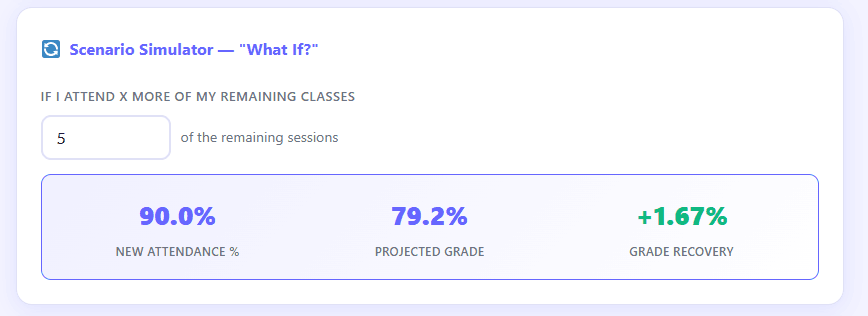
    Scenario simulator in Canvas attendance calculator showing what-if grade prediction for future attendance

    Test different situations such as:

    • What if you attend 5 more classes?
    • What if your attendance improves next month?

    👉 The system shows real-time grade recovery or loss predictions.

    Step 8: Follow Smart Insights & Recommendations

    Smart insights section of Canvas attendance calculator showing grade risk warnings and improvement tips

    You will receive personalized guidance:

    • 🟡 Attendance risk warnings
    • 🔴 Grade drop alerts
    • 🟢 Recovery suggestions
    • 📚 Study improvement strategies

    🚀 Why Use This Canvas Attendance Calculator?

    Many Canvas LMS students are unclear about how attendance affects grades across different weighting systems.

    Students don’t clearly understand:
    How attendance is calculated in their final grade
    How much impact missed classes really have
    Whether attendance can change their overall result

    This calculator solves that problem instantly by giving you:
    📊 Real-time attendance impact calculation
    → See exactly how your attendance changes your grade instantly
    📉 Grade loss prediction
    → Understand how many marks you lose from missed classes
    📈 Visual impact analysis
    → Get clear charts and breakdowns of attendance vs final grade
    Stop wondering—use the calculator and take control of your grade impact now.

    💡 Pro Tip
    Don’t wait. Use the calculator today to see your real attendance impact—protect your grades by acting early.

    📊 Real Example: How Attendance Changes Your Final Grade

    To help you clearly understand how attendance affects your score in Canvas LMS, here is a simple real-world scenario based on a typical course setup.

    📌 Example Scenario

    • Total Classes: 30
    • Attendance Weight: 10%
    • Student Attendance: 22 attended, 8 missed

    📉 Impact Comparison

    If Attendance is Good (Higher Attendance):
    • Higher attendance percentage
    • Better contribution to the final grade
    • Minimal or no grade loss
    If Attendance is Low (Missed Classes):
    • Lower attendance percentage
    • Reduced weighted score
    • Noticeable impact on final grade

    📊 Final Result Difference

    • 📌 Grade Difference: Small but measurable drop in overall performance
    • 📉 Final Score Change: Around -0.5% (depending on weight calculation)
    • ⚖️ Impact Level: Low to moderate in this example case

    💡 Simple Understanding

    Even in a 10% weighted attendance system, missing multiple classes can slightly reduce your final grade — especially when combined with other course requirements.

    📊 How Attendance Affects Your Grade in Canvas

    Many Canvas courses assign a percentage of your final grade for attendance, making attendance directly impact your performance.⚖️ Weighted Attendance System Explained
    Each course assigns attendance a weight (e.g., 5%, 10%, 20%) in your final grade, with your score being affected proportionally. Higher attendance weight = greater impact on final grade
    • Lower attendance weight = smaller impact on final grade

    📉 How Missed Classes Reduce Your Final Grade

    Missing classes lowers your attendance percentage, which reduces your weighted grade and final result. Even a few absences can:
    • Reduce your attendance percentage.
    • Lower your weighted score contribution.
    • Impact your final grade more than expected (especially in high-weight courses)

    🔑 Key Things to Understand

    • Your Canvas attendance grade percentage is calculated by dividing the number of classes you attended by the total number of class sessions, then multiplying by 100.
    • The attendance weight in the Canvas course decides how much that percentage affects your final grade.
    • The impact of missing classes on grade canvas becomes more severe when the attendance weight is high.

    💡 Simple Summary

    In Canvas calculates your attendance as a percentage, applies course weight, and adds it to your grade. Every missed class can reduce your performance.

    📈 How to Improve Your Attendance Grade

    Improving your attendance can quickly boost your overall performance in Canvas LMS. Commit to showing up, and you’ll see your efforts rewarded, especially if your course includes attendance as part of the final grade.

    💡 Practical Tips to Improve Your Grade

    • 🗓️ Attend all remaining classes with determination. Every class you attend increases your attendance percentage and moves you closer to your grade goals.
    • ✋ Improve participation by actively contributing. Your enthusiasm and engagement can help you stand out and positively influence attendance-based grading.
    • ⏰ Maintain a consistent schedule. Plan your day with purpose and confidence to avoid missing lectures and stay on track toward success.
    • 🔔 Use reminders or alarms to support your goals. Set alerts for upcoming classes and strengthen your commitment to perfect attendance.
    Even small improvements in attendance can lead to noticeable gains in your final grade. Take positive action, and you’ll boost your results—especially in courses with higher attendance weight.

    🎯 Who Should Use This Tool?

    This Canvas LMS attendance calculator is useful for any student whose grades depend on attendance tracking.
    • 🎓 College students
    • 🏫 University students
    • 💻 Online course learners using Canvas
    • 📊 Students with attendance-based grading systems
    👉 If your attendance affects your marks, this tool is made for you.

    See exactly how your attendance is affecting your final grade in seconds with real-time analysis and visual insights.

    📌Canvas Attendance Impact Calculator FAQs :

    Does attendance affect grades in Canvas?

    Yes, in Canvas LMS many courses include attendance as a weighted part of your final grade, so it can directly impact your overall score.

    Canvas calculates attendance based on total attended classes vs total sessions, then applies the attendance weight defined in your course grading system.

    Yes, missing classes reduces your attendance percentage, which can lower your final grade if attendance is part of your grading policy.

    Attendance weight is the percentage of your final grade assigned to attendance (for example 5%, 10%, or 20%), depending on your instructor’s grading structure.

    It is highly accurate for standard weighted grading systems used in Canvas, but final results may vary based on instructor-specific grading rules.

    Scroll to Top