Table of Contents
Introduction
Have you ever seen a Blackboard originality score and wondered, “Does this mean I plagiarized?”
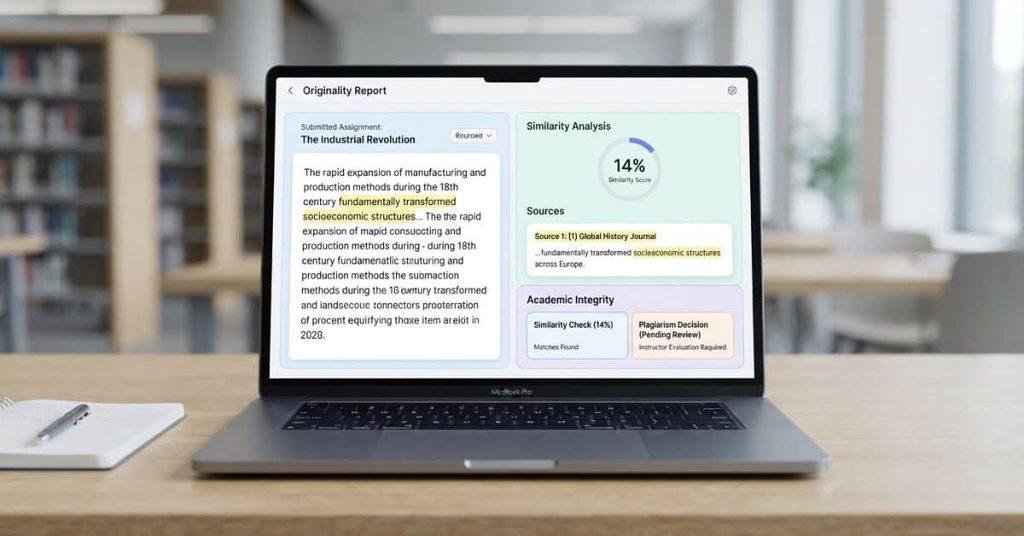
An Originality Report on Blackboard helps students and instructors review text similarities in submitted assignments. It can highlight parts of your work that match sources found by the originality-checking system.
For beginners, these results can look confusing at first. A similarity match does not automatically mean you copied someone else’s work. Quotes, citations, common phrases, assignment templates, and other legitimate matches can also appear.
The report is meant to provide useful information for reviewing your submission. It does not always make a final judgment about plagiarism. Instructors may consider the matched text, sources, citations, and assignment requirements.
In this guide, you will learn what a Blackboard Originality Report means. You will also learn how similarity scores and matched sources should be understood.
By the end, you will know how to read your results and understand what they actually tell you.
What Is an Originality Report on Blackboard?
An originality report on Blackboard shows where submitted text overlaps with information found in other sources. Blackboard may provide this report through SafeAssign, an originality-checking tool used with assignments. The report helps students and instructors review submitted work for possible text matches.
When students open the report, they may see highlighted passages, matching sources, and similarity information. These details help users examine which parts of an assignment may overlap with existing material. The report supports review, but it does not automatically decide whether plagiarism occurred.
SafeAssign works with Blackboard assignment workflows in supported setups. It compares submitted work with available sources and generates an originality report. Students can use the results to check citations, quotations, and areas that may need closer review.
What Does an Originality Report Mean?
What does an originality report mean on Blackboard? It means the system found text in a submission that overlaps with identified sources. A match alone does not prove plagiarism. Proper quotations, citations, common wording, templates, and assignment instructions can create legitimate matches.
The report gives students useful information before or after submitting their work. Reviewing the matched passages can help identify missing citations or unclear paraphrasing. Instructors then consider the context and course requirements when reviewing the submission.
What Does a Blackboard Originality Report Show?
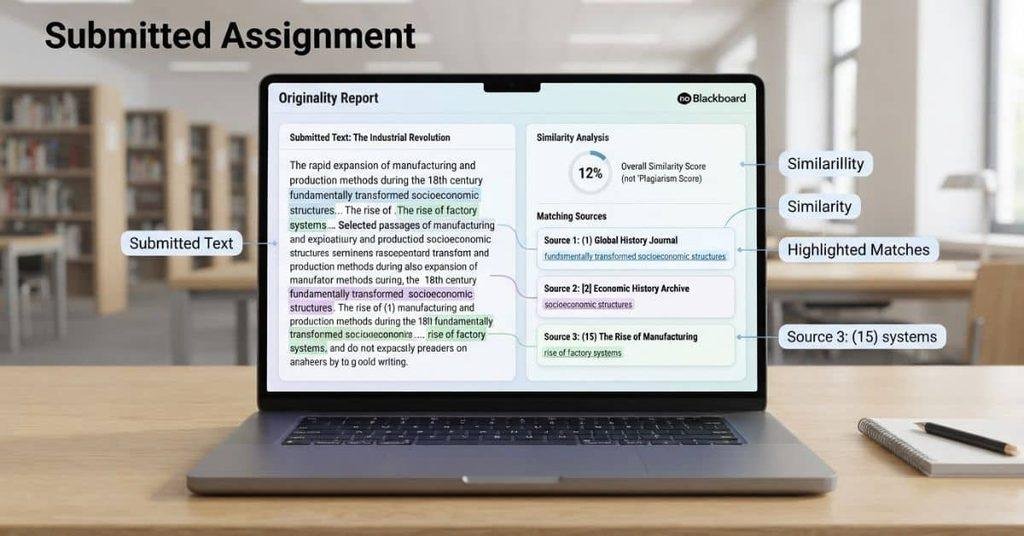
A Blackboard Originality Report may show several types of information about a submitted assignment. The exact layout can vary based on the Blackboard and SafeAssign version or configuration.
Students may encounter:
- Similar or overlapping text: Passages that match or resemble content found in other sources.
- Matching sources: Sources connected to identified text matches.
- Highlighted passages: Sections of the submission marked for closer review.
- Similarity or originality information: Details that summarize detected matches.
- Source references: Information that helps identify where matching content appears.
- Overall report information: General details about the submission and its originality results.
These elements help students understand their assignment results instead of viewing a number without context. A highlighted passage needs review to understand why the system identified it.
For example, a correctly cited quotation may appear as a match. A common phrase may also overlap with another source. The report therefore provides evidence for review rather than a final plagiarism decision.
How Does a Blackboard Originality Report Work?
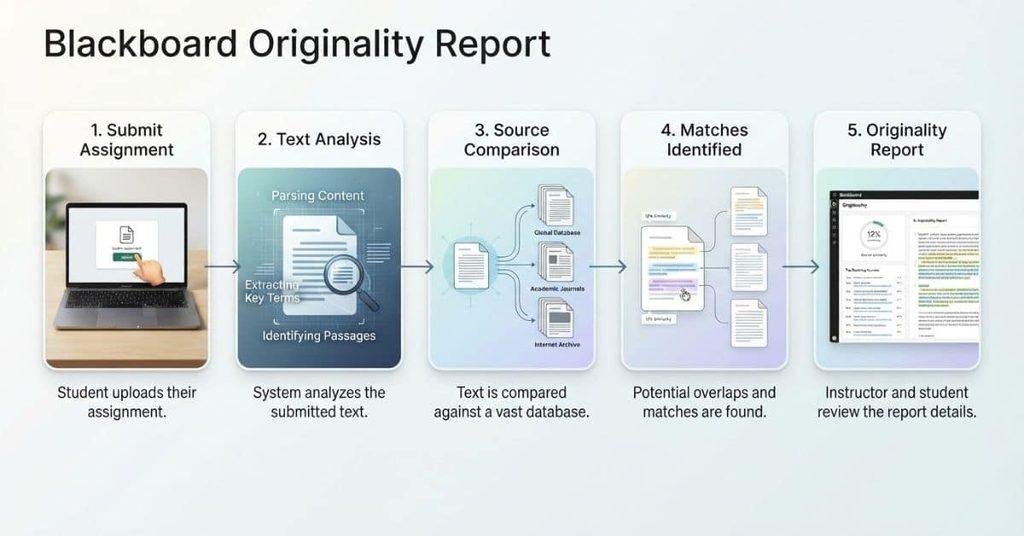
A Blackboard Originality Report starts when a student submits an assignment through a supported Blackboard workflow. SafeAssign or the connected originality system then analyzes the submitted work.
The basic process looks like this:
- Student submits the assignment.
- SafeAssign analyzes the submission.
- The system compares text with available sources.
- Potential matching areas are identified.
- An Originality Report is generated.
- The student or instructor reviews the results.
The system looks for text that overlaps with information in its available source collection. It then provides report details that help users examine those matches.
The report is a review tool rather than an automatic plagiarism verdict. Students should examine the highlighted text and sources before drawing conclusions about their work.
What Does the Similarity Score Mean on Blackboard?
The Blackboard similarity score generally indicates how much submitted text the originality system identified as matching or overlapping with available sources. It is usually presented as a percentage within the report.
A percentage does not automatically represent the percentage of plagiarism in an assignment. It also does not necessarily show how much work a student “cheated.” The detected overlap can include legitimate material.
For example, properly quoted and cited material may create a match. Common phrases or required assignment wording may also appear in the results. The meaning of the percentage depends on the actual passages and sources behind it.
Students should therefore review the report instead of focusing only on the number. The highlighted text, source information, citations, and assignment requirements provide important context.
Is a High Originality Score Bad?
A high originality or similarity percentage can give students more material to review. However, it does not automatically establish plagiarism or academic misconduct.
Several legitimate parts of an assignment can create matching text. These may include quotations, references, standard terminology, or assignment templates.
Look at the specific highlighted passages and their sources. Check whether you used quotation marks and citations correctly where required. Your instructor’s academic-integrity rules also matter when interpreting the results.
Is a Low Originality Score Good?
A low similarity score means the system detected relatively little matching text in the available sources. However, it does not automatically guarantee that an assignment meets every academic-integrity requirement.
Academic writing involves more than avoiding detected matches. Students must also follow citation rules, assignment instructions, and their school’s policies.
A low percentage can still require review. For example, a student could use an uncited source without creating a substantial detected match. Always review your work and follow your instructor’s requirements.
What Do Highlighted Matches Mean?
Highlighted matches show parts of your submission that the originality system identified as similar to available sources. The report may connect each highlighted passage with one or more matching sources.
When reviewing a highlighted section, check:
- The highlighted passage in your assignment
- The matching source identified by the report
- Similar wording between the texts
- Whether the passage is quoted material
- Whether the material is properly cited
- Whether the wording is unattributed
A highlighted match does not automatically mean you used the source incorrectly. The context determines why the text appears in the report.
For example, a direct quotation can legitimately match its original source. A properly cited paraphrase may also contain wording that triggers a match. Review each result before deciding whether you need to revise anything.
Why Is My Properly Cited Text Highlighted?
A similarity system can identify matching wording even when you correctly cite the source. The system focuses on text overlap, not simply whether your citation follows academic rules.
For example, a direct quotation uses the original author’s wording. That wording can match the source because the text is intentionally reproduced.
Proper citation gives readers information about where the material came from. It does not necessarily prevent the originality system from identifying the same wording.
Check the highlighted passage, quotation formatting, and citation against your instructor’s requirements. If the material is correctly quoted and cited, the match may have a legitimate explanation.
Why Are Common Phrases Highlighted?
Common phrases can sometimes appear as matches because originality systems compare submitted wording with available sources. Standard terminology, technical expressions, and frequently used phrases may occur across many documents.
For example, students writing about the same subject may need to use the same field-specific terms. Assignment instructions can also lead multiple students to use similar wording.
A highlighted common phrase does not automatically indicate inappropriate copying. Review the matching source and the surrounding text before making changes. If the wording is standard and appropriate, it may not require revision.
Does an Originality Report Mean You Plagiarized?
No. An Originality Report does not automatically mean you plagiarized. It identifies potential text overlap or similarity between your submission and available sources.
A match can happen for several legitimate reasons. For example, direct quotes may match their original sources. Correctly cited material can also appear in the results because the wording still overlaps with another document.
Assignment instructions and templates can create similar wording too. Students working on the same assignment may use required terms or phrases that appear in multiple submissions.
The instructor must consider the context behind each match. They may review the highlighted passage, source, citation, and assignment requirements before making an academic-integrity decision.
Institutional policies also determine how potential plagiarism is handled. Different schools and courses may have specific rules for citations, collaboration, quotations, and originality requirements.
The key point is simple: a similarity match is information to review, not an automatic plagiarism verdict.
What Is the Difference Between an Originality Report and a Plagiarism Report?
An Originality Report and a plagiarism determination serve different purposes. An Originality Report shows detected similarities or overlapping text in a submitted assignment.
A plagiarism determination involves a broader academic-integrity review. It can consider the matched content, attribution, context, assignment rules, and applicable institutional procedures.
For example, imagine a student includes a correctly cited quotation. The originality system may identify the quotation as matching its source. That match alone does not establish that the student plagiarized the material.
Students should avoid assuming, “My report has a match, therefore I plagiarized.” Instead, review each highlighted section and its source. Check whether the material has proper attribution and follows the assignment requirements.
The Originality Report provides information that supports this review. An academic-integrity decision requires context beyond the similarity result itself.
Is an Originality Report the Same as SafeAssign?
No. SafeAssign and an Originality Report are related, but they are not the same thing. SafeAssign is the Blackboard-associated tool that analyzes submitted work for text similarities and potential matches.
The Originality Report is the report produced from that analysis. It presents information about detected matches, sources, and other originality-related details.
Blackboard is the broader learning management system used by schools and colleges. SafeAssign can work within Blackboard assignment workflows, while the Originality Report provides the results of the analysis.
Think of the relationship this way:
- Blackboard: The learning management system
- SafeAssign: The originality-checking tool
- Originality Report: The results produced from the analysis
These terms are connected, but you should not use them interchangeably.
For a deeper explanation, see What Is SafeAssign on Blackboard?
How to Read a Blackboard Originality Report
Reading the report can feel confusing when you first see highlighted text and matching sources. Use a simple review process instead of focusing only on the overall percentage.
Step 1: Look at the Overall Similarity Information
Start by reviewing the report’s overall similarity information. Treat the percentage as a starting point, not a plagiarism verdict.
Step 2: Review Highlighted Passages
Look at each highlighted section in your submission. Identify exactly which words or sentences the system matched.
Step 3: Open the Matching Source
Review the source connected to each match. Compare its wording with the highlighted part of your assignment.
Step 4: Check Whether the Passage Is Properly Quoted
If you used the source’s exact words, check your quotation formatting against your course requirements.
Step 5: Check the Citation
Make sure quoted or borrowed information has the required citation and attribution.
Step 6: Review Unnecessary or Unattributed Matching Text
Pay closer attention to wording that closely follows a source without proper attribution.
Step 7: Follow Your Instructor’s Requirements
Your instructor’s instructions and school policies determine how you should handle potential issues.
What Should You Do If Your Originality Report Shows Matches?
Don’t panic when your Originality Report shows matches. Start by reviewing each highlighted passage and the source connected to it.
Check whether each match comes from a quotation, citation, common phrase, assignment wording, or other legitimate overlap. Then identify any wording that needs clearer attribution or better paraphrasing.
If you copied wording unnecessarily, rewrite it in your own words while preserving the appropriate citation. Don’t remove citations simply to reduce your similarity percentage. Citations provide important information about your sources.
Finally, follow your instructor’s academic-integrity and citation requirements. The goal is not simply to achieve a lower percentage. The goal is to submit work that follows the rules for your course and institution.
Can Students See Their Originality Report on Blackboard?
Students may be able to view their Originality Report, but access depends on the assignment settings and configuration. Instructors or institutions can control how originality information appears to students.
Some assignments may let students open report details after submitting their work. Other configurations may limit the information students can access.
If you don’t see an Originality Report, check the assignment interface and your instructor’s instructions. Don’t assume that every Blackboard assignment automatically gives students access to the full report.
The available information can also vary based on the Blackboard and SafeAssign setup used by your school. Your instructor can clarify which report details are available for your assignment.
Can Teachers See the Originality Report?
Instructors may have access to the Originality Report associated with a student’s submission. The report can help them review highlighted matching areas and identified sources when those details are available.
Teachers can examine the actual passages rather than relying only on an overall similarity percentage. They may consider quotations, citations, assignment requirements, and other relevant context.
The report supports the instructor’s review process. It does not automatically replace human judgment or determine an academic-integrity outcome by itself.
Access and available report details can depend on the Blackboard and SafeAssign configuration. Instructors should follow their institution’s procedures when reviewing potential similarities.
Does an Originality Report Detect AI?
An Originality Report and AI detection are different concepts. An originality or similarity report focuses on detected text overlap with available sources.
A similarity result should not automatically be treated as an AI-detection result. A passage can show a match without indicating how the text was created.
AI-related functionality, when available, depends on the specific Blackboard tools, integrations, and configuration used by an institution. Students should check which features their course actually uses.
For a focused explanation of AI-related checks, see Does Blackboard Detect AI?
Does an Originality Report Detect Copy and Paste?
An Originality Report focuses on submitted content and text overlap with available sources. It does not mean the system recorded someone physically pressing Ctrl+C or Ctrl+V.
A copied passage may appear as a matching source in the report. However, that match does not show how the text entered the assignment.
The report identifies similarities in the submitted work rather than documenting every copy-and-paste action. For more details, see Can Blackboard Detect Copy and Paste?
What Causes a High Similarity/Originality Result?
A higher similarity result can have several causes. Some are legitimate, while others may require students to review their writing and attribution.
Direct Quotations
Direct quotations use wording from another source, so the originality system may identify that text as a match. Proper quotation marks and required citations can explain the result.
A quotation match does not automatically indicate plagiarism. Review whether the quotation follows your instructor’s formatting and citation requirements.
Properly Cited Sources
Correctly cited material can still appear as matching text. The system compares wording with available sources, regardless of whether you provided proper attribution.
Check the highlighted passage and citation rather than assuming the match is a problem.
Common Phrases
Common phrases and standard terminology may appear in many documents. The system can identify these similarities even when you did not copy a source improperly.
Consider the wording, source, and surrounding context before changing anything.
Assignment Questions or Templates
Required questions, prompts, templates, or standard instructions can create similar wording across student submissions.
This type of overlap may be expected when everyone receives the same assignment structure.
References/Bibliography
Reference entries can contain titles, author names, publication details, and other standard information. These elements may create matches with existing sources.
Check your instructor’s requirements before changing reference formatting simply to lower the similarity result.
Excessive Use of Source Wording
Following a source too closely can produce substantial matching text. This can happen even when a citation appears at the end of the passage.
Review your paraphrasing and make sure your writing clearly reflects your own understanding.
Unattributed Copying
Using another source’s wording without proper attribution can also create a high similarity result. Review these passages carefully and compare them with the identified source.
Follow your course’s citation and academic-integrity requirements when correcting any issues.
Can an Originality Report Affect Your Grade?
An Originality Report is not itself a grade. It provides information that an instructor may consider while evaluating a submitted assignment.
An instructor may review highlighted matches, sources, citations, and assignment requirements. They may then apply the course or institution’s academic-integrity policies.
A similarity result does not automatically mean you receive a grade penalty. The way originality concerns affect grading depends on your instructor’s requirements and institutional policies.
Students should focus on understanding the highlighted matches rather than trying to reach a specific percentage. Proper citations, accurate quotations, and original writing remain important parts of academic work.
Blackboard Grade Calculator — Related Student Tool
An Originality Report helps you understand text overlap in an assignment. It does not calculate your course grade or predict your final course result.
If you want to estimate your current or potential Blackboard course grade, use our Blackboard Grade Calculator. You can enter your assignment grades and weighting details to estimate your overall course grade.
These tools solve different problems:
- Originality Report: Helps you review text similarities and matching sources.
- Blackboard Grade Calculator: Helps you estimate your course grade.
Using both tools can help you review different parts of your coursework. Check your instructor’s grading rules for the official course grade.
Conclusion
An Originality Report on Blackboard shows detected text similarities and matching sources in submitted work. It does not automatically mean you plagiarized or received an academic penalty.
We covered how SafeAssign relates to Blackboard, what similarity scores mean, and how to review highlighted matches. We also explained why quotes, citations, common phrases, and templates can create legitimate matches.
If your report shows matches, review each passage and its source carefully. Check your citations and follow your instructor’s academic-integrity requirements.
For help with another part of your coursework, explore our student calculators and Blackboard resources. You can also share this guide with classmates who may find their originality results confusing.
Frequently Asked Questions
An Originality Report on Blackboard shows text similarities between a submitted assignment and available sources. It may highlight matching passages and identify sources connected to those matches. The report helps students and instructors review submitted work for potential overlap.
An Originality Report means the originality system identified text that overlaps with available sources. A match does not automatically mean plagiarism. Quotes, citations, common phrases, and assignment wording can also create matches.
The originality report on Blackboard provides information about detected similarities in submitted work. Students can review highlighted passages and matching sources to understand why specific text was identified.
The similarity percentage generally indicates the amount of submitted text the system identified as overlapping with available sources. It is not automatically a percentage of plagiarism or cheating. Always review the individual matches and their context.
No. An Originality Report does not automatically establish plagiarism. It identifies potential similarities that require review. Instructors consider the content, citations, assignment requirements, and applicable academic-integrity policies.
A high similarity result may mean more text requires review. However, it does not automatically establish plagiarism. Quotes, references, common wording, and assignment templates can increase the percentage.
A low similarity result means the system detected relatively little matching text. It does not automatically guarantee that an assignment meets every academic-integrity requirement. Students should still check citations and follow course rules.
Properly cited text can still be highlighted because the system detects wording overlap with a source. A correctly cited quotation may intentionally use the source’s exact words. The match does not automatically indicate improper use.
Student access depends on the assignment settings and Blackboard configuration. Some instructors may allow students to view report details, while other setups may limit access. Check the assignment interface or ask your instructor.
Instructors may have access to the Originality Report connected to a submitted assignment. They can review highlighted passages and matching sources when those details are available. The report supports their review rather than replacing human judgment.
No. SafeAssign is the originality-checking tool associated with Blackboard in supported setups. The Originality Report presents the results of that analysis. Blackboard itself is the broader learning management system.
An Originality Report primarily addresses text similarity and source overlap. AI detection is a different function. If AI-related tools are available, their use depends on the specific Blackboard tools and configuration.
An Originality Report identifies submitted text that matches or overlaps with available sources. It does not necessarily record whether someone physically used copy and paste. A matching passage can appear without documenting how the text entered the assignment.

We are the Canvas Academic Team, a developer team focused on building simple and practical tools that help students succeed academically. This platform was created specifically for Canvas LMS students to make grade tracking, GPA calculations, exam planning, and academic management easier and more efficient.
Our focus is on creating fast, accurate, and student-friendly educational tools along with helpful learning resources that improve productivity and reduce academic stress.
Through CanvasGradeCalculator.com, our goal is to continue building useful resources that help students study smarter, stay organized, and achieve better academic results.