Table of Contents
Introduction
Have you ever wondered if Blackboard knows when you copy and paste an answer?
If you are a college student in the USA, this question can feel stressful. Blackboard supports different assignment and test features, so copy-and-paste tracking can vary.
So, can Blackboard detect copy and paste? The answer is more nuanced than a simple yes or no. Blackboard may handle activity differently depending on the tool, course settings, and assessment type.
This guide explains what Blackboard can actually detect and what it cannot automatically see. You will also learn the difference between tracking a copy-and-paste action and finding copied content.
We will cover Blackboard assignments, tests, and SafeAssign in simple terms. You will understand when copying content may raise concerns and when it may not.
By the end, you will know what Blackboard can monitor and how similarity checking works. This can help you use course materials responsibly and avoid common misunderstandings.
Can Blackboard Detect Copy and Paste?
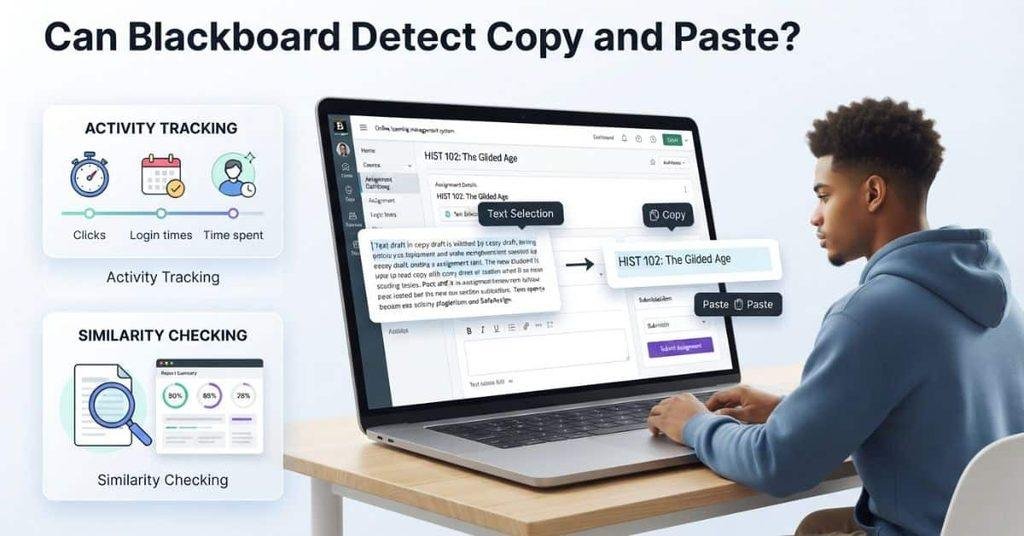
When students ask, can Blackboard detect copy and paste, they often mean two different things. They may wonder if Blackboard can see the copy-and-paste action itself. Or they may mean whether Blackboard can identify copied content after they submit it.
Copying text from another website and pasting it into a Blackboard assignment does not automatically mean Blackboard knows where the text came from. The platform can receive the text entered into the assignment, but source identification depends on the tools and settings used by the course.
Copying and pasting within Blackboard can also mean different things. For example, a student might copy a question or answer from one part of the platform and paste it elsewhere. That does not necessarily mean Blackboard has identified the action as suspicious.
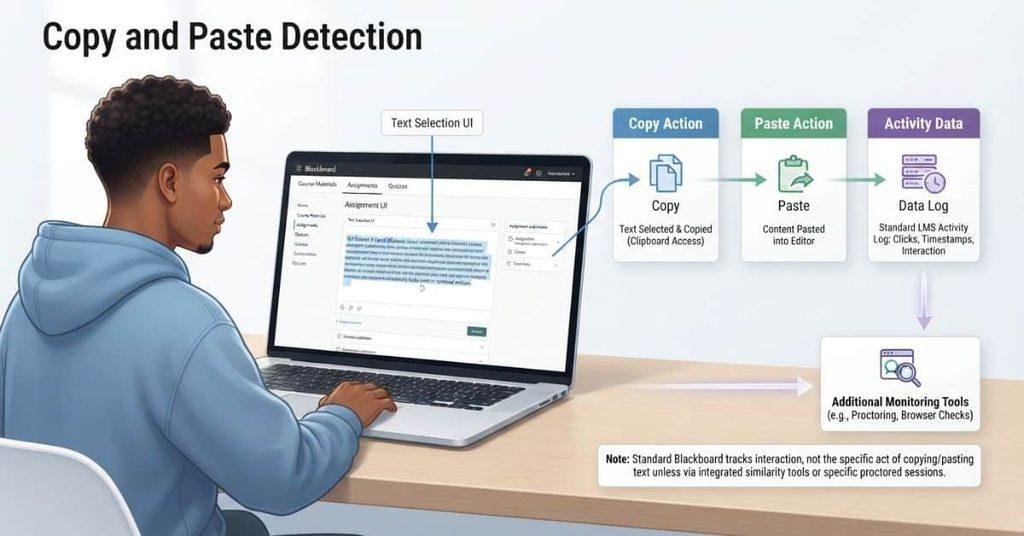
It helps to separate two concepts:
- Action tracking: Information about activity during a Blackboard session may be available depending on the feature and settings.
- Content analysis: Tools such as SafeAssign can compare submitted work against other sources for similarities.
- Source identification: Blackboard does not automatically know the original website or document for every piece of pasted text.
Can Blackboard Tell If You Copy and Paste?
Students often ask, can Blackboard see if you copy and paste? The answer depends on what Blackboard feature they use and what activity information that feature records.
A webpage can sometimes observe events or information connected to a user’s session. However, that does not mean Blackboard universally records every physical keyboard shortcut or mouse action.
For example, pressing Ctrl+C on a webpage does not automatically prove that Blackboard has logged the exact action. Likewise, pasting text into an assignment does not automatically reveal the website where the text originated.
The situation can differ during Blackboard tests. Test settings, browser restrictions, monitoring tools, or other integrations may provide additional information. These features vary by institution and course.
The key distinction is simple: observing activity is different from identifying copied content. A similarity tool can analyze submitted text without needing to prove exactly how the student entered it.
Can Blackboard See When You Copy and Paste?
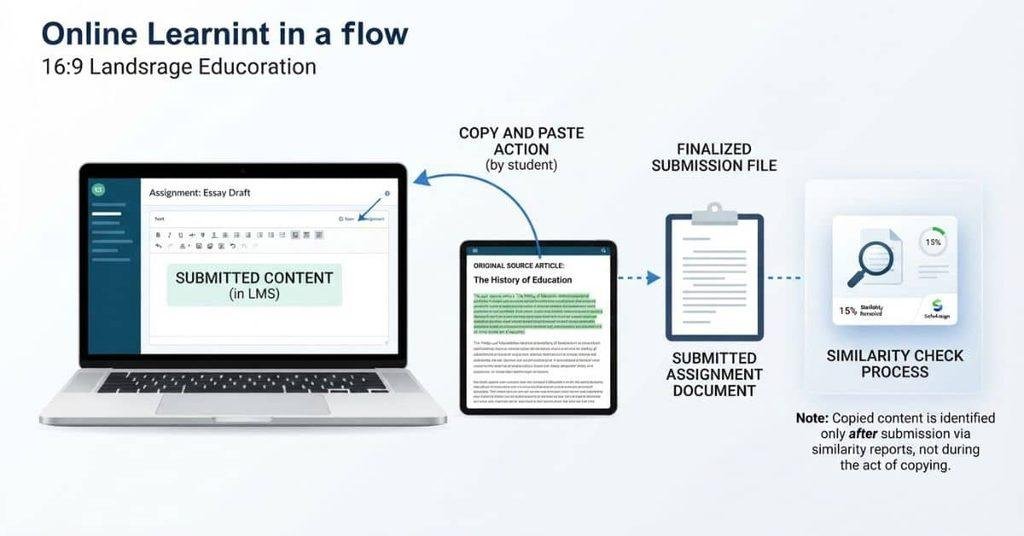
Students often ask, can Blackboard see when you copy and paste during an assignment or test. “Seeing” a copy-and-paste event does not necessarily mean Blackboard knows what you copied.
Blackboard may collect certain activity or session information, depending on the feature being used. However, that does not automatically identify material copied from another website or document.
An instructor also does not necessarily receive a simple notification saying that a student used copy and paste. What instructors can see depends on Blackboard configuration, course settings, assessment type, and any additional monitoring or originality tools.
A regular assignment may work differently from a Blackboard test. Some tests can use additional controls or restrictions that change what activity the system can observe.
The important distinction is between activity information and copied content. A system may record information about an interaction without knowing the original source of the text.
Does Blackboard Know If You Copy and Paste?
So, does Blackboard know if you copy and paste? There is no universal yes-or-no answer. The result depends on what you copied, where you pasted it, and which Blackboard feature you used.
Copying Text From Another Website
If you copy text from a website, Blackboard does not automatically know that website was the source simply because you copied the text.
Once you paste the material into an assignment, Blackboard receives the submitted text. A separate originality or similarity tool may then compare that content with available sources.
Pasting Text Into a Blackboard Assignment
Pasting text into an assignment places that content into the submission area. Whether Blackboard records additional information about the interaction depends on the assignment setup and platform features.
Your instructor may see the submitted work and related submission information. That does not necessarily mean they receive a direct “copy-paste detected” alert.
Copying and Pasting Between Blackboard Pages
Copying content from one Blackboard page and pasting it into another can involve activity within the same platform. However, that does not automatically mean Blackboard identifies every copy-and-paste action.
The exact information available can vary by Blackboard version, course configuration, assessment type, and enabled tools.
Can Blackboard See What You Copy?
A key question is whether Blackboard can actually see what you copy. This involves several different types of information, and they should not be treated as the same thing.
Blackboard may receive information about interactions with a course page or assessment. That does not necessarily mean it can see the exact text placed on your clipboard.
There is also a difference between seeing copied text and knowing where that text came from. For example, submitted text could contain material that also appears on another website. A similarity tool can compare that submission with available sources without proving how the student entered the text.
Think of the process in four parts:
- Interaction: The system may collect certain information about activity during a session.
- Copied text: The platform does not automatically have access to everything on your clipboard.
- Original source: Knowing where copied material came from requires additional information or analysis.
- Similarity checking: Tools such as SafeAssign can compare submitted work with existing sources.
These distinctions help explain why copy and paste detection and plagiarism detection are not the same thing.
Can Blackboard See What You Copied From Another Website?
If you copy text from another website, Blackboard does not automatically gain access to the entire webpage or your clipboard. What happens next depends on where you paste the content and which Blackboard features your course uses.
For example, pasting text into an assignment gives Blackboard the content included in your submission. A similarity tool may then compare that content with sources in its database.
That comparison is different from Blackboard watching the website you visited. It also does not necessarily establish exactly how you obtained the text.
Can Blackboard Know Where You Copied Something From?
Blackboard does not automatically know the original source of every piece of pasted text. Identifying a source usually requires additional information, such as a matching source found through a similarity-checking system.
This means copied content and copying activity are separate issues. An instructor may see that submitted text matches another source without receiving evidence of the exact copy-and-paste action.
Browser-level monitoring can also vary. Specific monitoring, lockdown, or proctoring software may provide additional information when the institution enables it.
Can Blackboard Detect Copy and Paste on a Test?
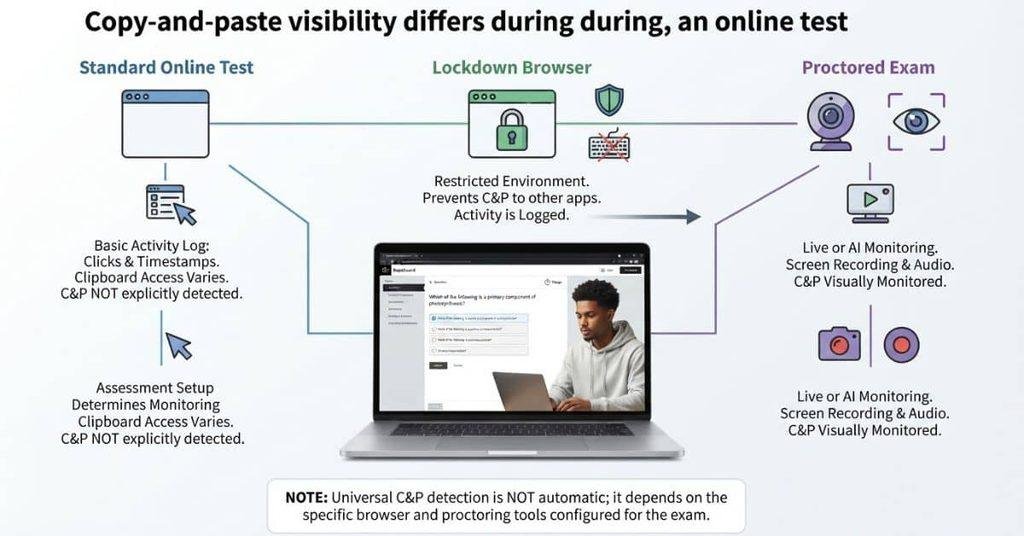
Can Blackboard detect copy and paste on a test? The answer depends heavily on how the test is configured.
A Blackboard test and a regular assignment use different workflows. A standard online test does not automatically mean your instructor can see every action you perform on your computer.
Test settings can control features such as navigation, access, and other assessment behavior. Institutions may also use additional lockdown or proctoring tools. Those tools can monitor more activity than a standard Blackboard assessment.
The important point is that Blackboard alone and Blackboard with additional monitoring tools are not necessarily the same setup.
Before taking an exam, check the instructions provided by your instructor. They should explain any required browser, lockdown, or proctoring software.
Can Blackboard Detect Copy and Paste During an Exam?
During an exam, the information Blackboard can collect depends on the test configuration and tools enabled by the institution.
A standard test does not automatically give Blackboard unrestricted visibility into everything happening on your device. Additional software can change what the assessment monitors.
For example, a lockdown or proctoring tool may impose browser restrictions or monitor specific exam-related activity. The exact features depend on the product and configuration.
Therefore, you should not assume that every Blackboard test uses the same monitoring system. Check the exam requirements before starting the assessment.
Does Blackboard Tell the Teacher If You Copy and Paste?
There is not necessarily a simple notification that tells an instructor, “This student copied and pasted.”
What an instructor can access depends on the assessment setup and available activity information. Separate originality, lockdown, or proctoring tools may provide additional reports or indicators.
If copied text appears in a submission, an instructor may also discover similarities through an originality-checking tool. That is different from receiving a direct copy-and-paste alert.
Pro Tip: Always follow the specific exam instructions provided by your school. Different Blackboard courses can use different settings and supporting tools.
Can Blackboard Detect Copy and Paste on a Multiple-Choice Test?
Can Blackboard detect copy and paste on a multiple-choice test? It depends on the test settings and any additional monitoring tools your school uses.
A student might copy a question from the test and paste it into another application. They might also copy an answer choice or use another source to find an answer. These actions involve different types of activity, and Blackboard does not automatically provide the same visibility in every setup.
The Blackboard test itself should be separated from additional monitoring software. A standard test may provide assessment and session information without giving the instructor complete visibility into everything happening on the computer.
Additional lockdown or proctoring software can apply different restrictions or monitoring features. The exact behavior depends on the specific tool and configuration.
Can You Copy a Question From a Blackboard Test?
Students sometimes ask, can Blackboard see when you copy a question? Copying the visible text of a question and Blackboard knowing exactly what you did with that text are two different things.
The fact that text can be selected or copied does not automatically tell Blackboard where you pasted it afterward. The platform may have access to certain information associated with the test session, depending on its configuration.
If a school uses additional monitoring software, the available information can be different. That software may restrict or monitor specific exam activity.
So, don’t treat copying the question itself as proof that Blackboard knows every subsequent action. Check the specific test instructions for any restrictions or monitoring requirements.
Does Blackboard Detect Copy and Paste in Assignments?
Assignments work differently from online tests. A student might paste text directly into Blackboard’s text editor, upload a document, or submit material that they copied from another source.
When you submit an assignment, Blackboard receives the content included in that submission. If the course uses an originality or similarity tool, that tool can compare submitted material with sources available to it.
For example, a copied passage may match content from websites, publications, or other sources in the tool’s comparison database. This can help identify similar or matching content.
However, finding matching text is different from detecting the physical Ctrl+C or Ctrl+V action. A similarity report focuses on the submitted content and its matches.
Uploading a document can also contain copied material. The important issue is what the submitted work contains and which checking tools your course uses.
Pro Tip: Follow your instructor’s citation and originality requirements. If you use another source, cite it according to your course guidelines.
What Is the Difference Between Copy-Paste Detection and Plagiarism Detection?
Copy-paste detection and plagiarism detection answer different questions. Understanding this difference makes Blackboard’s behavior much easier to understand.
Copy-Paste Detection
Copy-paste detection focuses on whether a system can identify or record an interaction or event. For example, a system might have information about activity during an assessment session.
That does not automatically mean the system knows what text you copied or where you copied it from. The available information depends on the platform, assessment settings, and any additional monitoring tools.
Plagiarism or Similarity Detection
Plagiarism or similarity detection focuses on the submitted content. It looks for overlap between student work and existing sources.
SafeAssign is an example of this type of tool. Blackboard describes SafeAssign as comparing submitted assignments with existing works to identify areas of overlap.
A similarity report can highlight matching text and identify sources associated with those matches. However, a match does not by itself establish exactly how a student obtained or entered the text.
Why These Are Not the Same Thing
Imagine a student copies a paragraph from a website and pastes it into an assignment. The copy-and-paste action and the later similarity check are separate mechanisms.
The first concerns how the content was entered. The second concerns what appears in the submitted work.
This distinction explains why finding copied content does not necessarily mean Blackboard recorded the student’s exact Ctrl+C or Ctrl+V action.
Can SafeAssign Detect Copy and Paste?
SafeAssign is designed to help identify potential plagiarism by comparing submitted assignments with existing academic works and other available sources. Blackboard documentation describes it as a tool that identifies areas of overlap in submitted work.
Its Originality Report focuses on similarities found within the submitted content. It can show matching text and sources connected with those matches.
This makes SafeAssign different from a tool designed specifically to record every copy-and-paste action. A SafeAssign report can provide evidence of text overlap, but that does not necessarily establish that the student pressed Ctrl+C and Ctrl+V.
For example, a student could manually type a sentence that closely matches an existing source. SafeAssign may still identify the overlap because it analyzes the submitted text.
Likewise, copying a passage into an assignment may result in a similarity match. The report focuses on the content and its sources, rather than simply proving the physical action that placed the text there.
Does SafeAssign Know You Copied and Pasted?
The more important question is usually what appears in the submitted work and what matches existing sources.
SafeAssign can identify areas of overlap between submitted assignments and sources included in its comparison process.
That does not mean the report necessarily proves that you used a specific keyboard shortcut or mouse action. Copying content and detecting matching content are different processes.
Pro Tip: Treat a SafeAssign report as a similarity analysis, not as a complete record of everything you did while preparing an assignment.
Can Blackboard Detect Copying Without SafeAssign?
Blackboard, SafeAssign, and third-party monitoring tools serve different purposes. It is more accurate to think of them as separate parts of an online learning environment.
The normal Blackboard LMS can handle course content, assignments, tests, submissions, and related assessment information. The exact activity information available can depend on the feature and configuration.
SafeAssign has a different purpose. It analyzes submitted work for similarities with available sources. It does not simply function as a universal copy-and-paste detector.
Some schools also use third-party proctoring or monitoring software. These tools can introduce additional restrictions or monitoring features during assessments.
Therefore, there is no single “Blackboard detector” that works identically across every course. The information available can depend on the assessment, Blackboard configuration, SafeAssign, and any additional technology used.
Does Blackboard Track Copy and Paste During Exams?
Exam monitoring can vary significantly based on the assessment setup. A normal Blackboard test should not be treated as identical to an exam using additional monitoring technology.
Regular Blackboard Test
A regular Blackboard test provides the tools needed to complete an online assessment. The information available to instructors depends on the test configuration and Blackboard features being used.
It does not automatically mean the instructor can see everything happening on the student’s computer.
Blackboard Ultra Test
Blackboard Ultra provides its own assessment environment and settings. The available activity information depends on the features enabled for that particular test.
An Ultra test should not automatically be assumed to have the same monitoring capabilities as a proctored exam.
Proctored Blackboard Exam
A proctored exam can use additional technology to monitor or restrict assessment activity. The exact capabilities depend on the proctoring service and its configuration.
These tools can provide information beyond what a standard Blackboard test provides.
Exam With Lockdown Browser
A lockdown browser can restrict how students interact with their devices during an assessment. Depending on the specific software, it may prevent access to other applications or websites.
The key point is that additional assessment technology can have different monitoring capabilities from normal Blackboard functionality. Always check your school’s exam instructions to understand which tools apply.
Can Blackboard See If You Copy a Question?
Students often ask, can Blackboard see when you copy a question from an online test? Copying question text, copying an answer choice, and pasting that content somewhere else are separate actions.
Blackboard may have access to certain assessment or session information. However, that does not automatically mean the system identifies every copy action or knows exactly where you pasted the copied material.
For example, selecting and copying a question does not necessarily create a simple instructor-visible alert saying that you copied it. Whether additional information exists depends on the assessment configuration and any monitoring software involved.
The same applies when copying an answer choice. The exact behavior can differ between a standard test, a restricted assessment, and an exam using proctoring technology.
Pro Tip: Don’t assume all Blackboard tests have identical monitoring. Review the assessment instructions before starting an exam.
What Happens If You Copy and Paste During a Blackboard Test?
The result depends on where you copy or paste, how the test works, and whether your school uses additional monitoring technology.
Scenario 1: Copying Text Inside Blackboard
You might select text from a question or another area within Blackboard. Copying that text does not automatically mean Blackboard identifies everything you do with it afterward.
The information available can depend on the assessment settings and Blackboard features being used.
Scenario 2: Copying a Question to Another Application
A student might copy a question and paste it into another application. A standard Blackboard test does not automatically mean the instructor can see everything happening on the computer.
However, additional monitoring software can change what information the assessment system collects.
Scenario 3: Pasting an Answer Into Blackboard
Pasting an answer into a test places that content into the assessment. Blackboard can process the answer as part of the submitted test response.
That does not necessarily mean the system knows where the answer came from or how you entered it.
Scenario 4: Using a Proctoring or Lockdown Tool
Proctoring and lockdown tools can add restrictions or monitoring features. Their capabilities vary by product, settings, and institutional configuration.
For this reason, a proctored exam should not be treated like a standard Blackboard test.
Scenario 5: Copying Text and Later Submitting It as an Assignment
If copied material later appears in an assignment, an originality or similarity tool may identify matching content. The analysis focuses on the submitted work and available comparison sources.
That is different from proving exactly when or how you copied the material.
Does Copying and Pasting Automatically Mean Blackboard Will Flag You?
A copy-and-paste action by itself does not necessarily establish academic misconduct. Whether an action violates course rules depends on the assessment instructions and your institution’s academic-integrity policies.
A submitted answer can also receive separate originality or similarity analysis. For example, matching text may appear in a SafeAssign report when the course uses that tool.
An academic-integrity review can consider additional information beyond a similarity result. The exact process depends on the institution and its policies.
This means students should distinguish between an observed action, a similarity match, and a confirmed policy violation. These are not automatically the same thing.
If your instructor prohibits copying during a test, follow those instructions even when you are unsure what the technology can detect. Checking the course rules before an assessment can prevent misunderstandings.
What Should Students Know About Copying Text Into Blackboard?
Knowing what Blackboard can detect is only part of the issue. Students should also understand the rules that apply to each assignment or test.
Before copying text into Blackboard, check the instructions for the specific assessment. Your instructor may allow outside resources for one assignment but prohibit them during an exam.
For assignments, follow the required citation style when you use information from outside sources. Proper citations help show which ideas or words came from another source.
For tests, pay close attention to resource restrictions. If an exam says no outside resources, don’t use another website or application during the test.
Also, don’t assume that “Blackboard can’t see X” means an action is permitted. Technical visibility and academic-integrity rules are separate issues.
A useful checklist is:
- Read the assignment or test instructions first.
- Check whether outside websites or resources are allowed.
- Cite outside material when the assignment requires citations.
- Follow any lockdown or proctoring requirements.
- Ask your instructor if a rule seems unclear.
Following the assessment rules is more reliable than trying to predict what Blackboard can or cannot detect.
Conclusion
Blackboard does not have one universal system that automatically detects every copy-and-paste action. What Blackboard can observe depends on the assessment, settings, and any additional monitoring tools.
So, can Blackboard detect copy and paste? The answer depends on what you are doing and which tools your course uses. SafeAssign focuses on similarities in submitted work, while proctoring tools may provide additional exam monitoring.
For students in the USA, the safest approach is simple. Follow your instructor’s instructions, respect outside-resource restrictions, and cite sources correctly.
Have you used Blackboard for an assignment or test with specific copy-and-paste rules? Share your experience or questions in the comments. You can also explore more student guides and online learning resources on our website.
Blackboard Copy and Paste — Common Questions
Blackboard does not have one universal detector for every copy-and-paste action. What it can observe depends on the assessment, settings, and additional monitoring tools.
Not necessarily. Blackboard may collect certain activity information, but that does not mean it identifies every physical copy-and-paste action.
It depends on the Blackboard feature and assessment configuration. Additional lockdown or proctoring software can provide different monitoring capabilities.
Not automatically in every situation. Blackboard may process submitted content or assessment activity, but these are different from knowing exactly what you copied.
A standard Blackboard environment does not necessarily identify every copy-and-paste action. Course settings and additional tools can affect what information becomes available.
Copying question text does not automatically mean Blackboard creates a visible alert for the instructor. Assessment settings and monitoring tools can affect available information.
It depends on the test configuration. A standard test and an exam using lockdown or proctoring software can have different monitoring capabilities.
Blackboard does not universally detect every copy-and-paste action. It can handle assessment activity and submitted content, while separate tools may provide additional analysis.
The answer depends on the exam setup. Standard Blackboard tests differ from exams using additional proctoring or lockdown technology.
SafeAssign can identify similarities between submitted work and sources available to its comparison process. It focuses on submitted content rather than simply detecting Ctrl+C or Ctrl+V.
There is not necessarily a simple copy-and-paste notification for instructors. What teachers can access depends on the assessment configuration and supporting tools.
Blackboard does not automatically know the original website for every copied passage. Submitted text may undergo similarity analysis if the course uses an applicable originality tool.

We are the Canvas Academic Team, a developer team focused on building simple and practical tools that help students succeed academically. This platform was created specifically for Canvas LMS students to make grade tracking, GPA calculations, exam planning, and academic management easier and more efficient.
Our focus is on creating fast, accurate, and student-friendly educational tools along with helpful learning resources that improve productivity and reduce academic stress.
Through CanvasGradeCalculator.com, our goal is to continue building useful resources that help students study smarter, stay organized, and achieve better academic results.