Table of Contents
Introduction
Can Canvas tell if you used ChatGPT, or does it simply collect your assignment?
If you are new to Canvas, it can be confusing to understand how AI detection works. Many U.S. students wonder, does Canvas have AI detection, and whether their assignments are automatically checked.
The answer depends on how your school or instructor has configured Canvas. Canvas is primarily a learning management system, not one universal AI detector. Some courses may use third-party tools for plagiarism or AI-related checks.
This matters because seeing a Canvas submission screen does not necessarily mean AI detection is running. Different schools can use different integrations and academic policies.
In this guide, you’ll learn whether Canvas can detect ChatGPT and what AI detector Canvas may use. We’ll also explain discussion posts, plagiarism checks, and cheating detection.
You’ll understand what Canvas can actually see and what depends on your course setup. We’ll also cover why AI detection results should not be treated as perfect proof.
Can Canvas Detect ChatGPT?
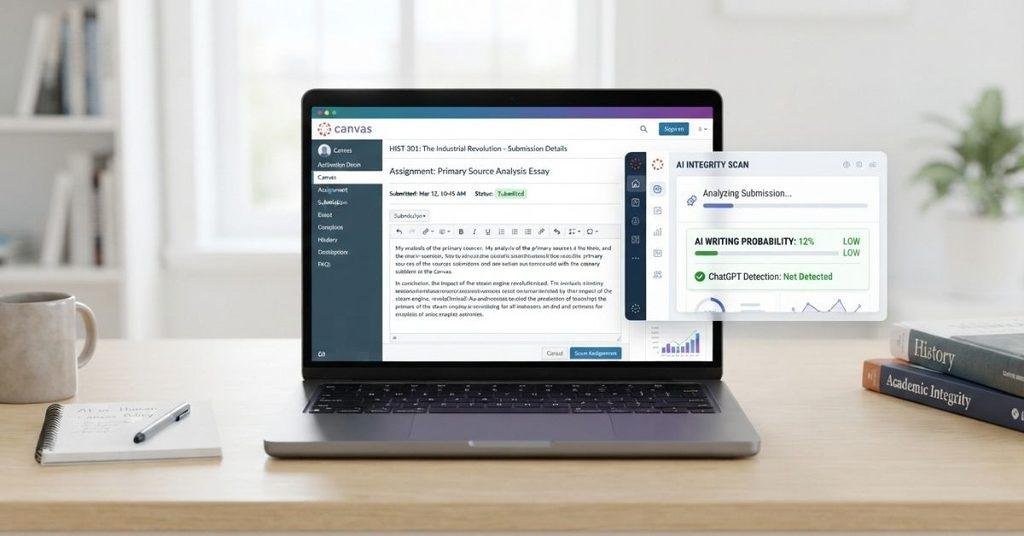
Can Canvas detect ChatGPT? Not by itself in every course. Canvas is primarily a learning management system, while AI detection may come from a separate tool connected to your course.
If your school uses an AI detection service, that tool may analyze submitted writing for patterns associated with AI-generated text. However, detecting ChatGPT use is different from simply receiving and storing an assignment in Canvas.
AI detectors also don’t directly see your ChatGPT conversations or know exactly how you created your work. They analyze the submitted text and may produce an AI-related score or indicator.
AI detection is different from plagiarism checking, so you may also want to read our guide on Canvas Turnitin and originality reports to understand similarity scores and originality results.
Why an AI Detection Result Isn’t Proof
An AI detection result shouldn’t automatically prove that a student used ChatGPT. AI detectors can make mistakes, including flagging human-written work or missing AI-generated content.
For this reason, instructors may consider other evidence before reaching an academic-integrity decision. They might review your writing history, drafts, sources, assignment instructions, or other course activity.
Pro Tip: Always check your instructor’s AI policy before using ChatGPT for coursework. A tool’s detection ability doesn’t determine whether AI use is allowed.
What AI Detector Does Canvas Use?
What AI detector does Canvas use? Canvas does not rely on one universal AI detector for every course or school. Canvas is an LMS that manages assignments, grades, discussions, and other course activities.
Schools can connect Canvas with different third-party services. These tools may offer plagiarism checking, AI-writing analysis, or other academic-integrity features. The exact tool depends on your institution and its Canvas setup.
That means the answer to what AI checker does Canvas use can vary between courses. An instructor may also enable a tool for specific assignments rather than every submission.
Your best source is your course information. Check the assignment instructions, syllabus, or academic-integrity policy for details about AI checking.
If those details aren’t clear, ask your instructor which tool they use. This helps you understand what happens after submitting your work.
How Does AI Detection Work With Canvas?
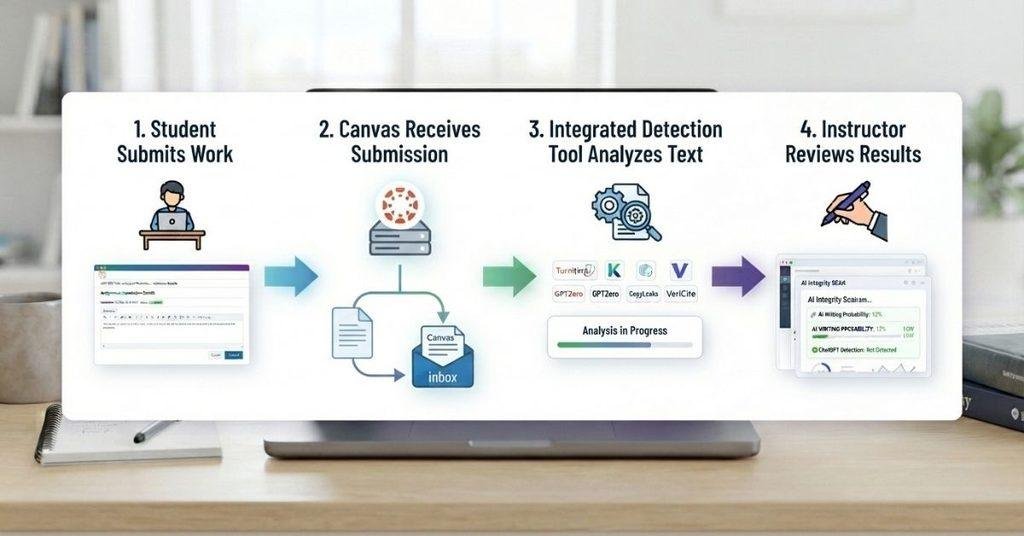
How does Canvas detect AI? In many setups, Canvas doesn’t perform the AI analysis itself. Instead, an integrated service may analyze the submitted content.
The basic process looks like this:
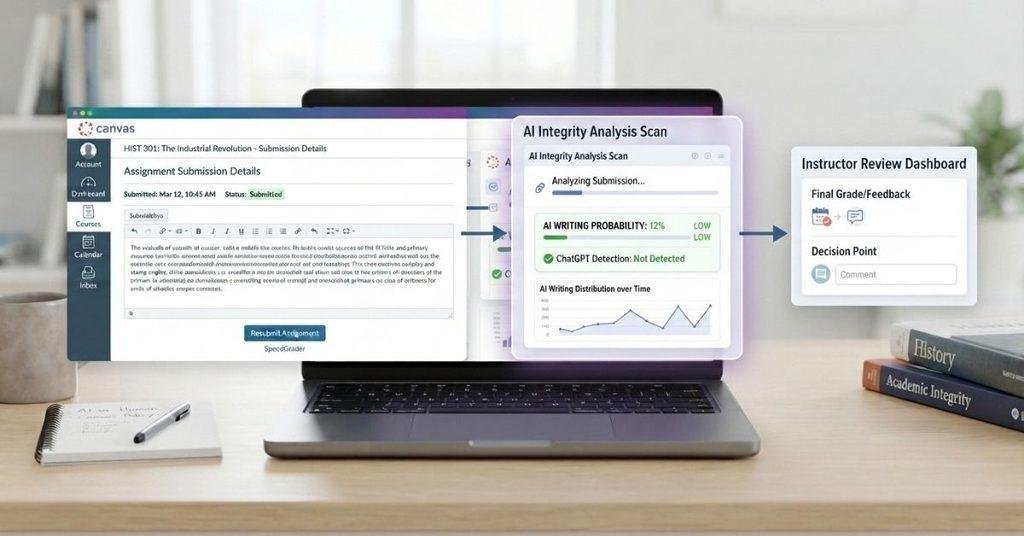
Student submits work → Canvas receives it → an integrated tool may analyze it → a report or indicator may reach the instructor.
The exact workflow depends on the tools connected to your school’s Canvas environment. Some integrations may check submissions for similarity, AI-related signals, or both.
This distinction matters because Canvas receiving your assignment doesn’t automatically mean Canvas knows you used ChatGPT. An external service may analyze the submitted writing based on its own methods.
AI detection can also produce uncertain results. Instructors may therefore consider the report alongside drafts, sources, writing patterns, and course policies.
Does Canvas Automatically Check Every Assignment for AI?
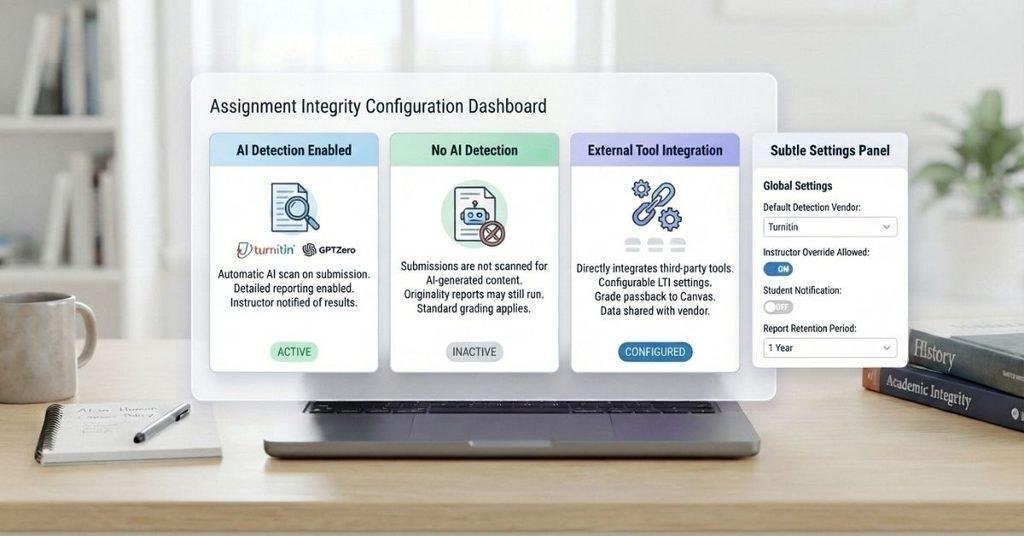
Does Canvas automatically check for AI? No, you shouldn’t assume that every Canvas assignment receives an AI check. AI detection depends on your school’s setup, instructor settings, and connected tools.Students also ask what instructors can see after submitting coursework, so see what professors can see on Canvas for a broader look at Canvas activity.
Some institutions connect Canvas with external services that can analyze submitted work. An instructor may enable these tools for certain assignments, while other assignments may use no AI detection at all.
Canvas itself mainly handles course activities and submissions. An external integration may provide additional analysis after you submit your work.
This means submitting an assignment through Canvas doesn’t automatically confirm that an AI detector analyzed it. The setup can vary between courses, instructors, and institutions.
Check your assignment instructions and course AI policy for specific details. If the policy doesn’t explain the process, ask your instructor before using AI tools for coursework.
Expert Tip: Never treat the absence of an AI warning as permission to use AI. Follow your instructor’s stated rules instead.
Can Canvas Detect AI in Discussion Posts?
Can Canvas discussion boards detect AI? Standard Canvas Discussions don’t automatically mean that every post receives AI detection. AI checking depends on whether your institution or instructor uses an integrated tool that supports this analysis.
A discussion post submitted through Canvas can be stored and displayed like other course content. However, that doesn’t mean Canvas itself automatically analyzes the writing for AI-generated content.
Some courses may use external academic-integrity tools with specific assignments or activities. Whether those tools can analyze discussion posts depends on the integration and course configuration.
So, can Canvas discussion posts detect AI? The answer depends on the tools enabled for your course. The same applies to questions such as does Canvas discussion check for AI or does Canvas discussion posts check for AI.
Can Canvas Detect Cheating?
Can Canvas detect cheating? It can support academic-integrity checks, but there isn’t one single method that catches every form of cheating. Different Canvas features and connected tools can provide different types of information.
Depending on the course setup, instructors may consider:
- AI-generated writing: External AI detection tools may analyze submitted text.
- Plagiarism or similarity: Integrated services may compare submissions against other sources.
- Quiz activity: Canvas can record certain actions and submission details.
- Suspicious behavior: Instructors may review unusual activity or assignment patterns.
- Proctoring tools: Separate services may provide additional exam monitoring.
- Instructor review: Teachers can consider drafts, sources, writing style, and other context.
So, does Canvas detect cheating automatically? Not in every situation. How does Canvas detect cheating depends on the features and integrations used by your school.
The key point is simple: AI detection is only one possible part of academic-integrity checks. It should not be confused with a universal Canvas cheating detector.
Does Canvas Detect Plagiarism or AI?
Canvas and AI detection are related to academic integrity, but they aren’t the same thing. Canvas mainly manages your course, assignments, submissions, and other learning activities.
The type of checking depends on your school’s setup and any external tools connected to Canvas.
| Check | What it looks for |
|---|---|
| Plagiarism/similarity | Matching text with other sources |
| AI detection | Patterns associated with AI-generated writing |
| Canvas activity | Actions and events recorded within Canvas |
| Proctoring | Additional monitoring during exams |
A similarity check looks for matching or closely related content. AI detection uses different methods to identify patterns that may be associated with AI-generated writing.
These checks can work together, but one does not automatically prove the other. For example, a high similarity score doesn’t mean that AI created the assignment.
If you’re researching Canvas plagiarism checks, see our Canvas Turnitin & Originality Reports Explained guide for a deeper explanation of similarity reports and originality checking.
What Is the Difference Between Canvas AI Detection and Turnitin?
Canvas and Turnitin serve different primary purposes. Canvas is an LMS, while Turnitin is an external academic-integrity service that schools can integrate with learning platforms.
Turnitin can provide similarity checking and, depending on the product and setup, AI-writing detection features. Canvas itself doesn’t represent one universal Turnitin or AI detector.
It’s also important to understand that a similarity report is not an AI detection report. A similarity score shows matching content against sources included in the service’s comparison process. It doesn’t automatically show that AI generated the writing.
AI-writing indicators use different analysis methods. They may identify patterns associated with AI-generated text, but such results can have limitations.
Your course may use Turnitin through Canvas, but that doesn’t mean every Canvas assignment uses the same checks. Your institution and instructor decide which integrations and features apply.
Can Canvas Tell If You Used ChatGPT?
Can Canvas detect ChatGPT? It depends on the tools connected to your course and how your institution uses them. Canvas doesn’t necessarily have direct access to your ChatGPT account or private conversations.
The more relevant question is whether your submitted work can be analyzed by an AI detection service. An integrated tool may examine the writing for patterns associated with AI-generated text.
That doesn’t mean the tool can simply open your ChatGPT history and see what you typed. AI detection generally focuses on the submitted content and uses its own analysis methods.
AI detection results also aren’t infallible. A tool may produce an AI-related indicator without proving exactly how the student created the work.
For that reason, instructors may consider other evidence alongside detection results. Drafts, sources, assignment requirements, writing patterns, and course policies can all provide useful context.
Does Canvas Know If You Used AI Outside Canvas?
Canvas activity does not equal everything happening on your device. Canvas generally records activity that occurs within its platform rather than automatically reading every other application.
If you use ChatGPT or another AI tool outside Canvas, Canvas doesn’t necessarily have direct access to that activity. AI detection usually focuses on content submitted through the course system or an integrated service.
However, additional monitoring software can have different capabilities. Some schools may use separate proctoring or monitoring tools with their own features and settings.
This distinction matters because students often confuse Canvas activity tracking with device-wide monitoring. If you’re concerned about browser activity, see our guide on Can Canvas See If You Switch Tabs?
What Can Teachers See When AI Detection Is Used?
What teachers can see depends on the tools and settings used by their institution. Not every instructor has access to the same reports or activity information.
When an AI detection or academic-integrity tool is connected, an instructor may see:
- AI-related indicators from a supported detection service
- Similarity or originality reports from an integrated service
- Assignment submission information recorded by Canvas
- Relevant Canvas activity associated with course work
These reports can help instructors review submissions, but they don’t necessarily explain exactly how a student created the work.
If you want to understand Canvas activity more broadly, see our guide on What Can Teachers See on Canvas?
Is Canvas AI Detection Always Accurate?
No AI detection system should be treated as perfect proof that someone used AI. AI detectors can produce false positives, meaning they may flag human-written content.
Writing style, editing, sentence structure, and other factors can affect detection results. A detector’s result also doesn’t necessarily explain how the submitted work was created.
For this reason, an AI-related indicator should be considered one piece of information rather than a final verdict. Instructors may review drafts, sources, previous work, and other relevant context.
Course policies also matter when evaluating suspected AI use. An instructor may consider both the detection result and the specific rules for that assignment.
Pro Tip: Keep your drafts and research notes when possible. They can help show how your work developed if questions arise about your writing.
What Should Students Know About AI Use on Canvas?
Before using ChatGPT or another AI tool for coursework, check the rules for that specific class. AI policies can differ between instructors, assignments, and institutions.
Start with your course syllabus and assignment instructions. Look for sections covering artificial intelligence, ChatGPT, generative AI, or acceptable technology use.
Your instructor may allow AI for brainstorming, editing, or studying. Another assignment may require completely independent work. Always follow the instructions provided for that task.
Also, don’t assume that Canvas will warn you when AI use violates a course rule. A missing AI warning doesn’t mean AI use is permitted.
If the policy isn’t clear, ask your instructor before submitting AI-assisted work. This is safer than guessing what your course allows.
Canvas AI Detection vs. Other Monitoring Tools
Canvas, AI detectors, Turnitin, and proctoring tools serve different purposes. Some can work together, but they aren’t interchangeable.
| Feature | Canvas | AI Detector | Turnitin | Proctoring Tool |
|---|---|---|---|---|
| Course management | ✅ | ❌ | ❌ | ❌ |
| Assignment submission | ✅ | ❌ | Often integrated | Sometimes |
| Similarity checking | Depends on integration | Usually no | ✅ | ❌ |
| AI-writing analysis | Not universally built-in | ✅ | Depends on service/version | Usually not primary purpose |
| Quiz monitoring | Canvas features | ❌ | ❌ | ✅ |
| Webcam/screen monitoring | Not standard Canvas function | ❌ | ❌ | Depends on tool |
The exact features can vary because schools may use different integrations and service versions. Canvas itself remains the platform that manages the course and its activities.
An AI detector focuses on possible AI-generated writing. Turnitin commonly focuses on similarity checking, with some configurations offering additional AI-related features.
Proctoring tools serve a different purpose. Depending on the software and settings, they may monitor exams using features such as webcam or screen monitoring.
Expert Tip: Check which tools your school actually uses. Don’t assume that every Canvas course has identical monitoring features.
When an assignment has a significant effect on your course grade, use the Canvas Grade Calculator to see how different scores could affect your final result.
Conclusion
So, does Canvas have AI detection? Not as one universal feature for every course. Canvas mainly manages coursework, while schools can connect external tools for AI detection, similarity checking, or monitoring.
Whether Canvas can detect ChatGPT depends on your institution, instructor, assignment, and enabled integrations. AI detection results also aren’t guaranteed proof of AI use.
For students, the safest approach is simple: check your syllabus and assignment rules before using AI. If the policy isn’t clear, ask your instructor what is allowed.
Found this guide helpful? Share it with another student who uses Canvas. You can also explore our other Canvas guides for practical answers about assignments, monitoring, and academic-integrity tools.
Frequently Asked Questions
Canvas doesn’t use one universal AI detector across every course. Schools can connect third-party tools that analyze submitted work for AI-related signals. Whether AI detection is used depends on your institution, instructor, assignment, and enabled integrations.
Canvas itself doesn’t necessarily know that you used ChatGPT. However, an integrated AI detection service may analyze submitted writing for patterns associated with AI-generated content. These results can have limitations and don’t automatically prove that ChatGPT created the work.
Canvas doesn’t rely on one specific AI detector for every school. Institutions can choose different third-party services and integrations. Check your course syllabus, assignment instructions, or academic-integrity policy to find out which tools your school uses.
No, not every Canvas assignment automatically receives an AI check. AI detection depends on your school’s configuration and the tools enabled for a particular course or assignment. Don’t assume that every submission receives the same analysis.
Standard Canvas Discussions don’t automatically mean that every post receives AI detection. An external tool may analyze discussion content if the institution’s setup supports it. Check your course policy to understand whether AI checking applies to discussion posts.
Canvas can support academic-integrity reviews, but it isn’t one universal cheating detector. Instructors may consider AI detection, similarity reports, quiz activity, assignment submissions, or external proctoring tools. The exact process depends on the course setup.
Canvas can work with external plagiarism or similarity-checking services. These tools compare submitted content against relevant sources and produce reports. Canvas itself is primarily the learning management system, so plagiarism checking depends on the integrations used by your institution.
AI detection isn’t guaranteed to be accurate. Detection tools can produce false positives or miss AI-generated writing. Instructors should consider detection results alongside other evidence, such as drafts, sources, writing patterns, and course policies.
Canvas doesn’t automatically have access to your private ChatGPT conversations or every application on your device. AI detection generally focuses on submitted content. Separate monitoring or proctoring software may have different capabilities and settings.

We are the Canvas Academic Team, a developer team focused on building simple and practical tools that help students succeed academically. This platform was created specifically for Canvas LMS students to make grade tracking, GPA calculations, exam planning, and academic management easier and more efficient.
Our focus is on creating fast, accurate, and student-friendly educational tools along with helpful learning resources that improve productivity and reduce academic stress.
Through CanvasGradeCalculator.com, our goal is to continue building useful resources that help students study smarter, stay organized, and achieve better academic results.