Table of Contents
Introduction
Have you ever submitted an assignment in Blackboard and wondered what SafeAssign actually checks?
What is SafeAssign on Blackboard? It is a tool that helps instructors review submitted assignments for matching or overlapping content. It is commonly used in colleges and universities across the USA.
SafeAssign compares your submitted work with content from existing sources. These sources can include other student papers, online materials, and academic content. The tool then produces a similarity report for review.
For beginners, one point is especially important. SafeAssign is not the same thing as Blackboard. Blackboard is the learning platform, while SafeAssign is a tool that can be used within it.
A similarity match also does not automatically mean plagiarism occurred. Instructors review the matched content and its context before making academic decisions.
In this guide, you will learn how SafeAssign works, what its similarity score means, and what students should expect after submitting an assignment.
What Is SafeAssign on Blackboard?
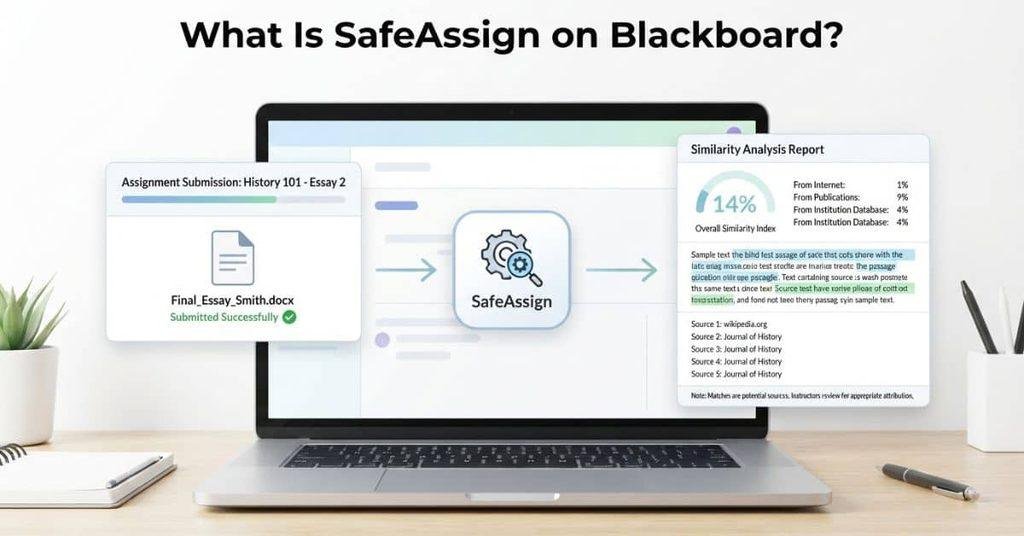
What is SafeAssign on Blackboard? SafeAssign is an originality-checking tool associated with Blackboard Learn. It compares submitted assignments with existing sources to identify areas of matching or overlapping content. Instructors can use these results to review whether students have properly attributed borrowed ideas or text.
SafeAssign can compare assignments against online sources, academic materials, and other submitted papers. The resulting report highlights matching content for further review. A match does not automatically mean a student committed plagiarism. Context and proper citations matter when interpreting the results.
Blackboard and SafeAssign are not the same thing. Blackboard Learn is the learning management system where schools manage courses, assignments, grades, and other learning activities. SafeAssign is a separate tool that can work with assignments within that environment.
Understanding what is SafeAssign in Blackboard can help students know what happens after submission. It can also help them review citations and avoid accidental overlap before turning in an assignment.
What Does SafeAssign Mean?
The name SafeAssign refers to a tool designed to support originality and proper source use in student assignments. Its main purpose is to identify matching content between a submission and other sources.
Students may see SafeAssign mentioned when an instructor enables it for an assignment. The tool checks the submitted work and creates information that helps instructors review potential matches. It does not replace the instructor’s judgment.
For students, understanding what is Blackboard SafeAssign means knowing that it focuses on submitted assignment content. It helps users examine originality and attribution rather than simply labeling every match as plagiarism.
What Does SafeAssign Do?
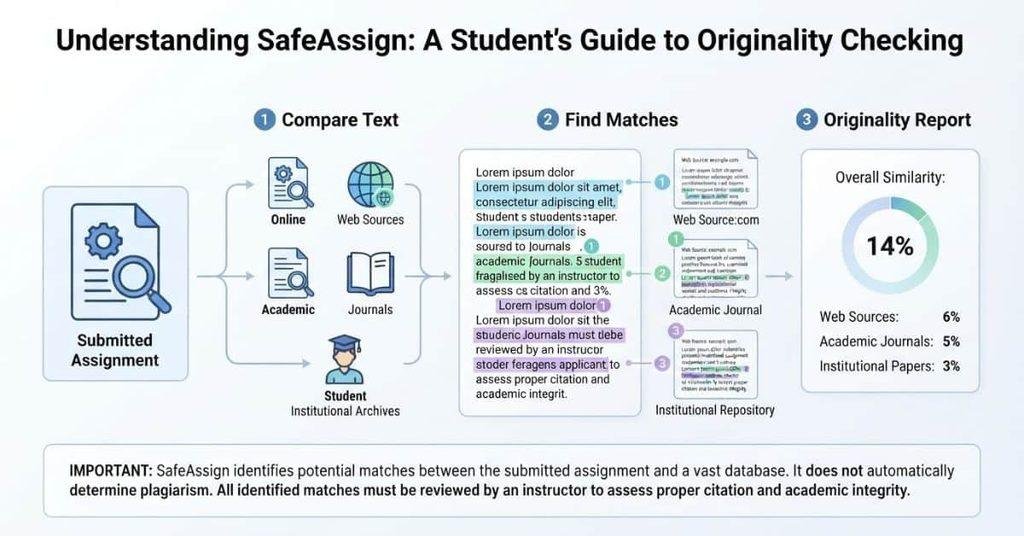
SafeAssign helps instructors review submitted assignments for matching or overlapping content. It focuses on comparing student work with available sources. The results can help users examine originality and proper attribution.
Checks Submitted Assignments for Matching Text
SafeAssign analyzes assignments submitted through supported Blackboard Learn activities. It looks for text that matches content found in its available source collections.
A matching phrase does not automatically mean plagiarism. Common phrases, correctly quoted material, and properly cited sources can also create matches.
Compares Work Against Available Sources
SafeAssign compares submitted work against sources available to its system. These may include internet content, academic materials, and other submitted assignments.
The exact sources and results can depend on the assignment settings and available databases. Students should focus on the specific matches shown in their report.
Generates an Originality/Similarity Report
After analyzing a submission, SafeAssign can generate an Originality Report. The report shows areas where the submitted text overlaps with identified sources.
This information gives instructors and students a clearer way to review matching content. A similarity result needs context before anyone decides whether the source use is appropriate.
Helps Identify Potentially Unoriginal Content
SafeAssign can highlight potentially unoriginal content and areas of overlap. This helps instructors review citations, quotations, and source use more closely.
SafeAssign does not automatically determine that plagiarism occurred. The instructor reviews the report and considers the assignment, sources, citations, and context.
How Does SafeAssign Work?
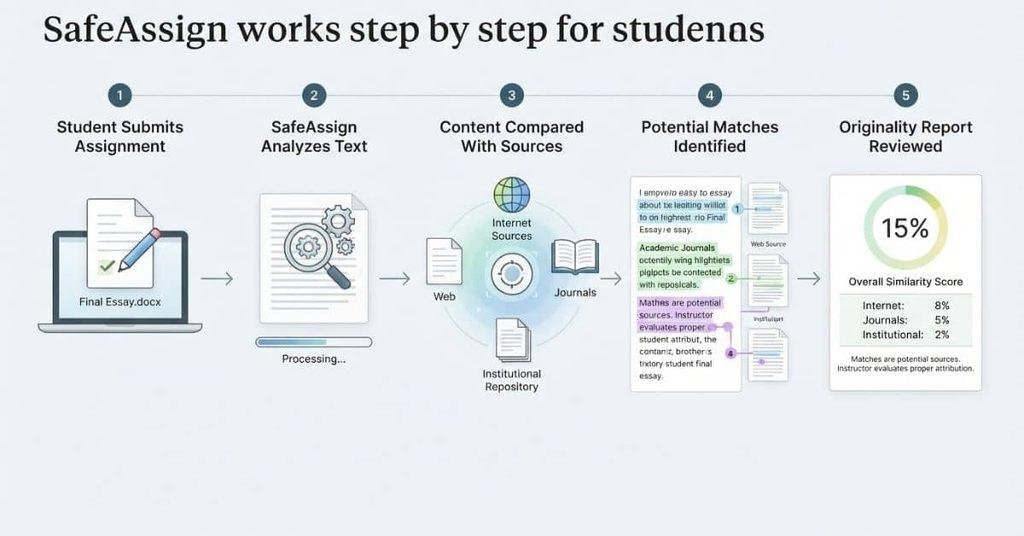
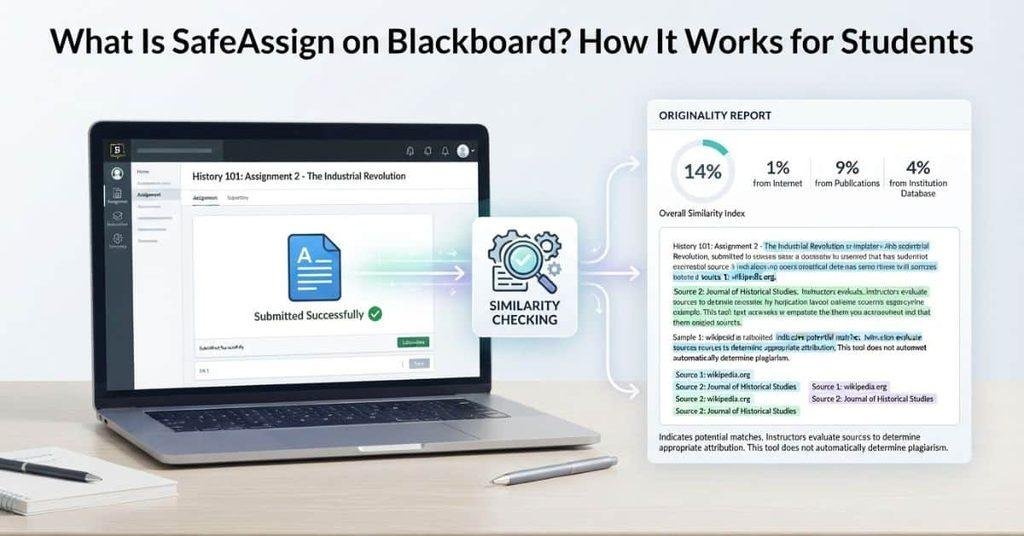
SafeAssign follows a straightforward process when an instructor enables it for an assignment. Understanding these steps can help students know what happens after they submit their work.
Student submits assignment
↓
SafeAssign analyzes the submission
↓
Content is compared with available sources
↓
Matching or overlapping areas are identified
↓
Originality Report is generated
↓
Instructor reviews the results
SafeAssign first processes the submitted assignment and compares its content with available sources. It then identifies areas that appear to overlap with existing works.
The system presents these findings through an Originality Report. Depending on the assignment setup, students may also be able to view the report.
The report supports academic review rather than providing an automatic academic-integrity verdict. An instructor must consider the context of each match, including quotations, citations, and commonly used language.
This distinction matters because a matching phrase alone does not prove that a student used another source improperly. The report provides information that helps instructors make that assessment.
What Is a SafeAssign Originality Report?
A SafeAssign Originality Report summarizes areas of overlap between a submitted assignment and available sources. It helps instructors review matching content and investigate how students used outside material.
The report can show highlighted matching text, identified sources, and similarity or originality information. These details help users see which parts of an assignment resemble existing content.
A report does not automatically decide whether a student committed plagiarism. Instructors need to interpret each match based on its context and the student’s citations.
What Does the SafeAssign Report Show?
A SafeAssign report can show matching areas within a submitted assignment. It may also identify sources connected with those matches.
Depending on the Blackboard setup and report view, students may see highlighted passages and similarity-related information. These features help users locate content that requires closer review.
The report provides evidence for review rather than an automatic academic-integrity decision. Instructors consider the matches alongside quotations, citations, assignment requirements, and other relevant details.
What Do Highlighted Matches Mean?
Highlighted text indicates that SafeAssign found content that overlaps with available sources. The highlighted passage helps users locate the specific wording that triggered the match.
A highlighted section does not automatically indicate improper copying. Some matches can result from standard academic phrases, assignment templates, or correctly quoted and cited material.
Students should review each highlighted area and check whether they credited the original source appropriately.
Does a Match Automatically Mean Plagiarism?
No. A SafeAssign match only identifies an area of overlap. It does not automatically establish that plagiarism occurred.
A matching passage can appear because of:
- Correctly quoted material
- Properly cited information
- Common or widely used wording
- Assignment instructions or template language
- Previously available material
- Actual unattributed copying
For this reason, instructors must interpret the report in context. They can examine the matched source, the student’s citations, and how the material appears in the assignment.
The report is therefore a review tool, not an automatic plagiarism verdict.
What Is a SafeAssign Score?
Students often use “SafeAssign score” to describe the percentage shown in or associated with a SafeAssign Originality Report. This percentage provides information about how much submitted content overlaps with identified sources.
The percentage should not automatically be treated as a plagiarism percentage. A higher percentage does not necessarily mean more plagiarism, and a lower percentage does not guarantee that an assignment follows academic-integrity rules.
There is also no universal “safe score” that guarantees an assignment will be acceptable. Course requirements, citation practices, assignment instructions, and instructor expectations can differ.
The most useful approach is to review the actual matching areas rather than focusing only on the percentage.
Is a High SafeAssign Score Always Bad?
No. A high similarity percentage does not automatically mean an assignment contains plagiarism. Correct quotations, citations, required wording, or template language can contribute to matching content.
The instructor needs to examine what caused the matches. A student should also review the highlighted sections and their sources when the report is available.
Is a Low SafeAssign Score Always Good?
No. A low similarity percentage does not automatically prove that an assignment is acceptable. Academic integrity depends on how students use and attribute sources, not only on a percentage.
For example, unattributed use of a small amount of distinctive material can still require attention. Students should follow their instructor’s citation requirements and review identified matches carefully.
What Sources Does SafeAssign Check?
SafeAssign compares submitted assignments with sources available to its implementation. Blackboard describes SafeAssign as comparing submissions with existing works to identify areas of overlap.
The exact source coverage can depend on the Blackboard Learn and SafeAssign setup used by an institution. Therefore, students should not assume that SafeAssign checks one fixed, universal database.
Student Submissions
SafeAssign can compare a submission with other student work available through its services. This comparison can help identify overlapping passages between assignments.
A match with another submission does not automatically show that a student copied it. The instructor still needs to review the context and source.
Academic/Published Material
SafeAssign can compare submitted work with academic papers and other existing works available to the service. Blackboard documentation describes this comparison as a way to identify areas of overlap.
The specific academic sources available can vary by implementation. Avoid treating an older source list as a complete description of every current SafeAssign setup.
Internet or Other Available Sources
SafeAssign can also compare submissions with internet content and other sources available to its service. Source coverage can change as Blackboard updates its products and integrations.
For that reason, it is more accurate to describe SafeAssign as checking available sources rather than claiming one exhaustive database list.
Is SafeAssign the Same as a Plagiarism Checker?
SafeAssign is an originality and similarity analysis tool. It identifies areas where submitted content overlaps with existing sources.
Plagiarism is a broader academic concept. It can involve using another person’s words, ideas, or work without proper attribution.
SafeAssign can help identify potentially problematic overlap, but its report does not decide whether academic misconduct occurred. An instructor must interpret the matches and consider citations, quotations, assignment requirements, and context.
This distinction matters because a similarity match can have legitimate explanations. Properly cited material can appear in a report alongside potentially unoriginal content.
Does SafeAssign Detect AI?
SafeAssign’s similarity analysis and AI detection are different concepts. A SafeAssign similarity result should not automatically be described as an AI-detection result.
A similarity report focuses on overlap between submitted content and available sources. AI detection, when offered through a separate feature or integrated tool, addresses a different question.
Students should check which tools their institution and instructor actually use. Product features and integrations can vary by Blackboard implementation.
For a separate explanation of Blackboard and AI-related checking, see [Does Blackboard Detect AI?].
Can SafeAssign Detect Copy and Paste?
SafeAssign analyzes the content of a submitted assignment for matching or overlapping text. It does not need to detect the actual Ctrl+C/Ctrl+V action to identify possible overlap.
For example, a student could copy text from a website and paste it into an assignment. SafeAssign’s relevant function is then to analyze the submitted content and compare it with available sources.
This means SafeAssign is not a tool that simply records whether someone copied and pasted. Its similarity analysis focuses on the content that reaches the assignment submission.
A copied passage may appear as a match when the submitted work overlaps with an available source. However, a match alone does not establish plagiarism.
For more details about Blackboard’s handling of copied content, see [Can Blackboard Detect Copy and Paste?].
Does SafeAssign Check Every Blackboard Assignment?
No. Students should not assume that every Blackboard assignment automatically uses SafeAssign.
An instructor or institution needs to enable and use SafeAssign for the relevant assignment. The available settings can depend on the Blackboard Learn environment and course configuration.
Students can check the assignment instructions or submission area for indications that SafeAssign is being used. The assignment may also provide information about an Originality Report.
If you don’t see any SafeAssign information, check the assignment details or ask your instructor. Course and instructor settings determine whether SafeAssign applies to a particular assignment.
Can Students See Their SafeAssign Report?
Students may be able to view their SafeAssign Originality Report, but this isn’t guaranteed for every assignment.
Whether students can access the report depends on the assignment configuration and instructor or course settings. Some assignments may allow students to review the report, while others may not provide student access.
If a report is available, students can use it to review highlighted matches and examine possible source overlaps. This can help them check citations and understand how their submitted work compares with available sources.
If you don’t see a report after submitting, check the assignment instructions and Blackboard interface. You can also ask your instructor whether student access to the report is enabled.
Can Teachers See SafeAssign Results?
When SafeAssign is enabled for an assignment, instructors can access the submitted work and related SafeAssign results. The available information can include similarity details, highlighted matching areas, and identified source information.
These results help instructors examine where submitted content overlaps with existing works. They can review the highlighted passages and compare them with the listed sources.
Teachers still need to interpret the results themselves. A matching passage can have a valid explanation, such as a quotation or properly cited source. SafeAssign provides information for review rather than making the final academic decision.
Does SafeAssign Automatically Flag Students for Plagiarism?
SafeAssign does not automatically turn a similarity result into a plagiarism verdict. Its role is to identify potential matching or overlapping content for further review.
The basic process is:
SafeAssign result → potential matching content → instructor review
The instructor can then examine the matched text, source information, citations, and assignment context. This distinction matters because not every match represents improper source use.
A SafeAssign report should therefore be viewed as evidence for review, not as an automatic finding of academic misconduct.
SafeAssign vs Blackboard vs Turnitin
These names refer to different things, even though students may encounter them together.
| Tool | What it is |
|---|---|
| Blackboard | A learning management system used to manage courses, assignments, grades, and other learning activities. |
| SafeAssign | An originality and similarity tool associated with Blackboard Learn. |
| Turnitin | A separate academic-integrity and originality platform used by educational institutions. |
Blackboard provides the broader learning environment. SafeAssign focuses on analyzing submitted work for areas of overlap with available sources.
Turnitin is a separate platform with its own features and systems. Schools may use different tools depending on their institutional setup.
The important point is that Blackboard, SafeAssign, and Turnitin are not interchangeable terms.
SafeAssign vs AI Detector vs Proctoring
Students may see several different tools in Blackboard and assume they serve the same purpose. They don’t. Each tool addresses a different part of the learning or assessment process.
| Tool | Main purpose |
|---|---|
| SafeAssign | Identifies areas of text overlap and provides originality-related information. |
| AI detector | Estimates whether submitted text may show characteristics associated with AI-generated content. |
| Proctoring tool | Monitors or restricts activity during an assessment. |
| Blackboard | Manages courses, assignments, tests, grades, and other learning activities. |
SafeAssign focuses on similarities between submitted work and available sources. An AI detector addresses a different question about how text may have been produced.
A proctoring tool focuses on assessment activity rather than text similarity. Blackboard provides the broader environment where these different tools may be used.
Understanding these differences can prevent confusion about what each tool actually checks.
Is SafeAssign Used for Blackboard Tests and Quizzes?
SafeAssign is primarily associated with assignment and submission originality checking. A Blackboard quiz is a different type of assessment.
Students shouldn’t automatically assume that every test or quiz goes through SafeAssign. The instructor’s assessment configuration determines which tools apply to a particular activity.
A quiz may use other settings or monitoring tools instead. The presence of Blackboard alone does not mean SafeAssign processes every assessment.
If you’re wondering how quizzes handle other types of academic-integrity concerns, see [Can Blackboard Quizzes Detect Cheating?] for more information.
How Can Students Avoid Problems With SafeAssign?
Students can reduce avoidable similarity concerns by following their instructor’s academic-integrity and citation requirements.
Helpful practices include:
- Write ideas in your own words when appropriate.
- Cite information from sources correctly.
- Use quotation marks for direct quotations.
- Follow your instructor’s required citation style.
- Review your assignment before submitting it.
- Check citations and references for missing information.
- Review available SafeAssign feedback when your instructor provides it.
Don’t focus only on getting a low similarity percentage. A low percentage does not automatically mean an assignment meets every academic requirement.
The goal is to use sources honestly and give proper credit. When you’re unsure about a citation or source, ask your instructor for guidance.
Blackboard Grade Calculator — Related Student Tool
SafeAssign and grade calculations serve completely different purposes. SafeAssign provides originality and similarity information, while grade calculations help students understand their course performance.
Want to Calculate Your Blackboard Grade?
If you want to estimate your current or potential course grade, you can use our [Blackboard Grade Calculator]. Enter your grades and assignment information to estimate your course result.
This calculator is separate from SafeAssign. It helps with grade calculation, not originality or similarity checking.
Conclusion
SafeAssign helps instructors review submitted assignments for matching or overlapping content. Understanding what is SafeAssign on Blackboard can make the process less confusing for students.
SafeAssign is not the same as Blackboard, an AI detector, or a proctoring tool. It also does not automatically decide that plagiarism occurred. Instead, its reports give instructors information to review alongside citations, quotations, and assignment requirements.
For students, the best approach is simple. Write your work honestly, cite your sources properly, and follow your instructor’s academic-integrity guidelines.
Have you used SafeAssign for a Blackboard assignment? Share your experience or questions in the comments. You can also explore our other Blackboard student tools and guides for practical help.
What is SafeAssign on Blackboard?
SafeAssign is an originality and similarity tool associated with Blackboard Learn. It compares submitted assignments with available sources to identify areas of matching or overlapping content.
What is SafeAssign in Blackboard?
SafeAssign is a Blackboard-related tool that analyzes submitted work for similarities with existing sources. It helps instructors review potential areas of overlap.
What is Blackboard SafeAssign?
Blackboard SafeAssign refers to the SafeAssign originality-checking tool used with Blackboard Learn. It provides similarity information for submitted assignments.
What is Safe Assignment on Blackboard?
“Safe Assignment” usually refers to SafeAssign, Blackboard’s originality-checking tool. It helps identify matching or overlapping content in submitted assignments.
What is a SafeAssignment in Blackboard?
A “SafeAssignment” generally refers to an assignment that uses SafeAssign for originality checking. The exact terminology can depend on the Blackboard interface or course setup.
What does SafeAssign do?
SafeAssign compares submitted work with available sources and identifies areas of matching or overlapping content. It can then provide an Originality Report for review.
How does SafeAssign work?
A student submits an assignment, and SafeAssign analyzes its content against available sources. It identifies potential matches and generates information that instructors can review.
What is a SafeAssign Originality Report?
It is a report showing areas where submitted content overlaps with identified sources. The report helps instructors examine matching text and source information.
What does a SafeAssign score mean?
A SafeAssign score usually refers to similarity or originality-related percentage information. It should not automatically be treated as a percentage of plagiarism.
Does SafeAssign detect plagiarism?
SafeAssign can identify areas of overlap that may require review. It does not automatically determine that plagiarism occurred.
Does SafeAssign detect AI?
SafeAssign’s similarity checking is different from AI detection. A SafeAssign similarity result should not automatically be interpreted as an AI-detection result.
Can SafeAssign detect copy and paste?
SafeAssign analyzes submitted content for matching text rather than detecting the actual copy-and-paste action. A pasted passage may appear as a match if it overlaps with an available source.
Does SafeAssign check every assignment?
No. SafeAssign must be enabled and configured for the relevant assignment. Students should check the assignment details or instructor instructions.
Can students see SafeAssign reports?
Students may be able to view their Originality Report, depending on the assignment and course settings. Report access can vary by instructor configuration.
Does SafeAssign automatically flag plagiarism?
No. SafeAssign identifies potential matching or overlapping content for review. The instructor interprets the results and determines whether the source use is appropriate.

We are the Canvas Academic Team, a developer team focused on building simple and practical tools that help students succeed academically. This platform was created specifically for Canvas LMS students to make grade tracking, GPA calculations, exam planning, and academic management easier and more efficient.
Our focus is on creating fast, accurate, and student-friendly educational tools along with helpful learning resources that improve productivity and reduce academic stress.
Through CanvasGradeCalculator.com, our goal is to continue building useful resources that help students study smarter, stay organized, and achieve better academic results.