
- Intoduction
- What Is Moodle?
- What Is Moodle Software?
- Is Moodle a Learning Management System (LMS)?
- What Is Moodle Used For?
- How Does Moodle Work for Students?
- What Can You Do on Moodle?
- Who Uses Moodle?
- Is Moodle Free?
- Is Moodle Open Source?
- What Are the Main Features of Moodle?
- Moodle for Students vs. Moodle for Instructors
- Moodle vs. a Traditional Learning Platform
- Conclusion
- Frequently Asked Questions About Moodle
Intoduction
Have you ever logged into an online class and wondered how everything works in one place?
If you are a student, teacher, or school administrator, understanding digital learning tools can make online education much easier. One platform you may encounter is Moodle, which helps educational institutions organize courses and manage learning activities. It is widely used for online classes, assignments, quizzes, and student progress tracking.
What is Moodle? Moodle is an open-source learning management system (LMS) designed to support online and blended learning. It gives teachers a central place to share learning materials, communicate with students, and assess their work. Students can access course resources, submit assignments, take quizzes, and review grades.
In this guide, you will discover what Moodle is, how the Moodle platform works, and what Moodle software can do. You will also learn about its key features, common uses, and the difference between MoodleCloud and self-hosted Moodle.
Whether you are exploring Moodle for school, college, university, or workplace training, this beginner-friendly guide will help you understand the platform and decide whether it meets your learning needs.
What Is Moodle?
Moodle is an open-source learning management system (LMS) that helps people create, manage, and deliver online courses. It gives teachers, students, and organizations one central place to access learning materials and complete educational activities. If you’re wondering what Moodle is, think of it as a digital learning space where teaching and learning happen online.
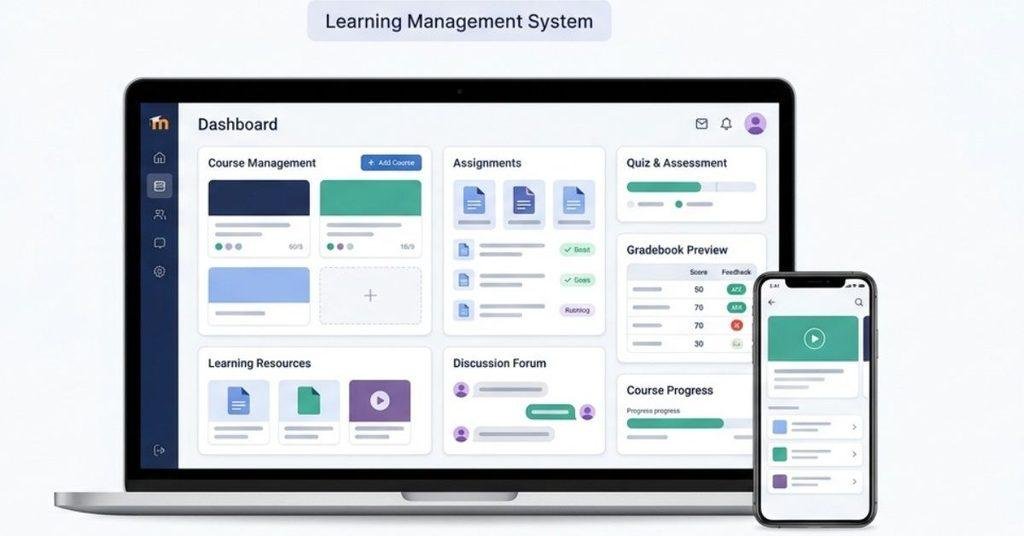
The Moodle platform allows schools, colleges, and universities to organize courses, share documents, create quizzes, collect assignments, and track student progress. Teachers can provide feedback, communicate with learners, and monitor their performance. Students can log in through a web browser to access course materials, submit homework, take tests, and check their grades.
Unlike a traditional classroom, Moodle doesn’t require teachers and students to meet in the same physical location for every learning activity. Learners can often study materials and complete assignments at a convenient time. However, instructors can also use Moodle to support in-person classes, making it useful for both online and blended learning.
Moodle software gives educational institutions flexibility because they can customize the platform to suit their teaching needs. Some institutions host Moodle on their own servers, while others choose managed hosting options. Its features and appearance may vary depending on how an organization configures it.
In simple terms, Moodle provides the digital tools needed to organize courses, support learners, and manage educational activities in one place.
What Is Moodle Software?
Moodle software is an open-source application that helps educators create and manage online learning environments. Schools, colleges, universities, and businesses use it to deliver training, organize course materials, and support learners. Unlike a simple file-sharing website, Moodle provides tools for teaching, assessments, communication, and progress tracking.
Most users access Moodle through a web browser, such as Chrome, Safari, or Firefox. An institution provides a Moodle website where students and teachers can log in with their accounts. Students can view lessons, download resources, submit assignments, take quizzes, and check grades. Teachers can upload learning materials, manage activities, and provide feedback from the same platform.
Institutions can choose between two common ways to run Moodle:
- MoodleCloud: A hosted service that lets institutions use Moodle without managing their own server infrastructure. It’s a practical option for organizations that want a simpler setup.
- Self-hosted Moodle: An institution installs Moodle on its own server or hosting service. This option offers greater control over technical settings, maintenance, integrations, and customization.
Moodle also supports plugins, themes, and configuration options that help institutions adapt the platform to their needs. For example, a university might add specialized assessment tools, while a business could configure courses for employee training. Some customizations require technical knowledge or additional resources.
Overall, Moodle software gives organizations a flexible way to manage digital learning. The best setup depends on the institution’s budget, technical skills, security requirements, and learning goals.
Is Moodle a Learning Management System (LMS)?
Yes, Moodle is a learning management system (LMS) that helps educators create courses, deliver lessons, assess students, and manage learning activities online. It brings essential teaching tools together in one platform, making it easier for institutions to organize learning and support students.
A learning management system helps teachers manage educational content and track student progress. Moodle does this through features that support both online classes and traditional classroom learning. Students can access course materials, complete activities, and communicate with instructors through their institution’s Moodle website.
Here are the main LMS features Moodle provides:
- Courses: Teachers can create courses, organize lessons, and structure learning activities around specific subjects.
- Assignments: Students can submit homework and projects online, while teachers can review submissions and provide feedback.
- Quizzes: Instructors can create online tests to assess students’ knowledge and understanding.
- Grades: Teachers can record assessment results and share grades with students. Students can follow our upcoming guide on how to check grades on Moodle to learn how to view their results.
- Learning resources: Instructors can share documents, videos, links, presentations, and other study materials.
- Student communication: Discussion forums, announcements, and messaging tools help teachers and students stay connected.
- Progress tracking: Teachers can monitor activity completion and review student performance using available tracking and reporting features.
These tools make Moodle more than a place to store course files. It provides a structured environment where educators can manage teaching activities and learners can access the resources they need.
In short, Moodle qualifies as an LMS because it supports course delivery, assessments, communication, grading, and learning progress management in one system. The exact features available depend on the institution’s setup and configuration.
What Is Moodle Used For?
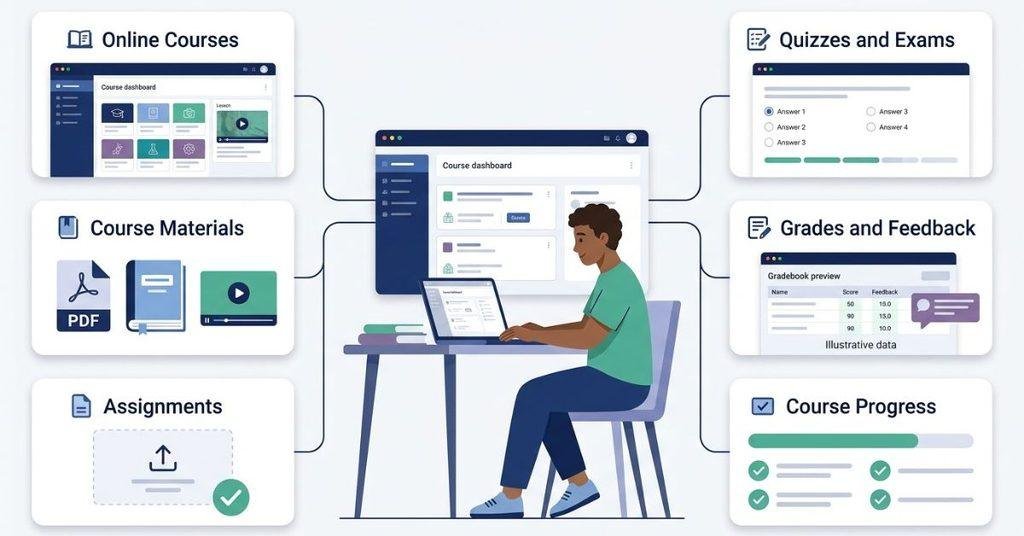
Moodle helps students manage their learning through one online platform. They can attend online courses, find study materials, submit assignments, take quizzes, check grades, and communicate with instructors. Schools and universities can also use Moodle to support in-person classes and blended learning.
Here are the main ways students use Moodle in their daily studies.
Taking Online Courses
Students use Moodle to access online courses and follow lessons from their computers, tablets, or phones. Each course may include learning modules, recorded lectures, reading materials, activities, and assessments. Instructors organize these resources to help students understand topics and complete course requirements.
Depending on the course setup, students can study independently or participate in scheduled online learning activities. Moodle also supports blended learning, where students combine classroom instruction with online coursework.
Accessing Course Materials
Moodle gives students a central place to find the resources their instructors share. These materials may include PDF files, presentations, videos, reading lists, website links, and study guides.
Instead of searching through emails or separate websites, students can open their Moodle course and find available resources. Access depends on the instructor’s settings and the student’s course permissions.
Submitting Assignments
Students can use Moodle to complete and submit homework, essays, projects, and other coursework. Instructors create assignment activities with instructions, deadlines, and submission requirements.
Depending on the assignment settings, students may upload documents, enter text online, or submit other permitted file types. After submission, they can review available status updates and read instructor feedback when it’s released.
For more practical guidance, link this section to your upcoming Moodle assignment submission guide once it’s published.
Taking Quizzes and Exams
Moodle supports online quizzes that help instructors assess student knowledge. Quizzes may include multiple-choice questions, true-or-false statements, short answers, and other question types.
Teachers control quiz settings, including availability, time limits, attempts, and feedback. Students can use these activities to practice concepts, complete assessments, and review their understanding. For detailed instructions, add an internal link to your upcoming Moodle quiz guide here.
Checking Grades and Feedback
Students can use Moodle’s gradebook to review scores for assignments, quizzes, and other graded activities. Depending on the instructor’s settings, they may also see comments, grading notes, and feedback explaining how to improve their work.
Grades may not appear immediately because instructors sometimes need time to assess submissions. Some activities may also have hidden grades or restricted feedback.
Students who need step-by-step instructions can visit your guide on how to check grades on Moodle once the article is published.
Communicating With Instructors and Classmates
Moodle provides communication tools that help students stay connected with their instructors and classmates. Depending on the institution’s configuration, these tools may include discussion forums, announcements, messaging, and collaborative activities.
Students can ask questions, discuss course topics, review important updates, and participate in group learning. Instructors can also share reminders about deadlines, assessments, and course changes.
These features help students stay informed without relying entirely on face-to-face conversations or separate communication platforms.
Tracking Course Progress
Moodle can help students understand how much coursework they’ve completed and which activities still need attention. Depending on the course settings, students may see activity completion indicators, assessment results, and other progress information.
For example, a course might mark a reading activity as complete after a student opens it or finishes a required task. Instructors can configure completion conditions to match course requirements.
How Does Moodle Work for Students?
Moodle gives students a central place to access courses, complete learning activities, and keep track of their studies. Once a school or university provides a Moodle account, students can usually access the platform through a web browser or a compatible mobile app. The exact layout and available features depend on the institution’s setup.
Here’s how a typical student uses Moodle:
- Log in to Moodle: Open your school’s Moodle website and enter your login details.
- Open a course: Select a course you’re enrolled in from your dashboard or course list.
- View course materials: Read lessons, watch videos, and download study resources shared by your instructor.
- Complete activities: Follow course instructions and finish required learning tasks.
- Submit assignments: Upload your work or enter your answers according to the assignment requirements.
- Take quizzes: Complete available practice quizzes, tests, or other online assessments before their deadlines.
- Check grades and feedback: Review released scores, instructor comments, and available progress information.
Your instructor may set specific deadlines, restrict access to activities, or release materials according to a schedule. Therefore, check your course regularly for updates and upcoming tasks.
If you’re new to the platform, read our upcoming guides on how to use Moodle and how to use Moodle as a student for more detailed instructions.
What Can You Do on Moodle?
Moodle offers several features that help students manage their coursework in one place. The available tools depend on how the school or instructor configures each course.
| Moodle Feature | What Students Can Do |
|---|---|
| Courses | Access enrolled classes and course activities |
| Assignments | Submit homework, projects, and other coursework |
| Quizzes | Complete online assessments and practice tests |
| Grades | View released scores and instructor feedback |
| Calendar | Track important dates and scheduled activities |
| Resources | Access files, videos, links, and learning materials |
| Messages | Communicate with instructors and classmates through available tools |
These features can make studying more organized by keeping learning materials, assessments, and course updates together. However, not every Moodle course uses every feature.
Pro Tip: Check your Moodle dashboard and course calendar regularly. This simple habit can help you find new materials, notice deadlines, and stay on top of your coursework.
Who Uses Moodle?
Moodle serves a wide range of learners, educators, and organizations. Its flexible features help users deliver courses, organize learning materials, assess performance, and manage training activities. Different institutions can adapt Moodle to match their teaching methods and learning goals.
Common Moodle users include:
- Colleges and universities: Instructors use Moodle to share lecture materials, manage assignments, create quizzes, and support campus-based or online courses.
- K–12 schools: Teachers can organize lessons, distribute resources, collect homework, and help school students follow their coursework.
- Online education providers: Course creators can deliver digital lessons, assess learners, and organize educational content through an online platform.
- Businesses and organizations: Companies can use Moodle to deliver employee training, share internal learning resources, and assess workplace skills.
- Training programs: Professional development providers can organize workshops, onboarding courses, and skill-building activities for different groups.
Moodle’s flexibility makes it suitable for both academic education and workplace learning. The specific features users receive depend on the organization’s setup, selected plugins, and course configuration.
Is Moodle Free?
Yes, Moodle LMS is open-source software that users can download and use without paying a traditional software license fee. However, running a Moodle website may involve other expenses.
For example, you may need to pay for web hosting, installation, technical support, maintenance, or customization. MoodleCloud, Moodle’s hosted service, may also involve subscription costs depending on the plan you choose.
Your total cost depends on how you set up and manage the platform. Institutions with technical expertise may handle some tasks internally, while others prefer paid hosting and support services.
For a closer look at the available options and potential expenses, read our guide on Is Moodle Free?.
Is Moodle Open Source?
Yes, Moodle is open-source software. This means its source code is available under an open-source license, allowing users to access, modify, and redistribute it under the license’s terms.
Moodle’s open-source nature gives schools, universities, and organizations greater control over their learning environment. They can adapt the platform’s appearance, configure its features, and add compatible plugins to support specific teaching or training needs.
For example, a university might customize its course layout, while a business could configure Moodle for employee training. Some changes require technical skills or professional assistance.
Open source doesn’t mean every Moodle-related service is free. Hosting, implementation, maintenance, and certain third-party services may still cost money.
If you’d like to understand how open-source learning platforms work and why organizations choose them, explore our guide on What Is an Open Source LMS?.
What Are the Main Features of Moodle?
Moodle includes tools that help schools, universities, and organizations manage online learning. Students can use these features to access course materials, complete assignments, check grades, and stay organized throughout their courses.
Here are the main features of Moodle:
- Course management: Organizes lessons, learning activities, and course topics in one place.
- Assignments: Lets students submit homework and projects online.
- Quizzes: Supports online tests, practice questions, and other assessments.
- Gradebook: Helps instructors record scores and share grades with students.
- Discussion forums: Allows students and instructors to discuss course topics and ask questions.
- Calendar: Displays important dates, deadlines, and scheduled activities when configured.
- File and resource management: Provides access to documents, presentations, videos, links, and other learning materials.
- Progress tracking: Shows activity completion and other progress information when enabled.
- Mobile access: Allows users to access Moodle through compatible mobile browsers or the Moodle app.
- Plugins and customization: Helps institutions adapt Moodle with additional features, themes, and integrations.
Not every course uses all these features. Instructors and administrators decide which tools are available based on their teaching needs and platform configuration.
For students, the most useful features are often course materials, assignments, quizzes, grades, and progress tracking. Together, these tools make Moodle a practical place to manage everyday learning activities.
Moodle for Students vs. Moodle for Instructors
Moodle supports both sides of the learning process. Students use it to access courses and complete coursework, while instructors use it to organize lessons, assess performance, and manage course activities.
| Moodle Activity | Students | Instructors |
|---|---|---|
| Courses | Access enrolled courses | Create and manage courses |
| Assignments | Submit coursework | Create assignments and review submissions |
| Quizzes | Take quizzes and tests | Create quizzes and manage assessment settings |
| Grades | View released grades and feedback | Grade submissions and provide feedback |
| Resources | Access learning materials | Upload and organize learning resources |
| Discussions | Participate in course discussions | Create and moderate discussions |
Students generally focus on completing activities and following course requirements. They may also check deadlines, review feedback, and communicate with instructors through available tools.
Instructors have more control over course content and settings. They can organize materials, set deadlines, create assessments, and monitor student progress. The exact permissions available to each user depend on their Moodle role.
Understanding this difference can help new users navigate Moodle more confidently. If you’re a student, focus first on finding your courses, checking instructions, submitting assignments, and reviewing grades.
Moodle vs. a Traditional Learning Platform
Moodle brings several common learning activities together in one digital environment. Instead of relying entirely on printed handouts, classroom announcements, emails, and separate assessment tools, students and instructors can use a central platform to manage much of their coursework.
Here are some key differences in how Moodle supports learning:
- Centralized course materials: Students can find lessons, files, videos, and links inside their courses.
- Online assignments: Instructors can collect coursework digitally and provide feedback through Moodle.
- Digital assessments: Quizzes and other assessment activities can help teachers evaluate student understanding.
- Grade tracking: Students can review released scores and feedback in one place.
- Communication: Forums, announcements, and other available tools help users stay connected.
- Flexible learning: Moodle can support self-paced activities, instructor-led online courses, and blended learning that combines classroom and online instruction.
Unlike a single-purpose file-sharing tool, Moodle is designed to support a broader range of teaching and learning activities. However, the available tools depend on the institution’s setup.
Moodle can also complement traditional classroom teaching rather than replace it. Teachers may use it to share resources before class, collect homework afterward, or help students review lessons outside school hours.
Conclusion
Understanding what Moodle is can help you feel more confident using online learning tools. This guide explained how Moodle works, who uses it, its main features, and how students can manage courses, assignments, quizzes, and grades. You also learned about Moodle’s open-source software, costs, and differences between student and instructor features.
Moodle is a flexible learning management system that supports schools, universities, and training programs. Whether you’re taking an online class or exploring digital learning for the first time, knowing its basic tools makes getting started easier.
Ready to make the most of Moodle? Explore our guides on how to use Moodle and manage your coursework more effectively. If you’ve used Moodle before, share your experience or questions in the comments!
Frequently Asked Questions About Moodle
What Is Moodle in Simple Words?
Moodle is an online learning platform where students can access courses, find study materials, submit assignments, take quizzes, and check grades. Teachers use it to organize lessons, assess student work, and share feedback. Schools and organizations can configure Moodle to meet their learning and training needs.
Is Moodle an LMS?
Yes, Moodle is a learning management system (LMS). It helps educators create courses, share learning materials, manage assessments, record grades, and track student progress. Students can use these tools through their institution’s Moodle website or a compatible mobile app.
What Is Moodle Used For?
Moodle is used to deliver online courses, organize educational resources, collect assignments, conduct quizzes, and manage learning activities. Schools, universities, online education providers, and businesses can also use it for blended learning and employee training. The available features depend on how the organization configures its Moodle platform.
Is Moodle Free?
Moodle LMS is open-source software that can be used without a traditional software license fee. However, hosting, installation, maintenance, customization, and hosted services such as MoodleCloud may involve costs. The total expense depends on the setup you choose. Read our detailed guide on Is Moodle Free? for more information.
Is Moodle Only for College Students?
No, Moodle is not limited to college students. K–12 schools, universities, online education providers, businesses, and professional training programs can all use it. Its flexible course management and assessment tools support different ages, subjects, and learning goals.
Can Students Use Moodle on a Phone?
Yes, students can usually access Moodle on a phone through a mobile browser or the official Moodle app, when supported by their institution’s setup. They can use their phones to view course materials, check activities, and complete certain tasks. Some features may work differently on mobile devices, and access can depend on course settings.

We are the Canvas Academic Team, a developer team focused on building simple and practical tools that help students succeed academically. This platform was created specifically for Canvas LMS students to make grade tracking, GPA calculations, exam planning, and academic management easier and more efficient.
Our focus is on creating fast, accurate, and student-friendly educational tools along with helpful learning resources that improve productivity and reduce academic stress.
Through CanvasGradeCalculator.com, our goal is to continue building useful resources that help students study smarter, stay organized, and achieve better academic results.