Table of Contents
Introduction
Ever opened a college course and wondered, “Where do I find everything for this class?”
Blackboard LMS is the digital classroom many students use to manage their college courses online. LMS stands for Learning Management System.
In the USA, colleges and universities use Blackboard to organize course materials, assignments, tests, grades, announcements, and discussions. Your Blackboard experience may look different depending on your school, course, or version.
You may also see names like Blackboard Learn or Blackboard Learn Ultra. These names can be confusing when you are new to online learning.
This guide explains what Blackboard LMS is, what Blackboard Learn means, and how the platform works. You’ll learn what students can do inside Blackboard and where common course tools are found.
By the end, you’ll have a clear understanding of Blackboard and its role in your education. Whether your instructor just gave you a Blackboard course or you’re exploring it for the first time, this guide will help you get started.
What Is Blackboard?
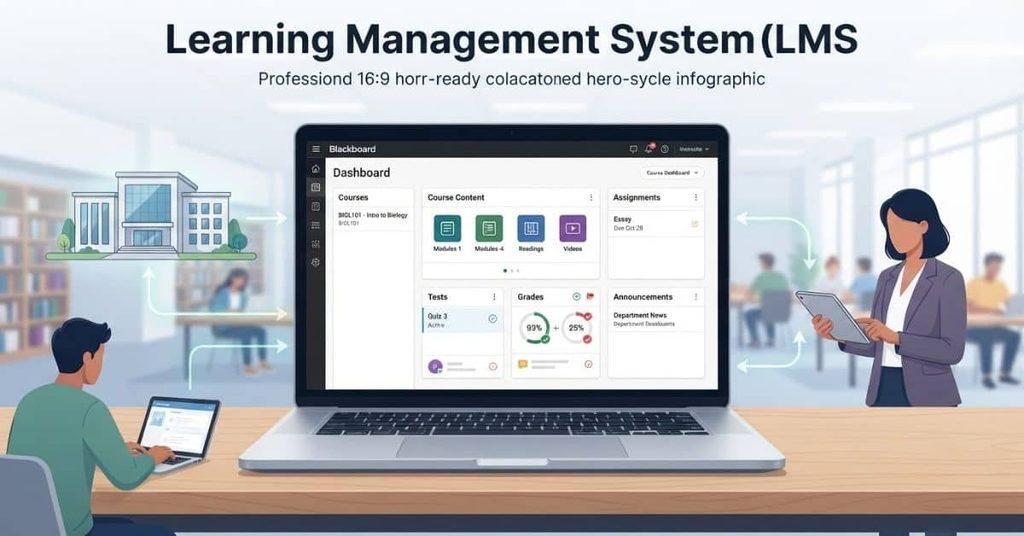
In this article, Blackboard refers to the educational technology platform used for teaching and learning. It does not mean the physical blackboard used for writing with chalk.
Blackboard is a Learning Management System (LMS) that helps schools, colleges, and universities manage courses in one digital environment. Students can log in to access their course materials, complete assignments, take tests, check grades, and communicate with instructors.
Think of Blackboard as an online hub for your class. Instead of keeping course information across different websites or apps, your school can organize many learning activities in one place.
Depending on your institution, you may use Blackboard Learn or Blackboard Learn Ultra. The layout and available tools can vary between schools and courses.
What Is Blackboard Used For?
Blackboard helps instructors organize courses and gives students a central place to complete and track their academic work. Common uses include:
- Online course content: Access readings, lecture notes, videos, files, and other learning materials.
- Assignments: View instructions, submit coursework, and check assignment feedback.
- Tests and quizzes: Complete online assessments when your instructor makes them available.
- Grades: View grades and feedback for activities included in Blackboard.
- Announcements: Receive course updates, reminders, and important messages.
- Discussions: Participate in discussion boards and respond to classmates or instructors.
- Communication: Interact with instructors and classmates through available course communication tools.
- Course organization: Find lessons, activities, resources, and other course information in an organized structure.
- Learning activities: Complete different digital activities assigned as part of your course.
The exact features you see depend on how your school and instructor have configured Blackboard. Some courses may use only a few tools, while others may rely on Blackboard for most online coursework.
What Is Blackboard Learn?
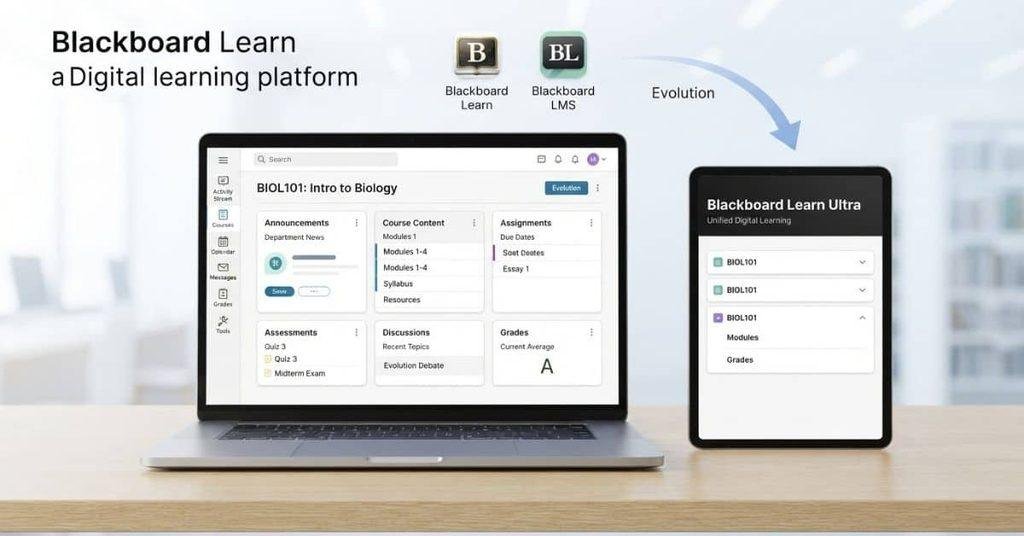
Blackboard Learn is the name associated with Blackboard’s learning management platform. It provides the digital tools students and instructors use to access and manage course activities.
Students may encounter Blackboard Learn when they log in to a college or university course. Depending on the institution, the platform can include course materials, assignments, tests, grades, discussions, announcements, and other learning tools.
Blackboard’s current branding prominently uses Blackboard LMS, while its product materials also refer to Blackboard Learn Ultra. This can make the terminology confusing for new students.
The simplest way to understand it is that Blackboard Learn refers to Blackboard’s learning platform and its course experience. The exact features and interface you see depend on your school’s setup and the version it uses.
Is Blackboard Learn the Same as Blackboard?
For most students, Blackboard and Blackboard Learn refer to the same general learning platform they use for their courses.
You may also see Blackboard Learn Ultra, which refers to a version of the Blackboard learning experience. Its layout and navigation can differ from other Blackboard environments.
So, if your instructor says, “Check Blackboard,” they generally mean the Blackboard platform your school provides. The exact name, appearance, and available tools depend on your institution.
What Is Blackboard Learning System?
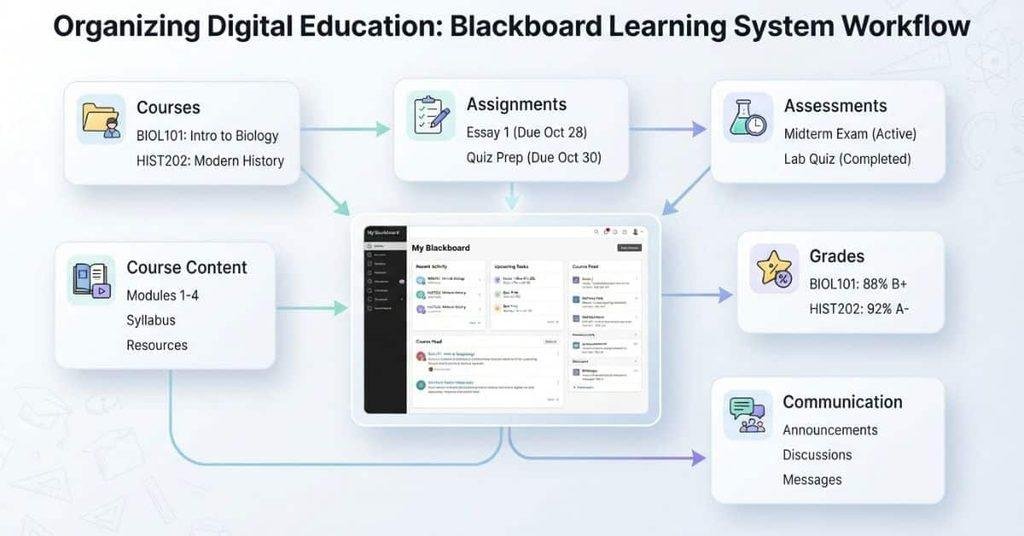
The term Blackboard learning system generally refers to Blackboard’s digital learning platform. It helps educational institutions manage courses, content, assignments, assessments, grades, communication, and other learning activities.
In simple terms, Blackboard learning system is another way of describing Blackboard as an LMS. You do not need to treat it as a separate platform or product.
Is Blackboard an LMS?
Yes. Blackboard is an LMS, or Learning Management System. Blackboard’s current product materials identify Blackboard LMS as its learning management platform.
An LMS gives an institution a digital system for organizing and managing teaching and learning. Blackboard supports many of the functions students and instructors need throughout a course, including:
- Course management: Organize courses, modules, lessons, and learning activities.
- Content delivery: Provide readings, documents, videos, and other course materials.
- Assessments: Create and complete assignments, tests, quizzes, and other assessments.
- Grade management: Record, review, and provide feedback on grades.
- Communication: Support announcements, course messages, discussions, and other interactions.
- Student learning activities: Give students a place to participate in activities and track their course work.
The exact tools available can vary by institution, course, and Blackboard configuration. Current Blackboard documentation, for example, describes course content, assignments, discussions, gradebook features, and communication tools within Blackboard LMS.
How Does Blackboard LMS Work?
Blackboard LMS works as a connected course environment. Your institution provides access, instructors build the course, and students use that course space to learn and complete activities.
A simple way to understand the process is:
Institution → Course → Content → Assignments & Tests → Grades → Student Progress
Here is what that process looks like from a student’s perspective.
Step 1 — Institution Provides Blackboard Access
Your college or university provides Blackboard access as part of its learning technology setup.
The institution manages the Blackboard environment and determines which courses and tools are available to students. Your login process may connect with your school’s existing student account.
Step 2 — Students Log Into Blackboard
After receiving access, students sign in to Blackboard using the credentials or login method provided by their institution.
Once signed in, you may see your Blackboard homepage, course list, announcements, calendar information, and other available tools.
Step 3 — Students Open Their Courses
Your available classes appear in the Courses area or another course navigation area provided by your institution.
When you select a course, you enter its digital learning space. The layout can vary depending on the Blackboard experience your school uses.
Step 4 — Instructors Add Course Content
Instructors add the materials students need for the course. This can include documents, readings, videos, learning modules, instructions, and other resources.
Blackboard also provides tools for organizing course content and learning activities.
Step 5 — Students Complete Assignments and Assessments
Students use the course area to complete assigned activities. Depending on the course, these may include assignments, tests, quizzes, discussions, and other learning activities.
The instructor controls which activities are available and when students can access or submit them.
Step 6 — Grades and Feedback Are Posted
After students submit their work, instructors can review submissions, assign grades, and provide feedback through Blackboard.
Students can then check available grades and feedback in the course. Blackboard’s current documentation includes grading and feedback features for assignments and other course activities.
In short, Blackboard connects the main parts of a digital course in one place: your institution provides access, instructors organize the course, students complete learning activities, and grades or feedback are made available through the platform.
What Can Students Do on Blackboard?
Blackboard gives students one central place to access course information and complete many online learning activities. The tools available depend on the course and your institution’s Blackboard setup.
View Course Materials
Students can open course materials provided by their instructors. These may include readings, documents, presentations, videos, learning modules, and other resources.
Submit Assignments
Blackboard can be used to view assignment instructions and submit coursework online. Students may also be able to review submission details and instructor feedback.
Take Tests and Quizzes
Instructors can provide online tests and quizzes through Blackboard. Students can access available assessments and submit their answers within the required timeframe.
Check Grades
Students can view available grades for assignments, tests, and other graded activities. Blackboard may also display feedback from instructors alongside graded work.
View Announcements
Instructors can post announcements to share course updates, reminders, schedule changes, or other important information with students.
Participate in Discussions
Students can participate in online discussions when their course uses discussion tools. They may post responses, reply to classmates, and interact with their instructor.
Check Due Dates
Blackboard can help students keep track of upcoming assignments, tests, and other course activities. Due dates may appear within course areas, activity pages, or available calendar tools.
Communicate With Instructors
Depending on the course setup, students can use Blackboard’s communication tools to interact with instructors and classmates. Available options may include course messages, discussions, or other communication features.
Access Courses on Mobile Devices
Students can also use the Blackboard mobile app to access supported course content and stay connected with their classes. Blackboard’s student app materials describe features for accessing course content, grades, announcements, assignments, discussions, and interactions with instructors and classmates.
What Can Teachers Do on Blackboard?
Blackboard also provides tools for instructors to build and manage their courses. Teachers can use the platform to:
- Create and organize course content
- Add learning materials and resources
- Create assignments and assessments
- Create tests and quizzes
- Grade student work
- Provide feedback
- Communicate with students
- Monitor course activity
- Manage learning activities
The specific tools available can vary based on the Blackboard version, institution, and course configuration.
What Is Blackboard Ultra?
Blackboard Ultra is a modern learning experience within the Blackboard platform. It provides students and instructors with a newer interface for accessing and managing courses.
You may see Blackboard Learn Ultra when your college or university uses the Ultra experience. The appearance, navigation, and available tools can differ from other Blackboard environments.
For students, the main purpose remains the same. Blackboard Ultra provides a digital space for accessing course content, completing assignments, taking assessments, viewing grades, participating in discussions, and managing other course activities.
The exact features you can use depend on your institution’s Blackboard configuration. Your instructor may also choose which tools and activities are available in each course.
Blackboard Learn vs Blackboard Learn Ultra
Blackboard Learn is the broader name associated with Blackboard’s learning management platform, while Blackboard Learn Ultra refers to a newer learning experience within that platform.
You can think of Ultra as a newer interface and experience for Blackboard courses. Your school determines which Blackboard experience you use, so you may see different menus, layouts, and features from students at another college.
What Is Blackboard Used For in College?
Colleges and universities use Blackboard to give students and instructors a central digital space for managing coursework. It can support online, hybrid, and technology-supported classes.
Common college uses include:
- Online classes: Access lessons, course materials, activities, and other online learning resources.
- Hybrid courses: Combine classroom instruction with digital course activities.
- Course materials: Find readings, documents, videos, presentations, and other resources.
- Homework and assignments: View instructions and submit coursework online.
- Exams and quizzes: Complete online tests and quizzes when instructors make them available.
- Grades: View available grades and instructor feedback.
- Instructor communication: Receive messages and communicate with instructors through available course tools.
- Class discussions: Participate in discussion boards and interact with classmates.
- Course announcements: Receive important updates, reminders, and other information from instructors.
Why Does My College Use Blackboard?
Your college may use Blackboard to organize course information and learning activities in one digital environment. Instead of checking separate systems for every part of a class, students can often find course materials, assignments, assessments, grades, and announcements through Blackboard.
The exact setup varies by college and course, so your Blackboard homepage may look different from another student’s.
Is Blackboard the Same as a College Student Portal?
No. Blackboard and a college student portal usually serve different purposes. Your college may use both systems, but they are not necessarily the same platform.
Blackboard primarily serves as the learning and course environment. Students may use it to access course materials, submit assignments, take tests, view grades, participate in discussions, and receive course announcements.
A student portal is usually focused on broader administrative and academic services. Depending on the college, it may handle:
- Registration: Add, drop, or manage courses.
- Tuition and payments: View charges and manage payments.
- Admissions: Access application or enrollment information.
- Official transcripts: Request or access academic transcripts.
- Degree requirements: Review progress toward a degree.
- Student records: Manage personal, academic, or enrollment information.
The exact services depend on your college’s systems. Your school may also connect Blackboard with its student portal, allowing you to move between the two.
Simple distinction: Use Blackboard for your courses and learning activities, while your student portal typically handles official college and student services.
Is Blackboard the Same as Canvas?
No. Blackboard and Canvas are separate Learning Management Systems (LMSs). Both can provide digital tools for managing college courses and supporting online learning.
Colleges and universities choose which LMS they provide for their students. As a result, one school may use Blackboard while another uses Canvas.
Both platforms can support common course activities such as:
- Accessing course materials
- Submitting assignments
- Taking tests and quizzes
- Viewing grades
- Participating in discussions
- Receiving course announcements
- Communicating with instructors
However, their interfaces, navigation, terminology, and available features can differ. Even within the same LMS, an institution may configure tools differently.
For students, the practical point is simple: you generally use the LMS provided by your institution. If your college uses Blackboard, you use Blackboard for the courses and activities your instructors make available there.
Is Blackboard Free for Students?
Students generally access Blackboard through their college, university, or other educational institution rather than creating a separate personal Blackboard account.
Whether students pay a separate fee for Blackboard depends on how their institution has arranged its Blackboard services. Some schools may include access as part of their existing education or technology services, while other arrangements can differ.
Blackboard is primarily an institutional learning platform, not a standalone service where every student signs up for a free personal account.
If your school uses Blackboard, your institution should provide information about access, login details, and any costs that apply to your program.
How to Use Blackboard as a Student
Using Blackboard usually starts with signing in through your institution and opening your available courses.
The basic process is:
- Log in to Blackboard through your school’s provided access.
- Open Courses to see your available classes.
- Select a course to enter its learning area.
- Review course content and instructor instructions.
- Complete assignments and tests when they become available.
- Check grades and announcements for updates and feedback.
For a complete beginner walkthrough, see our guide on [How to Use Blackboard]. It covers the process in more detail without repeating the full tutorial here.
How to Log Into Blackboard
Students normally access Blackboard through the login page provided by their college or university. Your school may use its own login system or direct you to a specific Blackboard sign-in page.
For step-by-step instructions, see our guide on [How to Log Into Blackboard]. This guide explains the login process and common steps students may need to follow.
What Can You Find on Blackboard?
The exact options depend on your institution, course, and Blackboard setup. However, students commonly find the following areas:
- Courses: Your enrolled classes and available course spaces.
- Course Content: Lessons, readings, videos, files, and other learning materials.
- Assignments: Coursework, instructions, submission areas, and feedback.
- Tests: Online exams and other assessments.
- Quizzes: Short assessments or knowledge checks created by instructors.
- Grades: Available scores, grades, and instructor feedback.
- Calendar: Important dates and upcoming course activities, when enabled.
- Announcements: Updates, reminders, and messages from instructors.
- Messages: Available course communication between students and instructors.
- Discussions: Online conversations and participation activities for your classes.
Some courses may use only a few of these features, while others may use Blackboard for most of the course.
Blackboard Grades and GPA
Blackboard can display course grades and scores, but it is important to understand that a Blackboard grade is not always the same as your official college GPA.
Depending on your institution’s setup, Blackboard may show an Overall Grade or other course-level grade information. Your college’s official semester or cumulative GPA may instead be calculated and maintained in its student information system or student portal.
This means you should use Blackboard to monitor your course performance, while checking your institution’s official academic records for your official GPA.
How to Check GPA on Blackboard
Some students may expect to find their GPA directly in Blackboard. What you can see depends on how your institution has configured its systems.
For a step-by-step explanation, see [How to Check GPA on Blackboard].
Blackboard Grade Calculator
Want to estimate your course grade from the scores shown in Blackboard?
Use our [Blackboard Grade Calculator] to calculate or estimate your course grade based on your assignment, quiz, test, and other available scores.
Common Blackboard Questions
How Do I Reset My Blackboard Password?
If you cannot access your Blackboard account, your institution may provide password recovery or account-management options.
For step-by-step help, see [How to Reset or Change Your Blackboard Password].
How Do I Find Turnitin on Blackboard?
Turnitin may be available inside a Blackboard assignment when your instructor or institution uses the service.
Learn where to look with [How to Find Turnitin on Blackboard].
What Is SafeAssign on Blackboard?
SafeAssign is an originality-checking tool that some Blackboard courses may use for submitted assignments.
For a beginner-friendly explanation, see [What Is SafeAssign on Blackboard?].
Can Blackboard Detect AI?
Questions about AI detection can be confusing because Blackboard courses may use different tools and configurations.
For a detailed explanation of what Blackboard itself does and what separate detection tools may be involved, see [Does Blackboard Detect AI?].
Conclusion
Blackboard is a Learning Management System that helps colleges organize digital courses and learning activities. You now know what Blackboard LMS is, how Blackboard Learn and Ultra fit in, and what students and instructors can do on the platform.
For beginners, the key idea is simple: Blackboard LMS brings many parts of your course into one digital space. You can find course materials, submit assignments, take assessments, view grades, and follow important announcements.
Remember that Blackboard features can vary by institution and course. Your official GPA and student records may also be managed outside Blackboard.
Ready to explore more? Check our other Blackboard guides and student resources for step-by-step help with common tasks. If this guide helped, share it with a classmate who is new to Blackboard.
Frequently Asked Questions
Find clear answers to common questions about Blackboard LMS, Blackboard Learn, courses, grades, and student use.
Blackboard is a Learning Management System (LMS) used by educational institutions to manage digital courses and learning activities. Students can use it to access course materials, submit assignments, take tests, view grades, and participate in discussions.
Blackboard LMS is Blackboard’s learning management platform. It provides a digital environment where institutions, instructors, and students can manage courses, content, assessments, grades, communication, and learning activities.
Blackboard Learn is the name associated with Blackboard’s learning management platform. Students may see Blackboard Learn or Blackboard Learn Ultra depending on the product and experience their institution uses.
For most students, Blackboard and Blackboard Learn refer to the same general learning platform. Blackboard Learn Ultra is a newer learning experience, so the interface and available tools may differ depending on the institution.
The Blackboard learning system generally refers to Blackboard’s digital learning platform. It helps institutions manage courses, content, assignments, assessments, grades, communication, and other learning activities.
Yes. Blackboard is a Learning Management System (LMS). It provides tools for course management, content delivery, assessments, grade management, communication, and student learning activities.
Blackboard Ultra is a modern learning experience within the Blackboard platform. Students may see a different interface and navigation when their institution uses the Ultra experience.
No. Blackboard primarily provides the learning and course environment. A college student portal may handle registration, tuition payments, admissions, transcripts, degree requirements, and official student records.
No. Blackboard and Canvas are separate Learning Management Systems. Colleges and universities choose which LMS to provide, and their interfaces, navigation, and available features can differ.
Students generally access Blackboard through their college, university, or educational institution. Whether students pay a separate fee depends on the institution’s arrangement. Blackboard is primarily an institutional learning platform rather than a standalone free student account service.
Students can access course materials, submit assignments, take tests and quizzes, check grades, view announcements, participate in discussions, check due dates, communicate with instructors, and access supported course features on mobile devices.
Teachers can create course content, organize learning materials, create assignments and assessments, grade student work, provide feedback, communicate with students, monitor course activity, and manage learning activities.
Colleges use Blackboard for online and hybrid courses, course materials, homework, assignments, exams, quizzes, grades, instructor communication, class discussions, and course announcements.
Blackboard LMS connects an institution, courses, content, assignments, assessments, grades, and student learning activities. Students log in, open their courses, complete available work, and review grades or feedback posted by instructors.
It depends on your institution’s setup. Blackboard may display course grades or an Overall Grade, but your official semester or cumulative GPA may be maintained in your college’s student information system or student portal.
Depending on your course and institution, you may find courses, course content, assignments, tests, quizzes, grades, calendar information, announcements, messages, and discussions on Blackboard.
Start by logging into Blackboard through your institution. Open Courses, select your class, review the course content, complete assignments or tests, and check your grades and announcements.
Students normally access Blackboard through the login page provided by their college or university. Your institution may use its own login system or direct you to a specific Blackboard sign-in page.
Password recovery depends on your institution’s account system. If you cannot sign in, use the password recovery option provided by your school or contact your institution’s IT or support team.
Turnitin may appear inside a Blackboard assignment when your instructor or institution uses the service. The location can vary depending on the course and Blackboard setup.
SafeAssign is an originality-checking tool that may be used with Blackboard assignments. Availability depends on your institution and instructor. A SafeAssign result should not automatically be treated as a plagiarism verdict.
Blackboard itself is primarily a learning management platform. Whether an institution uses an AI-detection tool with Blackboard depends on its technology setup and policies. AI detection tools can also be separate services integrated with course systems.

We are the Canvas Academic Team, a developer team focused on building simple and practical tools that help students succeed academically. This platform was created specifically for Canvas LMS students to make grade tracking, GPA calculations, exam planning, and academic management easier and more efficient.
Our focus is on creating fast, accurate, and student-friendly educational tools along with helpful learning resources that improve productivity and reduce academic stress.
Through CanvasGradeCalculator.com, our goal is to continue building useful resources that help students study smarter, stay organized, and achieve better academic results.