
- Introduction
- Can Moodle Detect Cheating?
- Can Moodle Quizzes Detect Cheating?
- Can Moodle Exams Detect Cheating?
- How Does Moodle Detect Suspicious Quiz Activity?
- Can Moodle Know If You Cheat?
- Can Moodle Detect Different Types of Cheating?
- Can Moodle Detect Cheating Without Proctoring Software?
- Does Moodle Use AI to Detect Cheating?
- Can Moodle Detect Tab Switching or Copy and Paste?
- What Can Instructors See in Moodle?
- Does Moodle Automatically Know When a Student Cheats?
- Conclusion
- Frequently Asked Questions
Introduction
Have you ever wondered whether Moodle can tell if you switch tabs during an online exam?
If you use Moodle for quizzes, tests, or college exams, you may worry about what your instructor can see. Many students in the USA use Moodle for online learning and assessments. Understanding its tracking features can help you feel more confident before your next exam.
So, can Moodle detect cheating? The answer depends on how your school configures Moodle and which monitoring tools it uses. Moodle can record quiz attempts, submissions, timestamps, and certain student activities. However, these records do not automatically prove that someone cheated.
In this guide, you will learn how Moodle monitors quizzes and exams. We will explain what instructors can see, whether Moodle tracks tab switching, and how browser restrictions affect monitoring. You will also discover how plugins and online proctoring tools can add extra monitoring features.
By the end, you will understand Moodle’s actual capabilities, common limitations, and what its activity logs really mean.
Can Moodle Detect Cheating?
Yes, Moodle can help instructors identify suspicious activity during online quizzes and exams. However, Moodle cannot automatically detect every form of cheating or prove that a student cheated. Its monitoring capabilities depend on the quiz settings, installed plugins, browser restrictions, and proctoring tools used by the school.
Moodle can record information about quiz attempts, submitted answers, timestamps, and certain activities within the learning platform. Instructors can review these records through quiz reports, attempt reviews, and activity logs. These tools help teachers understand how students interacted with an assessment.
However, Moodle’s activity records have limitations. For example, a student might switch browser tabs without Moodle knowing what they viewed elsewhere. A timestamp or unusual activity pattern alone does not prove academic dishonesty. Instructors need to consider the available evidence and assessment rules before drawing conclusions.
Different schools also use different Moodle configurations. One institution might use standard Moodle quiz features, while another adds secure browsers or online proctoring software. These additional tools can provide monitoring features that Moodle does not offer by itself.
What Does Moodle Record During a Quiz?
Moodle can store several types of information about quiz activity. The exact details depend on the Moodle version, quiz settings, and features enabled by the institution.
Common examples include:
- Quiz attempts: Moodle can record when a student starts, saves, and submits a quiz attempt.
- Answers and submissions: Instructors can review recorded responses, saved answers, and submitted work when the quiz settings allow it.
- Timing information: Quiz reports can show attempt start times, submission times, and time spent on an attempt.
- Quiz navigation: Depending on the question layout and attempt records, instructors can review how students moved through quiz questions.
- Activity logs: Moodle logs certain events, such as viewing activities, starting attempts, and submitting quizzes.
Instructors can use quiz reports and logs to investigate unusual activity or resolve questions about a submission. However, these records show activity within Moodle, not everything a student does on their device.
For example, Moodle’s standard logs do not automatically reveal every website a student visits or every application they open. Additional monitoring software may collect more information, depending on its features and permissions.
Pro Tip: Before an exam, review your instructor’s assessment instructions and any monitoring requirements. Understanding which tools your school uses can help you know what activity it may record.
Can Moodle Quizzes Detect Cheating?
Yes, Moodle quizzes can help instructors identify suspicious activity, but they cannot automatically detect every type of cheating. If you’re wondering, can Moodle quizzes detect cheating, the answer depends on the quiz settings and monitoring tools your school uses.
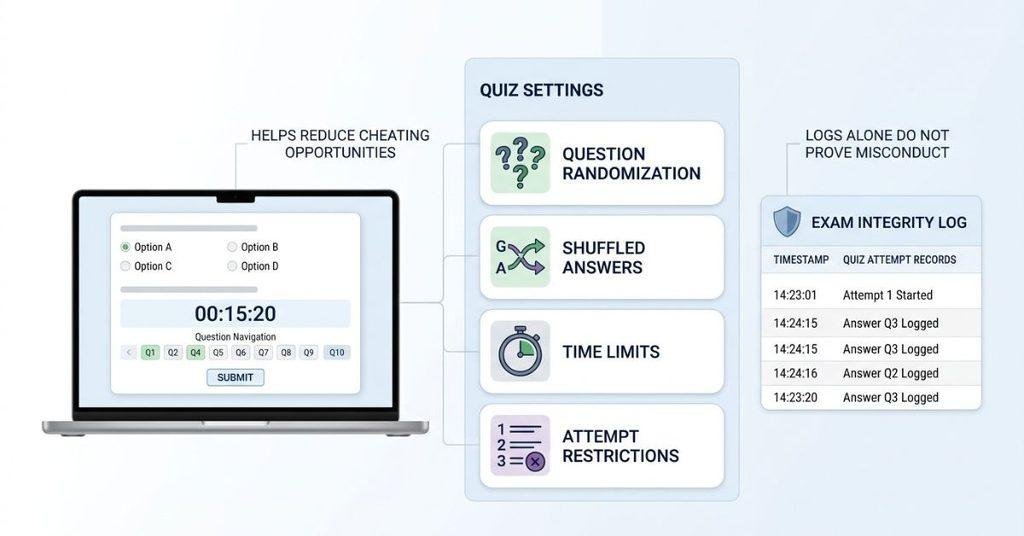
Moodle allows instructors to configure quizzes with time limits, randomized questions, shuffled answers, and restrictions on quiz access. These features help reduce opportunities for cheating. Instructors can also review quiz attempts, submitted answers, timestamps, and available activity logs.
However, a standard Moodle quiz does not automatically provide full exam proctoring. It generally records activity within the platform rather than monitoring everything students do on their computers. Some institutions add secure browsers, proctoring software, or other integrations to strengthen exam controls.
The same applies to the question, can Moodle quiz detect cheating. Moodle’s built-in features can support academic integrity, but their effectiveness depends on the configuration. Reviewing activity records may raise concerns, yet those records alone do not prove misconduct.
How Moodle Quiz Settings Can Help Prevent Cheating
Moodle offers several settings that instructors can use to make online assessments more secure. These features focus mainly on preventing dishonest behavior rather than automatically detecting every violation.
- Time limits: Instructors can set a time limit to keep assessments within a defined period.
- Question randomization: Moodle can present questions in a different order or select questions from a question bank.
- Shuffling questions and answers: Supported quiz settings can change question order or answer order, making it harder to copy another student’s responses.
- Question banks: Instructors can draw different questions from a larger collection, depending on how they configure the quiz.
- Attempt limits: Teachers can restrict how many times students can attempt a quiz.
- Password and access restrictions: Instructors can require a password or configure other access conditions where available.
- Browser and security restrictions: Depending on the Moodle setup, instructors may enable supported browser restrictions or connect additional security tools.
These measures can reduce opportunities for cheating, but none guarantees an honest assessment. Students should always follow the exam rules and ask their instructors about unclear requirements.
Can Moodle Exams Detect Cheating?
Moodle exams can help instructors review student activity, but their ability to detect cheating depends on the tools used during the assessment. A standard Moodle quiz records information about attempts and submissions. It does not automatically provide every feature found in a fully proctored exam.
For example, instructors can review quiz reports, saved answers, timestamps, and available activity logs. These records may help them investigate unusual patterns or questions about academic integrity. However, Moodle does not automatically know everything happening outside its learning platform.
Some schools use additional technologies for important exams. These may include secure browsers, remote proctoring software, webcam monitoring, or other assessment integrations. Depending on the software and its permissions, these tools may restrict certain computer activities or monitor aspects of the testing environment.
It’s important to distinguish between monitoring and proof. A secure browser might restrict access to other applications, while proctoring software might flag activity for review. Neither automatically proves that a student cheated in every flagged situation.
Your school’s setup determines which features are available. Two students taking exams through Moodle at different institutions might experience very different levels of monitoring.
Moodle Quiz vs. Proctored Exam
Moodle quizzes and proctored exams can share some features, but they do not necessarily provide the same level of monitoring.
| Feature | Standard Moodle Quiz | Proctored Exam |
|---|---|---|
| Main purpose | Deliver and record online assessments | Deliver assessments with additional monitoring |
| Quiz activity | Records available quiz activity | May also record quiz activity |
| Testing environment | Does not automatically monitor the entire device | May monitor selected device or environmental activity |
| Security controls | Can use configured quiz restrictions | May add secure-browser or proctoring controls |
| Activity review | Instructors review available reports and logs | Instructors may also review monitoring alerts or recordings |
| Capabilities | Depend on Moodle configuration | Depend on the proctoring system and its settings |
Key takeaway: Moodle can support secure assessments without full proctoring. Additional tools may provide stronger controls, but their exact capabilities vary by institution and software.
How Does Moodle Detect Suspicious Quiz Activity?
Moodle does not automatically identify every suspicious action as cheating. Instead, instructors can review available quiz reports and activity logs to understand how students completed an assessment.
These records can help teachers identify patterns that deserve further investigation. However, an unusual pattern does not necessarily indicate academic dishonesty. Technical problems, accessibility needs, interruptions, and legitimate study behavior can sometimes explain unexpected activity.
Instructors may review several types of information:
- Unusual timing: An instructor might investigate an attempt with unexpected timing patterns, especially when other evidence raises concerns.
- Attempt information: Quiz reports can help teachers compare attempts, saved responses, submissions, and available timestamps.
- Unexpected navigation or activity: Recorded Moodle events may help instructors understand activity within the platform, depending on the available logs.
- Multiple unusual events: Several concerning patterns together may justify a closer review, although they still require context.
- Answers and submissions: Instructors may compare student responses or review similarities that raise academic-integrity concerns.
Moodle’s records have clear limits. For example, an instructor might see when a student submitted a quiz, but that timestamp does not reveal everything the student did during the attempt. Standard Moodle logs also do not automatically show every website visited or application opened outside Moodle.
Additional proctoring tools may provide more information, depending on their features and permissions. Even then, automated flags can produce false positives and require careful interpretation.
The most trustworthy approach combines available records with the exam rules, relevant context, and a fair review of the evidence.
Pro Tip: If Moodle records unexpected activity during your exam, explain any genuine technical issue to your instructor promptly. Keep relevant error messages or screenshots when possible, and follow your school’s academic-integrity procedures.
Can Moodle Know If You Cheat?
Moodle can record certain student activities and help instructors investigate suspicious behavior, but it cannot know everything you do during an online exam. Simply logging into Moodle does not give the platform automatic access to every website, application, or device you use.
What Moodle can observe depends on the institution’s configuration. Standard Moodle features can record quiz attempts, submitted answers, timestamps, and certain events within the learning platform. Instructors can review these records to understand how students interacted with an assessment.
Additional software can extend monitoring and control. For example, a secure browser may restrict access to other applications, while proctoring software may monitor selected aspects of the testing environment. The exact capabilities depend on the software, its permissions, and the institution’s settings.
Instructors may also combine Moodle records with other evidence, such as similarities between submissions or information about a technical incident. However, unusual activity does not automatically prove cheating. Teachers should consider the available evidence and relevant circumstances before making a decision.
Can Moodle Detect Different Types of Cheating?
Moodle’s ability to identify academic dishonesty varies by activity. Some actions leave records within Moodle, while others require additional tools or evidence.
| Type of activity | Moodle alone? | May involve additional tools? |
|---|---|---|
| Multiple attempts | Can record quiz attempts and available attempt details | Not always necessary |
| Answer sharing | May reveal similarities or unusual response patterns, but cannot establish sharing by itself | Yes, depending on the circumstances |
| Copying existing material | Limited ability to identify copied material on its own | Plagiarism detection tools |
| AI-generated writing | Does not inherently identify AI-generated text | AI-detection tools, with limitations |
| Switching tabs | Standard Moodle does not reliably detect every tab switch | Secure browsers or proctoring tools |
| Using another device | Cannot automatically see activity on another device | Proctoring tools or other evidence |
| Outside assistance | Cannot automatically identify every instance of outside help | Proctoring tools or other evidence |
These distinctions matter because recording activity differs from identifying misconduct. For example, Moodle can record multiple quiz attempts when the configuration supports them, but multiple attempts may be entirely legitimate.
Similarly, plagiarism tools and AI-detection systems have limitations. They can flag content for further review, but their results should not serve as automatic proof of cheating.
Students should follow their institution’s assessment rules and understand which resources the instructor permits. Instructors should evaluate potential violations fairly and consider the limitations of any monitoring technology.
Can Moodle Detect Cheating Without Proctoring Software?
Yes, Moodle can help instructors investigate suspicious quiz activity without proctoring software. Its built-in features can record assessment events, preserve available attempt information, and provide reports that help teachers review student submissions.
For example, an instructor may examine quiz start and submission times, saved answers, attempt details, and relevant activity logs. These records can help clarify what happened during an assessment or identify activity that deserves further investigation.
However, Moodle’s native records cannot establish everything that happened during an exam. They do not automatically reveal every website a student visited, every application they opened, or whether another person provided assistance. A missing activity record also does not necessarily mean that an action never occurred.
Proctoring works differently. Depending on the system, it may add webcam monitoring, screen recording, identity checks, or restrictions on certain computer activities. These features can provide information that standard Moodle logs do not capture, although they also have limitations.
The final answer depends on the institution’s setup. Some schools rely on Moodle’s built-in quiz settings and activity reports, while others integrate additional security tools for high-stakes assessments.
For students, the practical takeaway is simple: don’t assume Moodle monitors everything, but don’t assume it records nothing either. Follow your exam instructions, use only permitted resources, and ask your instructor if you’re unsure about the monitoring rules.
Does Moodle Use AI to Detect Cheating?
Moodle’s standard activity monitoring and AI-based cheating detection are two different things. Moodle can record quiz activity and provide reports, but it does not automatically use AI to identify every instance of cheating or AI-generated writing.
Some institutions may integrate additional tools to analyze student work or support academic-integrity reviews. These tools can have different capabilities and limitations, so their results require careful interpretation.
If you’re concerned about AI-generated assignments or ChatGPT use, read our related guide: Does Moodle Have AI Detection? Can Moodle Detect ChatGPT? It explains how AI detection differs from Moodle’s built-in features.
Can Moodle Detect Tab Switching or Copy and Paste?
Moodle’s ability to detect tab switching or copy-and-paste activity depends on the available features and monitoring setup. Standard Moodle activity logs do not automatically provide a complete record of everything students do in their browsers or other applications.
Some secure browsers, plugins, or proctoring tools may impose additional restrictions or monitor certain activities. However, these capabilities vary, and an activity record alone does not necessarily prove cheating.
For a closer look at each topic, explore these guides:
- Can Moodle Track Tabs? Does Moodle Detect Tab Switching? Learn what Moodle may detect when students switch browser tabs during an exam.
What Can Instructors See in Moodle?
Moodle gives instructors access to information that helps them manage courses, grade assessments, and review student activity. The exact information available depends on their permissions, the course configuration, and the features enabled by the institution.
Depending on the setup, instructors may be able to view:
- Quiz attempts: Available attempt details, responses, and submission status.
- Submission information: Uploaded assignments, submitted work, and relevant timestamps.
- Grades: Quiz scores, assignment marks, and other recorded assessment results.
- Activity records: Logged events showing certain interactions with course materials and activities.
- Course and quiz events: Supported records of actions such as viewing activities, starting quizzes, or submitting attempts.
These records help instructors understand how students interact with Moodle. For example, a teacher can review a quiz attempt to check submitted answers or investigate a question about a submission.
However, instructor visibility does not mean unlimited access to a student’s computer. Standard Moodle does not automatically show every website visited, application opened, private file accessed, or action performed outside the platform.
Additional monitoring software may collect more information, depending on its capabilities and permissions. Students should check their institution’s exam instructions to understand which monitoring tools apply to their assessments.
Does Moodle Automatically Know When a Student Cheats?
No, Moodle does not automatically detect or prove every type of cheating. It can record certain student activities and help instructors investigate suspicious behavior, but its built-in features have clear limitations.
Moodle can store information about quiz attempts, submitted answers, timestamps, and other supported course events. Instructors can review these records to identify unusual patterns or investigate concerns about an assessment.
However, recording an activity is not the same as proving cheating. For example, an unusual quiz submission time does not automatically mean a student broke the rules. Standard Moodle also cannot automatically see everything a student does outside the platform.
Some schools use secure browsers, remote proctoring software, or other integrations to add monitoring features. These tools may provide more information or restrict certain activities, depending on their capabilities and settings.
Human review still matters. Instructors should consider the available evidence, technical issues, and course policies before deciding whether misconduct occurred. Students also have a responsibility to follow exam instructions and use only permitted resources.
Ultimately, Moodle can support academic-integrity checks, but it cannot guarantee that every instance of cheating will be detected.
Conclusion
So, can Moodle detect cheating? Yes, Moodle can record quiz activity and help instructors investigate suspicious behavior. However, it cannot automatically detect every form of cheating or prove misconduct from activity logs alone. Its monitoring capabilities depend on quiz settings, institutional policies, and additional tools such as secure browsers or proctoring software.
Understanding these limitations helps students in the USA approach online exams with greater confidence. The best approach is to follow your instructor’s rules, use permitted resources, and ask questions when exam requirements seem unclear.
Have you taken an online exam through Moodle? Share your experience in the comments below. You can also explore more educational guides and calculator tools on our website to support your academic journey.
Frequently Asked Questions
Find clear answers to common questions about Moodle cheating detection, online exams, quiz monitoring, and proctoring.
Can Moodle detect cheating?
Yes, Moodle can record quiz activity and help instructors investigate suspicious behavior. However, it cannot automatically detect every type of cheating or prove misconduct from activity logs alone.
Can Moodle quizzes detect cheating?
Moodle quizzes can record attempts, answers, timestamps, and certain activities. Instructors can review these records, but they do not automatically prove cheating.
Can Moodle exams detect cheating?
Moodle exams can support cheating investigations through activity logs and quiz reports. Secure browsers and proctoring software may provide additional monitoring features, depending on the institution’s setup.
Can Moodle know if you cheat?
Moodle cannot see everything you do outside its platform simply because you’re logged in. Its monitoring capabilities depend on the institution’s configuration and any additional tools it uses.
Does Moodle automatically detect cheating?
No, Moodle does not automatically identify or prove every instance of cheating. Instructors may need to review activity records and consider other evidence.
Can Moodle detect cheating without proctoring?
Yes, Moodle can record assessment activity without proctoring software. However, its standard features cannot monitor everything happening on a student’s device.
Can Moodle detect cheating on online exams?
Moodle can help instructors review online exam attempts, submissions, and available activity logs. Additional monitoring tools may offer stronger controls, depending on their features and configuration.
Does Moodle use AI to detect cheating?
Moodle’s standard activity monitoring differs from AI-based cheating detection. Some institutions may use additional AI detection or academic-integrity tools. Learn more in our guide: Does Moodle Have AI Detection? Can Moodle Detect ChatGPT?
Note: Moodle’s monitoring capabilities vary by institution, quiz settings, and additional software.

We are the Canvas Academic Team, a developer team focused on building simple and practical tools that help students succeed academically. This platform was created specifically for Canvas LMS students to make grade tracking, GPA calculations, exam planning, and academic management easier and more efficient.
Our focus is on creating fast, accurate, and student-friendly educational tools along with helpful learning resources that improve productivity and reduce academic stress.
Through CanvasGradeCalculator.com, our goal is to continue building useful resources that help students study smarter, stay organized, and achieve better academic results.