Table of Contents
Introduction
Have you ever wondered what your professor can actually see when you take a Blackboard test?
If you are new to online classes, this question can feel confusing. Many students wonder, can Blackboard detect cheating during an online quiz or exam? The answer depends on how your school sets up Blackboard and its assessments.
Blackboard can record certain course and test activity. However, recording activity is not the same as automatically proving that a student cheated. Some courses may use extra features or third-party tools to monitor exams.
These tools can include plagiarism checkers, similarity reports, AI detection systems, and online proctoring software. Some setups may also record actions such as leaving a test page.
In this guide, you will learn what Blackboard can track and what it cannot. You will also see how different monitoring tools work. This will help you understand online testing rules and avoid common misunderstandings.
Can Blackboard Detect Cheating?
Yes, Blackboard can provide information that may help instructors identify possible cheating, but Blackboard is not one universal cheating detector. Blackboard is a learning management system, or LMS, used to deliver courses, assignments, quizzes, and exams. Its available monitoring features depend on the course setup and school.
Different Blackboard features can provide different types of information. Some assessments may record test activity, while others may use additional services for plagiarism, AI detection, or exam monitoring.
An unusual activity or detection result does not automatically prove that cheating occurred. For example, leaving a test page may have several possible explanations. Instructors may review the available information alongside course rules and other evidence.
Your school or instructor may also use tools outside standard Blackboard features. These tools can add different monitoring or verification capabilities. Always check your course instructions before taking an online exam.
How Can Blackboard Detect Possible Cheating?
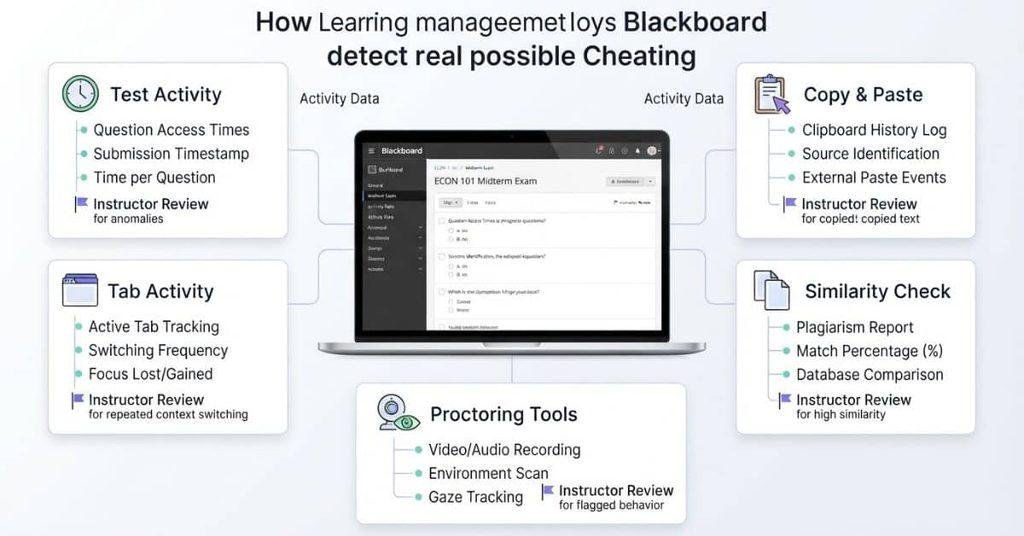
Blackboard itself does not use one method to identify every type of cheating. Instead, instructors may use different features and connected tools based on the assessment.
Tab Switching or Leaving a Test
Some online test setups may provide information about test activity. Depending on the configuration, instructors may have access to certain details about how a student interacted with an assessment.
However, leaving a test page does not automatically mean cheating happened. Technical issues, navigation mistakes, or other actions can explain unusual activity.
Internal link: Add a link to your guide about whether Blackboard can detect tab switching.
Copying and Pasting
Copying and pasting can depend on the specific Blackboard assessment and its settings. Standard Blackboard does not provide one universal system that proves a student copied answers.
Some assignments may use additional tools or restrictions. These can provide more information about submitted work or the testing environment.
Internal link: Add a link to your guide about whether Blackboard can detect copy and paste.
AI-Generated Writing
AI-generated writing is a separate issue from normal Blackboard activity. Blackboard does not automatically prove that every piece of student writing came from AI.
Schools may use separate AI detection tools with certain assignments. These systems can produce indicators or reports, but those results should be interpreted carefully. A detection result alone may not establish academic misconduct.
Internal link: Add a link to your guide about whether Blackboard can detect AI writing.
Similarity and Plagiarism Checking
Some Blackboard courses use SafeAssign to compare submitted work against sources in its database. It can generate a similarity report showing matching or similar text.
A similarity score does not automatically mean plagiarism occurred. Properly quoted or cited material can also create matches. Instructors typically review the report and the submitted work before making an academic decision.
Proctoring and Lockdown Tools
Some institutions connect Blackboard with third-party proctoring or lockdown tools. These tools can provide monitoring capabilities beyond ordinary Blackboard course features.
Depending on the product and exam settings, they may monitor parts of the testing environment, restrict certain actions, or record exam sessions. The exact capabilities vary by tool and institution.
Can Blackboard Detect Cheating on Tests?
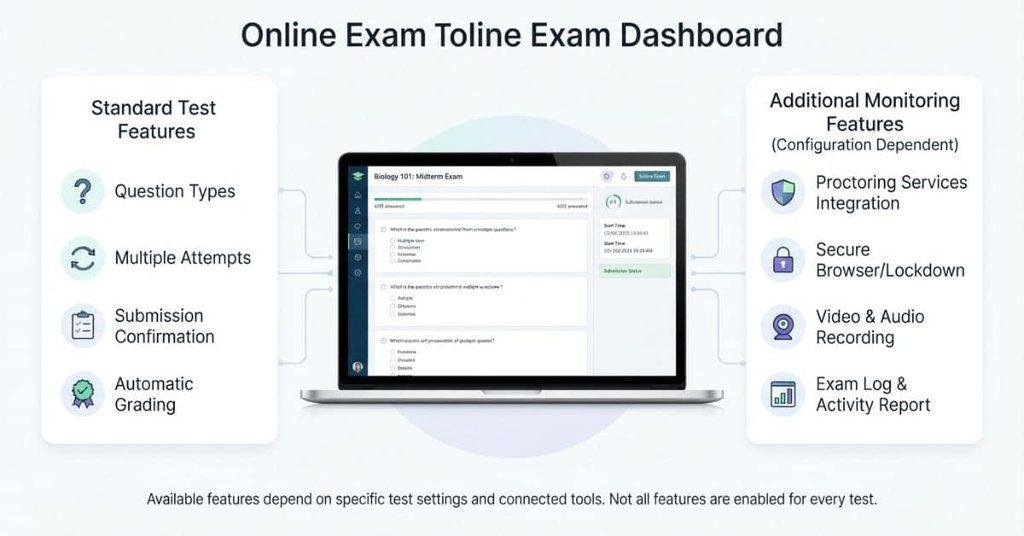
Blackboard can provide information about test activity, but its capabilities depend on the assessment setup. A regular Blackboard test may have different monitoring options than a proctored exam.
Blackboard Ultra tests also depend on the features enabled by the instructor and institution. Some online exams may include additional settings that collect more assessment activity.
Proctored exams can use separate monitoring software alongside Blackboard. These tools may monitor parts of the testing environment or restrict certain actions.
Assessment settings can also affect what information becomes available. For example, an instructor may configure different test options, time limits, or access rules.
Additional monitoring software can provide capabilities that standard Blackboard features do not provide. Always check your course instructions to understand the tools used for your exam.
What Blackboard May Record During a Test
What Blackboard records depends on the test configuration, Blackboard version, and tools connected to the course. Available information may include certain assessment activity and submission details.
Some setups may provide information about when a student starts or submits a test. Other monitoring tools may collect additional information during an exam.
Blackboard does not provide the same monitoring experience for every test. Your instructor or institution decides which available features and connected tools to use.
Does Blackboard Know If You Are Cheating?
Blackboard can record or produce certain information about how you interact with an assessment. However, an activity record does not automatically prove that cheating occurred.
For example, an unusual test activity may have multiple explanations. A student could experience a technical problem or accidentally perform an unexpected action.
Context matters when instructors review assessment activity. They may consider the test settings, submitted work, course rules, and other available evidence.
If an academic-integrity concern arises, the instructor or institution may follow its established review procedures. The specific process varies by school and course.
Key point: Blackboard can provide information that helps instructors review possible misconduct. It does not independently determine that every unusual action is cheating.
Can Blackboard Detect Cheating Without Proctoring?
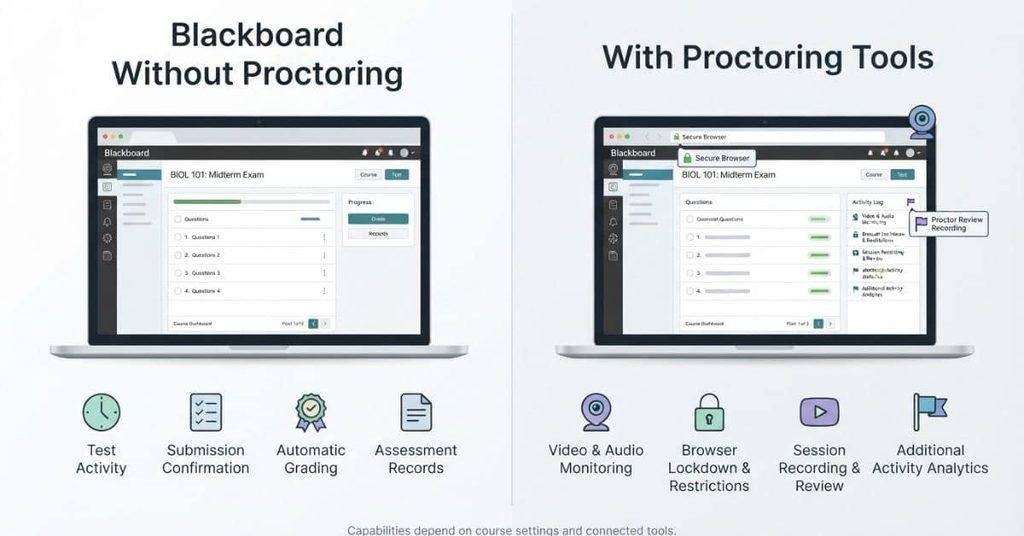
Blackboard can provide some assessment information without proctoring software. However, standard Blackboard functionality differs from dedicated proctoring technology.
Normal Blackboard features can manage tests, assignments, submissions, grades, and other course activity. The exact information available depends on the assessment settings and Blackboard version.
Proctoring and lockdown tools can add monitoring features beyond ordinary Blackboard functionality. Depending on the tool, they may monitor the testing environment, restrict certain actions, or record parts of an exam.
This distinction matters because Blackboard itself is not automatically a complete exam-monitoring system. If an instructor uses additional software, the available monitoring can be different.
What Can Teachers See on Blackboard?
Teachers may see different types of information depending on their course settings and Blackboard features. Not every instructor has access to the same information.
Depending on the setup, instructors may have access to:
- Test and assignment submissions
- Available attempt or assessment activity information
- Grades and assessment results
- Similarity or originality reports when enabled
- Assessment-related information
- Results from integrated third-party tools, where applicable
For example, a course using SafeAssign may provide a similarity report for a submitted assignment. A course using an integrated proctoring service may provide additional exam-related results.
Your instructor’s view depends on the tools and settings used for that course. Blackboard should not be treated as having one identical set of information for every teacher.
Can Blackboard Detect Different Types of Cheating?
Different types of suspected cheating require different tools or evidence. Blackboard features may provide some information, while connected services can add other capabilities.
Can Blackboard Detect Copy and Paste?
Whether copying and pasting can be identified depends on the assessment setup and any additional monitoring tools. Standard Blackboard does not automatically prove that copied content came from another source.
whether Blackboard can detect copy and paste.
Can Blackboard Detect Tab Switching?
Tab switching depends on the test configuration and monitoring technology being used. Blackboard does not provide one universal method that proves a student switched tabs to cheat.
whether Blackboard can detect tab switching.
Can Blackboard Detect AI?
AI detection depends on the tools used with an assignment or assessment. Blackboard itself should not be treated as a universal AI detector.
Some institutions may use separate AI detection services. Their results can provide indicators, but those results still require appropriate interpretation.
whether Blackboard can detect AI.
Can Blackboard Detect Plagiarism?
Blackboard courses can use similarity-checking tools such as SafeAssign. These tools compare submitted work with available sources and produce similarity information.
A similarity match does not automatically establish plagiarism. Quoted, cited, or commonly used material can also produce matching text.
Can Blackboard Detect Outside Help During an Exam?
Detecting outside help depends heavily on the assessment and monitoring setup. A standard Blackboard test may provide limited assessment information.
A proctored exam or connected monitoring tool may provide additional ways to monitor the testing environment. The exact capabilities vary by software, settings, and institutional policies.
What About Blackboard Grade Calculators?
Students may also wonder whether using a grade calculator counts as cheating. A grade calculator is normally a planning and calculation tool. It helps you estimate your current grade or understand how future scores could affect it.
Using a calculator to plan your grades is different from using an unauthorized resource during an assessment. However, exam rules can vary between instructors and institutions.
If an instructor prohibits external tools during an exam, follow those instructions. Always check the assessment rules before using any calculator or outside resource.
Can Using a Blackboard Grade Calculator Be Cheating?
Using a Blackboard Grade Calculator to estimate your course grade is generally a planning activity. It can help you understand weighted categories, assignment scores, and possible final grades.
The situation can be different during an active exam. Your instructor may restrict calculators, websites, notes, or other external resources. The assessment instructions should determine what you can use.
If you’re simply trying to estimate your current or potential Blackboard course grade, you can use our Blackboard Grade Calculator to calculate your grade without manually working through the percentages.
What Should You Do If You Are Worried About a Blackboard Activity Flag?
Seeing unusual activity on an online assessment can be stressful. Start by reviewing the course and exam instructions. Check whether your assessment used proctoring or additional monitoring software.
If a technical problem affected your attempt, contact your instructor and explain what happened. Keep relevant evidence, such as error messages or screenshots, when appropriate.
If your institution contacts you about an academic-integrity concern, follow its established review procedure. Provide accurate information and explain any technical issues that affected your assessment.
Remember that an activity record does not automatically establish cheating. The instructor or institution may review the available context before making an academic-integrity determination.
Conclusion
Blackboard can provide useful assessment information, but it is not one universal cheating detector. Whether can Blackboard detect cheating depends on test settings, connected tools, and institutional policies.
Some courses may use similarity checking, activity information, AI detection, or proctoring software. However, an activity record does not automatically prove that cheating occurred. Context and instructor review can matter.
If you’re taking an online exam, check the rules before you begin. Understand which resources and tools your instructor allows. If a technical problem affects your test, report it promptly.
For more helpful Blackboard guides, explore our related calculators and student resources. You can also share this guide with classmates who have questions about Blackboard exam monitoring.
Frequently Asked Questions
Blackboard can provide information about certain assessment activity, but it is not a universal cheating detector. Detection depends on test settings, connected tools, and institutional policies.
Blackboard does not automatically determine that every unusual action is cheating. It can provide assessment information that instructors may review alongside other evidence and course rules.
Blackboard may provide information about test activity and submissions. Additional monitoring or proctoring tools can provide more capabilities, depending on the exam setup.
Blackboard can provide some assessment information without proctoring. However, standard Blackboard functionality generally differs from dedicated proctoring and lockdown technology.
Whether tab switching can be detected depends on the test configuration and monitoring tools. Blackboard does not provide one universal feature that proves tab switching occurred.
This depends on the assessment settings and additional monitoring tools. Standard Blackboard does not automatically prove that copying and pasting means cheating occurred.
AI detection depends on the tools used by the institution or instructor. Blackboard itself should not be treated as a universal AI-writing detector.
Blackboard courses can use tools such as SafeAssign to generate similarity reports. A similarity match does not automatically establish plagiarism.
Teachers may see available assessment information, submissions, and reports from enabled tools. What they can access varies by course settings and integrated services.
Blackboard does not automatically determine that a student cheated based on every unusual action. Some integrated tools may generate alerts or reports for instructor review.
Detecting outside help depends heavily on the assessment setup. Proctoring or other monitoring tools may provide additional information beyond standard Blackboard features.
Using a grade calculator to plan or estimate your course grade is normally different from using unauthorized resources during an exam. Always follow your instructor’s assessment rules.

We are the Canvas Academic Team, a developer team focused on building simple and practical tools that help students succeed academically. This platform was created specifically for Canvas LMS students to make grade tracking, GPA calculations, exam planning, and academic management easier and more efficient.
Our focus is on creating fast, accurate, and student-friendly educational tools along with helpful learning resources that improve productivity and reduce academic stress.
Through CanvasGradeCalculator.com, our goal is to continue building useful resources that help students study smarter, stay organized, and achieve better academic results.