Table of Contents
Introduction
Have you ever opened Blackboard and wondered where your course evaluation went?
Course evaluations on Blackboard help colleges and universities collect student feedback about courses and instructors. They can help schools understand what students liked and what could improve. For beginners, finding the right evaluation can sometimes feel confusing.
Blackboard does not use one universal location for every course evaluation. Your college may place the survey inside a course, in a separate evaluation area, or behind a school-provided link.
This guide explains how to find and complete course evaluations on Blackboard step by step. You will learn where to look, how to open an evaluation, and what to do if you cannot find one.
We will also cover common Blackboard evaluation issues and explain why your school’s setup may look different. By the end, you should know exactly where to check and how to complete your course feedback with confidence.
How to Find Course Evaluations on Blackboard
Finding a course evaluation on Blackboard can be confusing if you are new to the platform. Course evaluations on Blackboard do not always appear in the same place. Your college or university may use Blackboard to provide the evaluation, or it may connect Blackboard to a separate survey system.
Use these steps to check the most common locations:
- Log in to Blackboard. Sign in through your college or university’s official Blackboard login page.
- Open your Courses area. Look through your current courses and select the class connected to the evaluation.
- Check the course navigation menu. Look for links labeled Course Evaluation, Evaluation, Survey, Feedback, or Student Feedback. Your school may use a different name.
- Check the institution’s evaluation area. Some schools provide evaluations outside the individual course. Look for an evaluation link on the Blackboard homepage or institution-specific menu.
- Review your Blackboard notifications. Your school may send a notification or announcement when an evaluation becomes available.
- Open the evaluation link. Follow the instructions shown on the survey page. Some evaluations may open directly in Blackboard, while others may take you to another system.
Where Are Course Evaluations Located on Blackboard?
There is no single universal location for every Blackboard course evaluation. Blackboard provides the learning platform, while individual colleges and universities can configure courses and evaluation processes differently.
You may find an evaluation in:
- A specific course area
- A Course Evaluation or Survey section
- An institution-specific evaluation page
- A Blackboard announcement or notification
- A link that sends you to your school’s separate evaluation system
Expert tip: If you cannot find an evaluation, check your school’s student portal or contact your instructor or academic support office. They can confirm whether an evaluation is available and where your institution placed it.
Trust note: Do not assume an evaluation is missing simply because you cannot see it inside a course. Your institution may control when evaluations appear, who can access them, and which system delivers them.
How to Do Course Evaluations on Blackboard
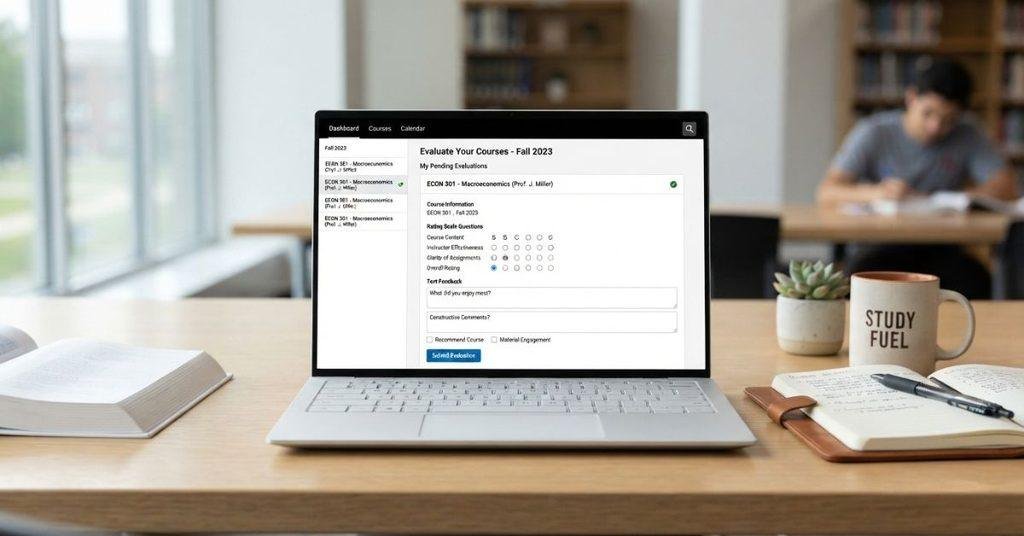
Once you find the evaluation, completing it is usually straightforward. How to do course evaluations on Blackboard depends on the evaluation tool your college uses. The questions and submission process can vary between institutions.
Follow the general workflow below:
- Open the course evaluation. Select the evaluation or survey link provided by your school.
- Read the instructions. Check the directions before answering any questions.
- Answer the required questions. Complete all required ratings or questions shown on the evaluation.
- Add written feedback when appropriate. Use specific, respectful comments that explain your experience.
- Review your responses. Check your ratings and written answers before submitting.
- Submit the evaluation. Follow the instructions shown on the evaluation page to finish the process.
- Check for confirmation. Some systems may show a confirmation message after successful submission.
Do not leave required questions unanswered if the system prevents submission. Also, check the deadline because your school controls when the evaluation opens and closes.
How to Complete a Blackboard Course Evaluation
A good course evaluation gives your school useful feedback about your learning experience. Take time to answer each question honestly and thoughtfully.
Start by completing all required questions. Review rating scales carefully because options can differ between evaluation systems. For written questions, provide constructive comments that explain what worked well and what could improve.
Before submitting, review your responses for accuracy. Make sure you have answered every required question and added comments where you want to provide additional context.
Finally, submit the evaluation before your institution’s deadline. Do not assume every Blackboard evaluation uses the same Submit button or screen. The evaluation system may use different wording or steps.
How to Find Course Evaluations on Blackboard Ultra
Blackboard Ultra does not have one guaranteed menu path for course evaluations. The location depends on your institution’s Blackboard configuration, the evaluation tool, and how your course is set up.
If you use Blackboard Ultra, check the areas your institution normally uses for course surveys or student feedback. You may also receive a notification, announcement, or direct link when an evaluation becomes available.
If you do not see an evaluation, avoid assuming that Blackboard Ultra does not support it. Your college may manage evaluations through a separate system connected to Blackboard.
Expert tip: Check your institution’s student portal, Blackboard announcements, and course navigation. If you still cannot locate the evaluation, contact your instructor or school support team for the correct access instructions.
Can You Do Course Evaluations on Blackboard?
Sometimes. Whether you can complete a course evaluation through Blackboard depends on how your college or university manages student feedback.
Some institutions use Blackboard to provide direct access to course evaluations. The evaluation may appear inside a course, through an institution-specific area, or through a notification or link.
Other schools use a separate survey or evaluation platform. Blackboard may only provide a link to that system, while some institutions may communicate evaluation instructions through another student portal or email.
This distinction matters when you cannot find an evaluation in your Blackboard course. Not seeing a survey inside your course does not necessarily mean your school does not have an evaluation.
Check your Blackboard announcements, institution-provided links, and student portal for additional instructions. If you still cannot find the evaluation, contact your instructor or academic support office.
Your institution controls the evaluation schedule, access requirements, and platform used. Therefore, always follow the instructions provided by your school rather than relying on one universal Blackboard process.
Why Can’t I Find Course Evaluations on Blackboard?
Several common reasons can explain why a course evaluation does not appear. The issue may not be related to your Blackboard account or course enrollment.
Check these possibilities:
- The evaluation period has not opened yet. Your school may only make evaluations available during a specific period.
- The deadline has passed. Some evaluation systems stop accepting responses after the closing date.
- Your institution uses another platform. The evaluation may be managed outside Blackboard.
- The evaluation is not linked directly inside the course. Your school may provide access through a separate page or notification.
- You are checking the wrong course. Make sure you selected the course connected to the evaluation.
- The evaluation has eligibility requirements. Your institution may limit access to certain enrolled students or courses.
- Your Blackboard configuration differs. Schools can organize Blackboard and connected tools differently.
Why Is My Course Evaluation Missing on Blackboard?
If your course evaluation is missing, check the timing and location first. Then confirm whether your institution uses Blackboard for evaluations.
Evaluation Hasn’t Opened Yet
Your evaluation may not be available because the scheduled evaluation period has not started. Check your school’s academic or evaluation instructions for the expected dates.
Evaluation Has Already Closed
If the evaluation deadline has passed, the survey may no longer appear or accept responses. Contact your institution if you believe you should still have access.
Your Course Doesn’t Use Blackboard for Evaluations
Some institutions do not manage course evaluations through Blackboard. Your school may use another platform for collecting student feedback.
You’re Looking in the Wrong Area
The evaluation may not appear inside the course itself. Check Blackboard notifications, announcements, institution-specific areas, and links provided by your school.
Your Institution Uses a Separate Evaluation System
Your college may connect Blackboard with another evaluation service or provide access separately. Follow your institution’s instructions for the correct evaluation website or login process.
Pro tip: If you have checked the available Blackboard areas and still cannot find the evaluation, ask your instructor or school’s support office where students should access it. They can confirm whether the evaluation is open and whether you are eligible to complete it.
Can Students See Course Evaluations on Blackboard?
Yes, students may be able to find and complete a course evaluation on Blackboard when their institution provides access through the platform. However, completing an evaluation is different from viewing evaluation results.
Your college or university decides whether students can access course or instructor evaluation results. In many setups, students may only see the survey questions and submission process. They may not have access to aggregated feedback or instructor reports.
Do not assume that completing an evaluation automatically gives you access to its results. Blackboard itself does not guarantee student access to evaluation reports.
If you want to see results, check your institution’s student portal, course information, or evaluation instructions. You can also contact your academic office for details about how your school shares evaluation results.
Finding the Evaluation vs. Seeing Results
These are two separate actions:
- Finding the evaluation: Locating and opening the survey provided by your institution.
- Completing the evaluation: Answering questions and submitting your feedback.
- Viewing results: Accessing reports or summaries after evaluations are collected.
Your institution controls which of these options students can access.
Are Blackboard Course Evaluations Anonymous?
It depends. Whether a course evaluation is anonymous or confidential depends on the evaluation system and your institution’s policies.
Blackboard does not make every course evaluation automatically anonymous. Your school may use a separate evaluation platform with its own privacy and response-handling rules.
Before submitting feedback, review the evaluation instructions or privacy notice provided by your university. Look for information explaining how responses are collected, stored, and reported.
If anonymity matters to you, do not rely on assumptions about Blackboard. Your institution’s official evaluation policy is the most reliable source for understanding how your responses are handled.
Can Professors See Who Completed a Blackboard Course Evaluation?
Completion tracking and response anonymity are separate concepts. An institution may be able to determine whether a student completed an evaluation without necessarily providing the instructor with that student’s individual responses.
How this works depends on the evaluation system and your institution’s policies. Some schools may track participation for administrative purposes, while evaluation responses may follow separate privacy procedures.
Professors may therefore receive course feedback without automatically seeing which student submitted each response. However, you should not assume complete anonymity unless your institution explicitly states it.
Expert tip: Before completing an evaluation, read your school’s evaluation instructions and privacy information. This gives you the clearest explanation of what your instructor and institution can see.
Can You Edit a Blackboard Course Evaluation After Submitting It?
Usually, this depends on the evaluation system and your institution’s settings. Blackboard does not guarantee that students can edit a submitted course evaluation.
Depending on your school’s setup, you may encounter several situations:
- One submission only: The system may lock your responses after submission.
- Editing before the deadline: Some systems may allow changes while the evaluation remains open.
- Evaluation can be reopened: Your institution or evaluation administrator may be able to reopen an evaluation in certain situations.
- No changes after submission: Some evaluations permanently close once you submit them.
If you notice an error after submitting, check the evaluation instructions first. If they do not explain the editing policy, contact your instructor or the appropriate university office.
Do not submit another response unless your institution specifically tells you to do so. Multiple submissions could be handled differently by the evaluation system.
What Happens After You Submit a Blackboard Course Evaluation?
After submission, the evaluation system may display a confirmation message or mark the survey as complete. The exact confirmation depends on the platform your institution uses.
Your response is then processed according to your school’s evaluation procedures. The institution may collect responses, organize feedback, and review results at a later time.
Do not assume your professor immediately receives your individual responses after you click submit. Evaluation access and reporting rules vary between institutions.
Some schools may provide instructors with summarized results after the evaluation period ends. Others may follow different reporting procedures.
If you need proof that you completed the evaluation, save any confirmation message shown by the system. You can also follow your institution’s instructions for verifying completion.
When Are Blackboard Course Evaluations Available?
There is no single Blackboard evaluation schedule that applies to every college or university. Each institution can choose when evaluations open and close.
Course evaluations may become available:
- Near the end of an academic term
- During a designated evaluation period
- Before final grades are released
- According to a university-specific academic schedule
Your evaluation may also have a specific opening and closing date. Check your institution’s announcements, student portal, course information, or evaluation instructions for the correct dates.
If you cannot find an evaluation, check whether the evaluation period has started. A missing survey does not necessarily indicate a Blackboard problem.
Expert tip: Record the evaluation deadline once your school announces it. Completing the survey early gives you more time if you experience access or login problems.
What Should You Write in a Blackboard Course Evaluation?
A useful course evaluation should describe your actual learning experience. Focus on specific parts of the course instead of making comments about the instructor personally.
Consider these approaches when writing your feedback:
- Be specific: Explain which activities, materials, or teaching methods helped you learn.
- Focus on learning: Discuss how assignments, lectures, discussions, or resources affected your understanding.
- Mention what worked: Identify course features that supported your learning.
- Give constructive suggestions: Explain what could improve and why.
- Stay respectful: Avoid personal attacks, insults, or comments unrelated to the course.
- Answer honestly: Give feedback that accurately reflects your experience.
For example, instead of saying that an assignment was simply “bad,” explain what made it difficult. You could mention unclear instructions, limited examples, or a workload concern.
Pro tip: Write feedback that gives the instructor something actionable. Specific observations are usually more useful than broad praise or criticism.
Blackboard Course Evaluation vs. Blackboard Survey
A Blackboard course evaluation and a Blackboard survey can look similar, but they do not always serve the same purpose.
A course evaluation usually collects structured feedback about a course, instructor, teaching methods, assignments, or learning experience. Colleges and universities may use this feedback to review courses and improve instruction.
Blackboard can also contain other types of surveys or forms. An instructor might use a survey to collect opinions about an assignment, ask students about course preferences, or gather information for a specific activity.
Therefore, do not assume that every survey you see in Blackboard is a formal course evaluation. The purpose depends on how your instructor or institution created and uses it.
If you are unsure, read the survey instructions or check the description provided by your school. This can help you determine whether you are completing an official course evaluation or another type of Blackboard survey.
Blackboard Course Evaluations vs. Course Grades
Course evaluations and course grades serve completely different purposes.
A course evaluation is feedback, while a course grade measures your academic performance. An evaluation may ask about teaching quality, course materials, assignments, and your overall learning experience.
Completing an evaluation does not itself give you a grade or change your academic performance. Your grades come from the coursework, assessments, and grading policies established for your class.
Keeping these two processes separate can prevent confusion when using Blackboard. If you are looking for your current academic performance, check the Grades area of your course rather than the evaluation section.
Blackboard Grade Calculator
Course evaluations are separate from your academic grade. If you’re checking your actual Blackboard course performance, use our [Blackboard Grade Calculator] to estimate your current grade.
Conclusion
Finding and completing course evaluations on Blackboard can be simple once you know where to look. We covered how to find evaluations, complete them, troubleshoot missing surveys, and understand privacy and submission rules.
Remember that every college or university can configure Blackboard and evaluation tools differently. Your school may use Blackboard directly or connect it to a separate evaluation system. Always follow your institution’s instructions and evaluation deadlines.
Take your time when writing feedback. Honest, specific, and respectful comments provide more useful information than general statements.
If you’re also checking your academic performance, use our Blackboard Grade Calculator to estimate your current course grade.
Have you had trouble finding a Blackboard course evaluation? Share your experience or explore more Blackboard guides on our website.

We are the Canvas Academic Team, a developer team focused on building simple and practical tools that help students succeed academically. This platform was created specifically for Canvas LMS students to make grade tracking, GPA calculations, exam planning, and academic management easier and more efficient.
Our focus is on creating fast, accurate, and student-friendly educational tools along with helpful learning resources that improve productivity and reduce academic stress.
Through CanvasGradeCalculator.com, our goal is to continue building useful resources that help students study smarter, stay organized, and achieve better academic results.