Table of Contents
Introduction
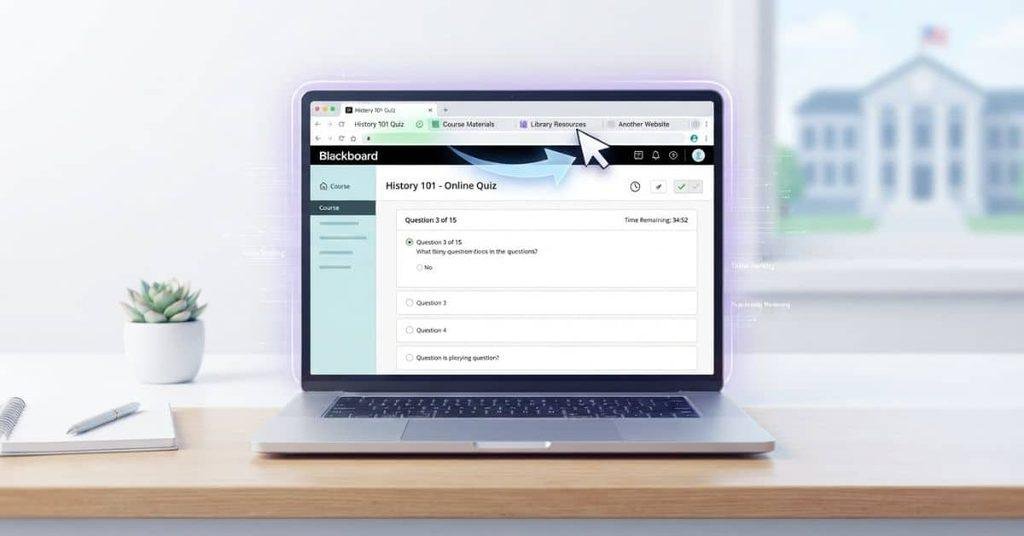
Have you ever switched tabs during a Blackboard quiz and wondered if your instructor could tell?
Can Blackboard detect when you switch tabs? The answer depends on how your course and assessment are set up. Blackboard can record certain activity within its platform. However, that does not automatically mean it can see everything you do in another browser tab.
This matters for students taking online classes, quizzes, and exams in the USA. Blackboard features can vary by course, institution, browser, and assessment settings. Proctored exams may also use additional software with different monitoring capabilities.
In this guide, you will learn what Blackboard may detect during a tab switch. You will also see how regular Blackboard assessments differ from proctored exams.
We will explain common tracking methods in simple terms. You will also learn what additional proctoring tools can change about exam monitoring.
By the end, you will have a clearer understanding of Blackboard tab switching and online exam privacy.
Can Blackboard Detect When You Switch Tabs?
Yes, a Blackboard assessment may detect that its browser page became inactive, but that does not mean Blackboard can see another tab’s contents. The exact behavior depends on the Blackboard setup, assessment settings, browser, and any additional monitoring software.
When you leave a Blackboard page, your browser can make that page inactive while you view another tab or window. A website may detect changes to its own page visibility or activity. However, detecting that a page became inactive is different from viewing what you opened elsewhere.
For example, Blackboard may know that you left its assessment page without knowing whether you opened Google, a notes document, or another website. Blackboard also does not automatically give every instructor a detailed report of everything you do outside Blackboard.
Ordinary course pages and online tests can work differently. Tests may use additional security settings or third-party proctoring tools. Those tools can provide monitoring features that standard Blackboard course activity does not provide.
Quick Answer
Blackboard may detect that its page became inactive during certain activities. That does not mean it can see the contents of another browser tab. During online tests, additional settings or proctoring software may provide more monitoring capabilities.
Does Blackboard Know When You Leave the Page?
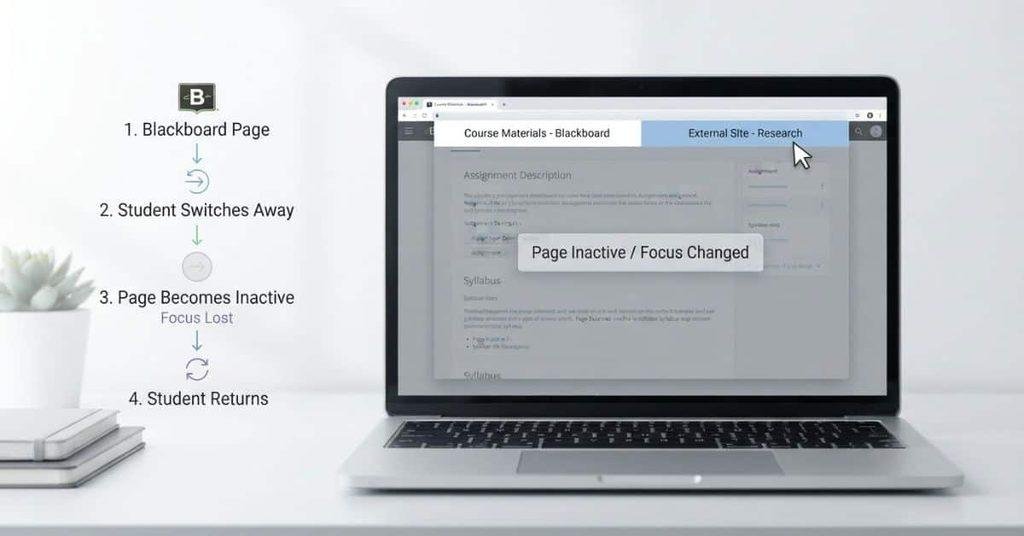
Leaving Blackboard can mean several different actions. These actions can produce different results depending on the browser, Blackboard feature, and course setup.
- Leaving a Blackboard page: You may navigate away from the current page. Blackboard can record activity within its platform when applicable.
- Switching browser tabs: The Blackboard page can become inactive while another tab becomes active. This does not automatically give Blackboard access to that tab.
- Opening another browser window: A separate window can take focus away from Blackboard. Whether Blackboard records anything depends on the specific activity and setup.
- Minimizing the browser: Minimizing the browser removes it from view. This differs from navigating to another website or closing the page.
- Navigating to another website: Blackboard does not automatically gain access to the other website’s content.
- Closing the Blackboard tab: This ends that browser page. Blackboard may still retain activity already recorded before the tab closed.
These actions should not be treated as identical. A Blackboard test may handle browser activity differently from a normal course page. Additional exam software can also change what gets monitored.
Can Blackboard Track Tab Switching?
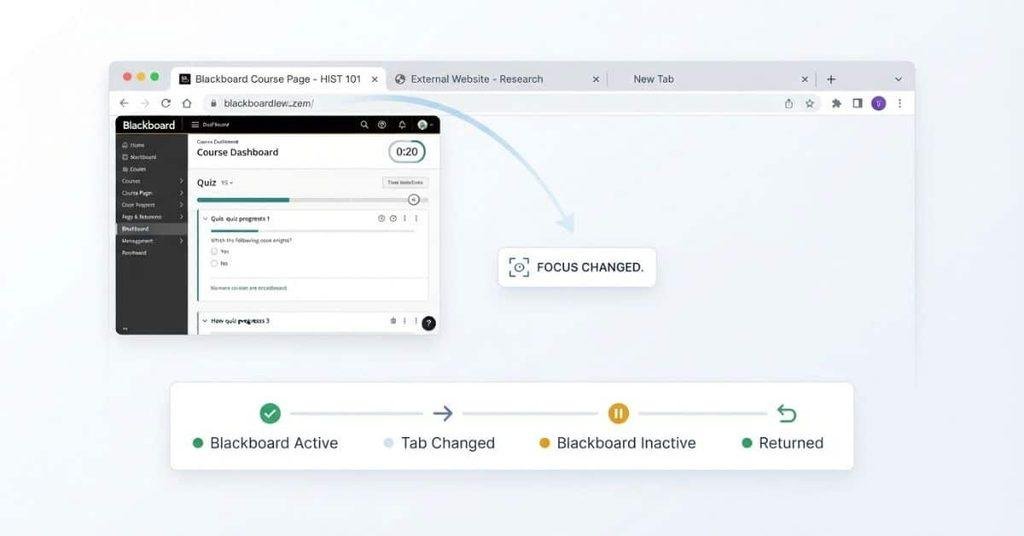
Blackboard can collect information about activity within its learning environment. However, activity tracking is not the same as monitoring everything on your computer.
What Blackboard Can Potentially Record
Depending on the Blackboard product and course configuration, relevant activity may include:
- Course and page interactions
- Assessment activity
- Answer or submission activity
- Submission timestamps
- Login or session information
- Other activity information supported by the specific Blackboard setup
The information available to instructors can also depend on institutional settings and Blackboard features. Therefore, you should not assume every Blackboard course records the same information.
During an online test, assessment-related activity can receive more attention than ordinary course browsing. Some institutions may also use separate tools for exam monitoring.
What Blackboard Cannot Automatically See
Blackboard’s activity records should not be confused with complete computer surveillance. Using Blackboard does not automatically give it access to everything displayed or entered elsewhere.
For example, standard Blackboard activity does not automatically mean Blackboard can see:
- The contents of another website
- Everything displayed in another browser tab
- What you type on another website
- Other unrelated activity on your computer
A separate proctoring application may have different permissions and monitoring features. That’s why you should check the specific instructions for your exam before assuming what Blackboard can detect.
Does Blackboard Tell Teachers When You Switch Tabs?
Usually, Blackboard does not simply send an instructor a notification saying, “This student switched tabs.” What an instructor can see depends on the Blackboard assessment, available activity records, and any additional tools used by the institution.
Blackboard can record certain technical or assessment activity without turning that information into a direct warning. An instructor may see assessment attempts, timestamps, submissions, or other available activity information.
A separate proctoring tool can change this situation. Such tools may monitor or flag browser activity based on their specific features and settings. Therefore, a student should not assume every Blackboard course gives instructors the same information.
Can a Blackboard Instructor See That You Left an Exam?
An instructor may have access to certain activity information associated with your Blackboard test. However, that does not automatically mean they receive a clear record showing exactly where you went after leaving the exam page.
The answer depends on the assessment setup and tools involved. A regular Blackboard test and a proctored exam can use different monitoring methods.
If a system records that an assessment page became inactive, that information still does not necessarily show what you viewed elsewhere. A separate proctoring system may provide additional information based on its permissions and configuration.
Does Blackboard Track Tabs During Tests?
A Blackboard test and a proctored Blackboard exam are not necessarily the same experience. A regular test can rely mainly on Blackboard’s built-in assessment features. A proctored exam may use additional software with separate monitoring capabilities.
Blackboard assessment settings can affect how an online test operates. Browser and session activity may also provide technical information during an assessment. The exact information available can vary by institution, Blackboard tools, browser behavior, and assessment configuration.
Additional monitoring tools can introduce features that standard Blackboard testing does not provide. These may include browser restrictions, activity flags, or other forms of exam monitoring.
Because setups differ, there is no single rule that applies to every Blackboard test. Students should check their exam instructions for information about required browsers, lockdown tools, or proctoring software.
What Happens When You Switch Tabs During a Blackboard Test?
Several outcomes are possible when you switch away from a Blackboard test. The test may continue normally, depending on its configuration and the tools involved.
Some assessment or proctoring configurations may record or flag certain browser activity. An institution may also require separate software that handles tab or window activity differently.
A recorded flag does not necessarily prove what you were doing in another tab. It may only indicate that the assessment page lost focus or that the monitoring system detected a particular event.
For this reason, students should not treat a tab-switching flag as proof that Blackboard can see another website’s contents. The exact meaning depends on the system and configuration used for that exam.
Does Blackboard Ultra Track Tabs?
If you’re searching “does Blackboard Ultra track tabs,” the key point is that Blackboard Ultra does not automatically mean full browser monitoring. Blackboard Ultra is the newer Blackboard experience, but tab monitoring depends on the specific assessment configuration and tools your school uses.
A Blackboard Ultra course can record activity related to the platform and its assessments. However, the platform version alone does not mean your instructor can automatically see everything happening in other browser tabs.
For online tests, the settings matter more than the name “Ultra.” Your institution may enable specific assessment features or connect additional exam-monitoring tools. Those tools can change what browser activity gets recorded or flagged.
Blackboard Ultra vs Blackboard Learn
Blackboard Learn refers to the broader learning management system. Blackboard Ultra refers to the newer interface and course experience within Blackboard Learn.
The difference does not mean Ultra automatically provides complete tab surveillance. Check the specific test instructions and assessment tools to understand what monitoring applies.
Can Blackboard Detect Tab Switching Without Proctoring Software?
Blackboard’s built-in features and third-party proctoring tools should be treated separately. Standard Blackboard functionality can handle course and assessment activity, but it does not automatically provide the same monitoring capabilities as dedicated exam software.
Without additional proctoring software, a Blackboard assessment may still record certain activity or technical events supported by its configuration. However, this does not automatically mean Blackboard can see the contents of another website or everything happening on your computer.
Schools can add technologies such as lockdown browsers or proctoring services for online assessments. These tools may restrict browser behavior or provide additional monitoring features beyond the normal Blackboard course environment.
The exact capabilities depend on the tool, permissions, browser, and assessment settings. If your exam uses additional software, read its student instructions carefully before starting the test.
Can Blackboard See What You Do in Another Tab?
Detecting a tab change is not the same as seeing what you do in that tab. Blackboard may detect certain activity related to its own page, but that does not automatically give it access to another website or application.
Can Blackboard See Another Website?
Standard Blackboard functionality does not automatically show an instructor the contents of another website you open. For example, a page becoming inactive does not tell Blackboard exactly which website you opened next.
A separate proctoring or lockdown tool may have additional browser-monitoring capabilities. Those capabilities depend on the specific software and permissions.
Can Blackboard See What You Search for?
Blackboard does not automatically receive your search queries simply because you use another browser tab. A search performed on another website is separate from your Blackboard activity.
However, additional exam-monitoring software may operate differently. Check the privacy and monitoring information provided for your specific assessment.
Can Blackboard See What You Type?
Blackboard does not automatically see everything you type outside Blackboard. Text entered into another website or unrelated application is not automatically part of your Blackboard activity.
Text you enter directly into a Blackboard assessment can, of course, become part of the assessment activity or submission.
Can Blackboard See Your Screen?
Blackboard itself should not be treated as a complete screen-monitoring system. Detecting that its page lost focus does not mean Blackboard can automatically view your entire screen.
A separate proctoring application may include screen-monitoring features. Whether those features apply depends on the software, permissions, and exam configuration.
What Can Blackboard Record During an Online Test?
Depending on the Blackboard setup and assessment configuration, an online test may involve information such as:
- Test attempts — information associated with starting or taking an assessment.
- Answers and submissions — responses entered and submitted through Blackboard.
- Start and submission times — timestamps associated with assessment activity.
- Interaction or activity information — actions supported by the assessment system.
- Assessment events — certain events generated while using the test.
- Technical or session information — information available through the relevant Blackboard configuration.
The exact information available can vary by Blackboard version, institutional configuration, assessment settings, browser behavior, and additional assessment tools.
Therefore, these categories should not be treated as a universal list of everything every Blackboard installation records. For a specific exam, the course instructions and stated monitoring tools provide the most relevant information.
Does Blackboard Show Teachers If You Switch Tabs?
A common student assumption is: “My teacher gets a notification every time I change tabs.” That is not a rule you should apply to every Blackboard course or test.
What matters is how the assessment records activity and what information the instructor can access. Blackboard’s standard assessment functionality can provide information about test attempts, submissions, timestamps, and other supported activity.
Instructor-facing reports can vary based on the Blackboard version, assessment settings, and institution configuration. A particular event may appear in available activity information without producing a simple “student switched tabs” notification.
Third-party proctoring or monitoring software can change what instructors or proctors can see. These tools may record or flag browser activity using features that standard Blackboard does not provide.
The key distinction is recording assessment activity versus sending a specific tab-switch notification. Students should check their test instructions rather than assume every Blackboard assessment works the same way.
What If Your Blackboard Exam Uses Proctoring Software?
Proctoring software can significantly change how an online exam operates. It may add monitoring or restrictions that do not exist in a normal Blackboard assessment.
Depending on the specific tool and exam settings, proctoring may include:
- Browser lockdown tools that restrict access to other websites or applications.
- Remote proctoring that monitors an exam session from a distance.
- Screen monitoring that can capture or review screen activity.
- Webcam monitoring that records or analyzes video during an exam.
- Microphone monitoring that can capture audio when enabled.
- Browser restrictions that limit tabs, windows, or navigation.
- Activity flags that identify events for later review.
Not every Blackboard exam uses these features. Some courses use only Blackboard’s built-in assessment functions, while others connect additional exam technology.
The specific monitoring method depends on your institution, course, assessment, and selected proctoring tool. Always review the exam instructions and privacy information provided by your school.
Blackboard vs Proctoring Software
| Blackboard | Proctoring Software |
|---|---|
| Learning management system | Additional assessment technology |
| Hosts courses and assessments | Designed to monitor or restrict exam behavior |
| Provides built-in assessment features | May add browser, screen, webcam, or microphone monitoring |
| Capabilities depend on configuration | Capabilities depend on the specific tool and permissions |
In simple terms, Blackboard manages the learning environment, while a proctoring tool can add specialized exam monitoring or restrictions.
Does Switching Tabs During a Blackboard Exam Automatically Mean Cheating?
No. A tab switch alone does not establish why a student switched tabs or what they did afterward. A student might change tabs accidentally, click the wrong window, or experience unexpected browser behavior.
Technical issues can also produce events that students do not expect. For example, browser focus can change because of another window, notification, or system action.
Whether an event violates academic-integrity rules depends on the institution’s policies and the evidence available for that assessment. A recorded event may provide information about what happened technically, but it may not explain the student’s intent.
Proctored exams can involve additional monitoring data. Even then, students should follow the specific exam rules and review their institution’s academic-integrity policy if they have concerns.
What Should You Do If You Accidentally Switch Tabs During a Blackboard Test?
If you accidentally switch tabs during a Blackboard test, stay calm and follow the exam instructions. Take these practical steps:
- Return to the Blackboard test. Go back to the assessment as soon as you notice the switch.
- Continue the assessment. If the test remains active, continue according to the instructions.
- Avoid repeated tab switching. Keep your focus on the test unless the instructions require another action.
- Follow the exam rules. Use only the websites, tools, and resources your instructor permits.
- Contact your instructor if needed. If the incident affects your test, follow your course policy for reporting technical problems.
If your exam uses proctoring software, also follow its specific instructions for unexpected browser or technical events.
Conclusion
Switching tabs during a Blackboard test does not automatically mean Blackboard can see another website. What Blackboard records depends on the assessment, settings, browser, and any additional proctoring software.
So, can Blackboard detect when you switch tabs? It may detect certain page or assessment activity in some configurations. However, detecting an inactive page differs from seeing everything on another tab.
If your exam uses proctoring software, check its rules before starting the test. These tools can add browser restrictions, screen monitoring, or activity flags.
For beginners, the safest approach is simple. Follow your instructor’s exam rules and avoid unnecessary tab switching.
Did you experience an unexpected tab switch during a Blackboard test? Share your experience or explore more online learning guides on our website.
Can Blackboard detect when you switch tabs?
Blackboard may detect certain page or assessment activity when its page becomes inactive. This depends on the assessment configuration and tools being used.
Can Blackboard see if you switch tabs?
It may detect that you left or returned to its page in some situations. That does not automatically show Blackboard what you viewed in another tab.
Does Blackboard track tabs?
Blackboard can track certain assessment and session activity. It does not automatically provide complete monitoring of every browser tab.
Does Blackboard know when you switch tabs?
In some assessment configurations, Blackboard or an associated tool may detect that its page lost focus. The exact behavior varies by setup.
Does Blackboard tell teachers if you switch tabs?
Not necessarily. Blackboard does not universally send instructors a simple notification for every tab switch. Instructor visibility depends on the assessment and available monitoring tools.
Does Blackboard show when you switch tabs?
Some configurations may record or flag related activity. A straightforward tab-switch record is not guaranteed for every Blackboard assessment.
Can Blackboard see what you do in another tab?
Standard Blackboard functionality does not automatically show the contents of another tab. Additional monitoring software may have different capabilities.
Does Blackboard Ultra track tabs?
Blackboard Ultra does not automatically mean full tab monitoring. Tab-related detection depends on the assessment configuration and additional tools.
Can Blackboard detect tab switching during a test?
Some test configurations may detect or record certain browser or assessment activity. Proctoring software can add further monitoring features.
Can Blackboard see your screen?
Blackboard itself should not be treated as automatic full-screen surveillance. Separate proctoring software may include screen-monitoring features.
Does Blackboard detect switching tabs without proctoring?
Certain Blackboard configurations may record relevant assessment or page activity without proctoring. However, this does not mean Blackboard automatically sees another tab’s contents.
What happens if I accidentally switch tabs during a Blackboard exam?
Return to the exam and continue if it remains active. Follow the exam instructions and contact your instructor if the incident causes a technical problem.

We are the Canvas Academic Team, a developer team focused on building simple and practical tools that help students succeed academically. This platform was created specifically for Canvas LMS students to make grade tracking, GPA calculations, exam planning, and academic management easier and more efficient.
Our focus is on creating fast, accurate, and student-friendly educational tools along with helpful learning resources that improve productivity and reduce academic stress.
Through CanvasGradeCalculator.com, our goal is to continue building useful resources that help students study smarter, stay organized, and achieve better academic results.