Introduction
Wondering if 70% in Canvas is a good grade?
Many students ask the same question: What grade is 70% in Canvas? Canvas shows percentages, but most schools use letter grades. That difference often causes confusion, especially for new college or high school students in the United States.
Often, a 70 percent score translates to a C grade, but this can vary by instructor or school policy, particularly because some classes use weighted assignments. This affects how your final percentage appears in Canvas.
Understanding your Canvas score matters. It helps you track your progress and determine whether you need to improve before the final exam. Many students also wonder questions like “Is 70 a C or D grade?” or “What percentage is an A in Canvas?”
This guide explains exactly what 70% equals in Canvas, how grading scales work, and when scores may round differently. You’ll also learn how to check your grade in Canvas and calculate future scores using simple tools like a Canvas grade calculator.
“Wondering what your 70% really means? Try our Canvas Grade Tracker and find out your letter grade instantly!”
What Grade is 70% in Canvas?
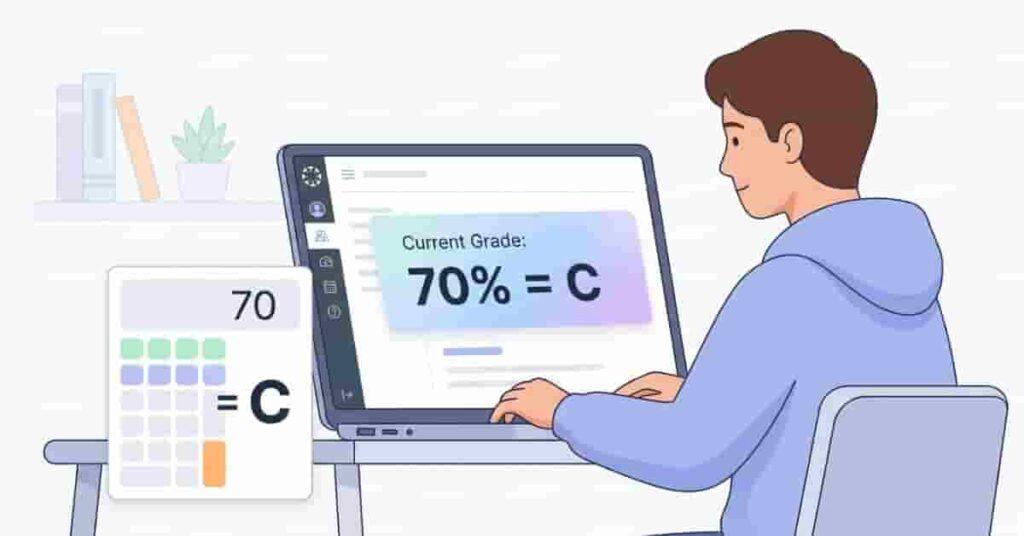
The short answer is simple. In most U.S. schools, 70% in Canvas usually equals a C grade. Many colleges and high schools follow the same grading scale, so a score between 70 and 79 percent often converts to a C.
However, Canvas only shows the percentage score by default. The letter grade depends on the grading scale set by your instructor or school. Some teachers keep the standard scale, while others adjust it for their course.
Standard Canvas Grading Scale
| Percentage | Letter Grade |
|---|---|
| 90–100% | A |
| 80–89% | B |
| 70–79% | C |
| 60–69% | D |
| Below 60% | F |
Using this scale, a 70 percent score sits at the start of the C range. This means you passed the course but still have room to improve.
Keep in mind that grading rules can vary. Some instructors adjust the ranges slightly or add plus and minus grades. For example:
- 77–79% may show as C+
- 73–76% may appear as C
- 70–72% may display as C-
Canvas simply follows the grading settings your instructor chooses. That is why two students with the same percentage might see different letter grades in different courses.
If you are unsure, open your Canvas syllabus or gradebook settings. Most instructors list the exact grading scale there. Checking this early helps you understand what your current percentage really means.
Pro Tips: Understanding Your Canvas Grade
- Always check your course syllabus for the exact grading scale.
- Look at weighted categories such as homework, quizzes, and exams.
- Use a Canvas grade calculator to test future scores and predict your final grade.
Is 70% a C or a D Grade?
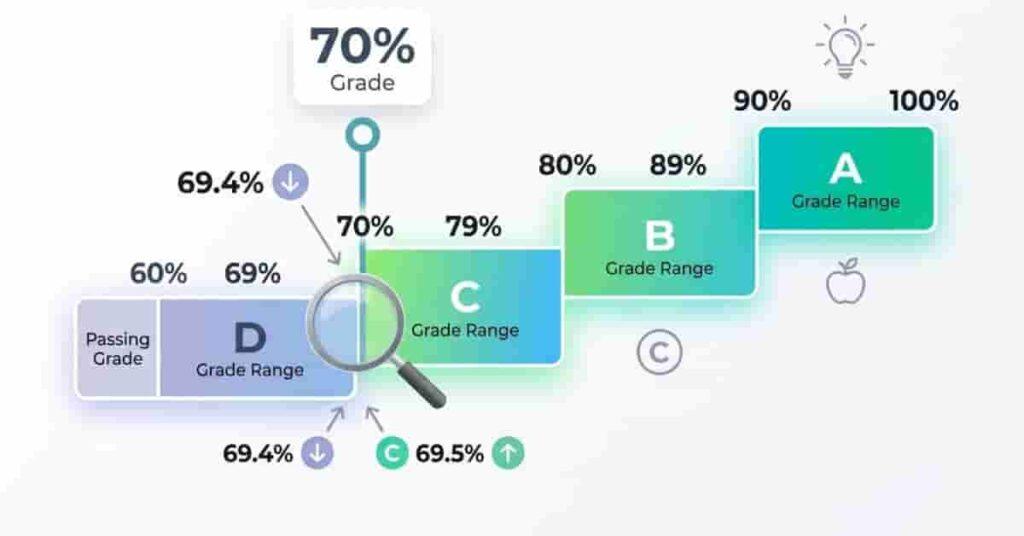
Many students ask this question after checking their gradebook. The confusion happens because Canvas shows percentages, while schools use letter grades. When you see 70%, it’s normal to wonder whether that’s a C or a D.
In the standard U.S. grading system, a 70% usually falls in the C range. Most high schools and colleges use a simple scale:
- 90–100% = A
- 80–89% = B
- 70–79% = C
- 60–69% = D
- Below 60% = F
Using this system, a 70% falls at the bottom of a C grade. It means you passed the course, but you may need improvement to reach a B.
Borderline percentages sometimes create confusion. For example, a student might earn 69.8% or 69.9% before rounding. If the instructor does not round grades, that score could remain a D rather than be rounded to 70%.
Sometimes, grading policies differ. Instructors may adjust scales or rounding, so a 70% could show up differently.
Example Scenario
Imagine a course with these assignment scores:
| Assignment | Score | Total |
|---|---|---|
| Homework | 85 | 100 |
| Quiz | 70 | 100 |
| Midterm | 65 | 100 |
| Project | 60 | 100 |
First, add the points earned: 70 + 60 + 90 + 60 = 280.
85 + 70 + 65 + 60 = 280 points
Next, add the total possible points: 100 + 100 + 100 + 100 = 400. Then divide the points earned by total points possible: 280 ÷ 400.
280 ÷ 400 = 70% course average
Using the standard grading scale, this 70% average equals a C grade in most Canvas courses.
Pro Tips: Avoid Grade Confusion
- Always check your course syllabus grading scale.
- Look for rounding rules in Canvas grade settings.
- Track your average weekly so small drops do not surprise you.
“Take control of your grades today! Use our Canvas GPA Calculator to see how your scores impact your GPA and plan for success.”
What Percentage is an A in Canvas?
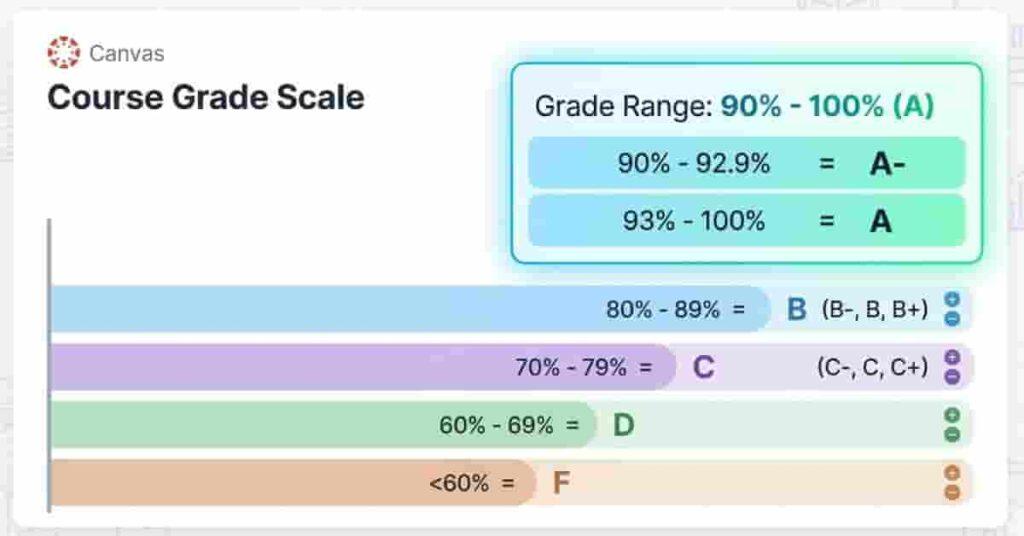
Many students track their grades closely and aim for an A. In most Canvas courses, this grade usually starts at 90%.
However, Canvas itself does not decide the letter grade. Your instructor sets the grading scale for the course. Because of this, the exact percentage for an A can vary between schools, departments, or even individual classes.
Most U.S. colleges begin the A range at 90%. So, if your Canvas grade shows 91% or 94%, it counts as an A. That’s why many students try to keep their average above 90%.
Still, some universities use plus-minus grading. These systems divide the A range into smaller categories. When this happens, the grade may appear as A, A-, or sometimes A+, depending on the exact percentage.
Typical A Grade Percentage
In many courses, the A range looks like this:
- A = 90–100%
Some universities use a slightly different breakdown:
- 93–100% = A
- 90–92% = A-
This grading style helps instructors give more precise feedback. For example, a 91% may show as A-, while a 95% appears as a full A.
Even with various scales, students usually need at least 90 percent on Canvas to earn an A-level grade.
Pro Tips: Reaching an A in Canvas
- Focus on high-weight assignments, check your Canvas gradebook for assignment weights, and use grade calculators or what-if grades to plan future scores.
- Check your assignment weights in the Canvas gradebook.
- Use what-if grades or a grade calculator to test future scores.
Is 89.5% an A?
Many students see 89.5% in Canvas and hope it becomes an A. The answer depends on the rounding rules your instructor has set. Canvas itself does not automatically change the grade. It simply follows the grading settings for that course.
In many U.S. schools, the A range begins at 90%. If your instructor allows rounding, 89.5% may be rounded up to 90%, which is an A. However, this is not guaranteed. Some instructors keep the exact percentage without rounding.
The Canvas gradebook settings your teacher chooses—such as rounding or displaying decimals—directly impact how scores like 89.5% are treated.
As a result, two students with the same percentage could get different results. One class may show 89.5 → 90 → A, while another keeps it as 89.5 → B.
When 89.5 Becomes 90
Rounding can occur if the instructor enables it in Canvas or if the course policy rounds to the nearest whole number for values of 0.5 or higher.
- The course policy rounds .5 or higher to the next whole number.
- The final grade is calculated and rounded at the end of the course.
When 89.5 Stays a B
In other cases, if rounding isn’t allowed, the score may remain unchanged and below the next letter grade.
- Canvas displays exact percentages with decimals.
- The grading scale strictly requires 90% for an A.
Pro Tips: Handling Borderline Grades
- Check the syllabus for rounding policies.
- Ask your instructor if grades are rounded.
- Complete small assignments to raise your average.%.
How Canvas Calculates Your Final Grade
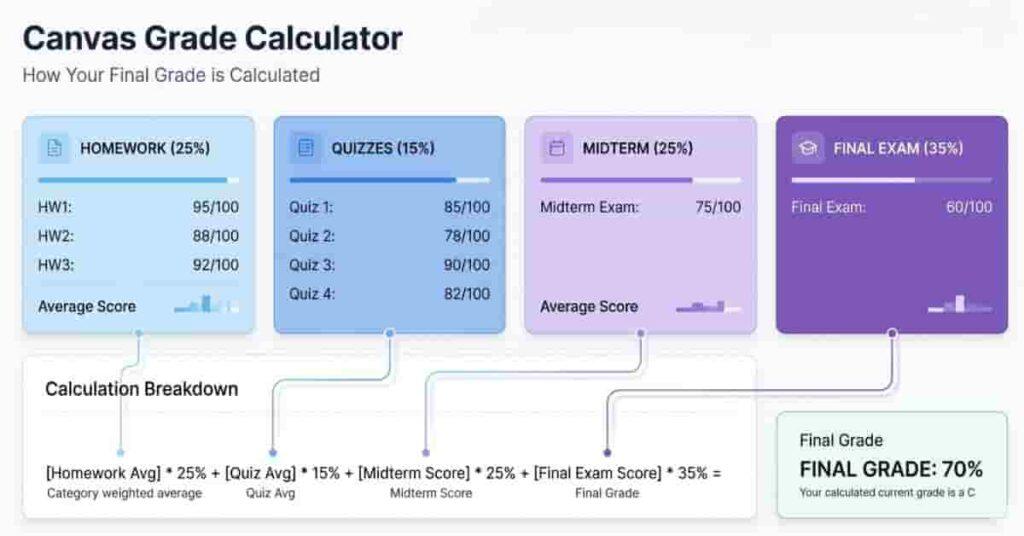
Canvas calculates your final grade by combining your assignment scores and your instructor’s grading rules into a single final percentage.
Many Canvas courses use weighted categories. Each category affects your final grade differently. Homework may count less than exams, and the final exam may carry the highest weight.
Canvas multiplies each category score by its weight, then sums them for your overall percentage. This number is later converted into a letter grade, such as A, B, C, D, or F.
Understanding this system helps answer questions like what 70% of your grade means or how a quiz score change affects your final result. Knowing the weights, you can predict future scores using a Canvas calculator.
Weighted Grading Example
Here is a simple example of a course grading structure:
| Homework | 30% |
| Quizzes | 20% |
| Midterm | 20% |
| Final Exam | 30% |
Now imagine your average scores look like this:
- Homework average: 75%
- Quizzes average: 65%
- Midterm score: 70%
- Final exam score: 70%
Canvas multiplies each score by its weight:
- Homework: 75 × 0.30 = 22.5
- Quizzes: 65 × 0.20 = 13
- Midterm: 70 × 0.20 = 14
- Final Exam: 70 × 0.30 = 21
Add the results:
22.5 + 13 + 14 + 21 = 70.5% overall average
This final percentage appears in your Canvas gradebook. Usually, a 70% overall average equals a C grade.
Pro Tips: Understanding Weighted Grades
- Check your assignment group weights in the Canvas gradebook.
- Focus on categories with the highest percentage weight.
- Use what-if scores to see how future exams affect your average.
How to Check What 70% Means for Your Course
If you scored 70% in Canvas, grading scales may vary by instructor or school. Here’s how to check what your percentage means for your grade.
- First, log in to Canvas and open your course. Next, select “Grades,” where you’ll find all assignment scores and percentages listed for your review.
- Locate the grading scale your instructor uses. This is typically found in the syllabus or in your Canvas course settings. Identify the exact percentage range that matches each possible letter grade.
- Determine the weight for each assignment category. Heavier-weighted categories like exams will influence your grade more than categories like homework. Identify these weights to see how your 70% fits into the overall grade calculation.
- Calculate your current total grade by multiplying each category’s score by its respective weight, and then adding them together. Canvas often does this automatically, but verifying it yourself ensures accuracy.
Two students with 70% may get different letter grades if instructors round differently or use custom scales. Always check your course settings to avoid surprises.
Pro Tips: Confirm Your Grade
- Compare the syllabus grading scale with Canvas settings.
- Double-check if weighted categories are set up right for your course.
- Try out a Canvas grade calculator to play with different “what-if” scenarios for upcoming assignments.
Practical Example – What 70% Means in a Course
Seeing 70% in Canvas can be unclear. Let’s break down what it means in real numbers.
Here’s a sample course with three graded items:
| Homework | 85 | 100 |
| Quiz | 40 | 50 |
| Midterm | 70 | 100 |
First, convert all scores to percentages:
- Homework: 85 ÷ 100 = 85%
- Quiz: 40 ÷ 50 = 80%
- Midterm: 70 ÷ 100 = 70%
To average scores equally, add the percentages and divide by the number of assignments: 85 + 80 + 70 = 235. 235 ÷ 3 = 78.3% average.
If your course uses weighted grading, the calculation changes. For example: Homework 30%, Quiz 20%, and Midterm 50%.
- Homework: 85 × 0.30 = 25.5
- Quiz: 80 × 0.20 = 16
- Midterm: 70 × 0.50 = 35
Add them: 25.5 + 16 + 35 = 76.5% final weighted average
A 70% midterm can still result in a passing average, like a C+ or B-, when paired with higher scores in other areas. Rounding rules vary by instructor.
Pro Tips: Using This Example
- Always check if your course uses equal or weighted grading.
- Track scores for each assignment category to see how they impact your final percentage.
- Try a Canvas grade calculator to run “what-if” scenarios and plan improvements.
How to Predict Your Grade in Canvas
Knowing your current grade is helpful, but forecasting your final grade is even more valuable. Canvas and similar tools enable students to estimate outcomes before the course concludes. This process is often called a “What-If” grade calculation.
The Canvas What-If feature lets you input hypothetical scores for future assignments or exams. For example, enter a 90% on your final exam to see its impact on your overall grade. This helps you plan study time and set achievable goals.
You can also use external Canvas grade calculators. These work similarly but often offer additional options, such as adjusting weights, adding extra credit, or testing multiple scenarios at once. Many calculators are free online and beginner-friendly.
Predicting your grade is especially valuable for exams. If your current average is 70%, a What-If calculation shows the exact score needed on the final to reach a B or an A. This directs your efforts to assignments with the greatest impact.
Pro Tips: Maximizing What-If Calculations
- Always update your current scores before testing new scenarios.
- Check the weights for each assignment category to ensure accuracy.
- Use predictions to prioritize high-impact exams or projects.
Tips to Improve a 70% Grade in Canvas
A 70% in Canvas usually means a C grade, but that’s just a starting point. With focus and determination, you can raise your overall percentage and reach for a B or even higher—believe in your ability to improve!
Start by focusing on high-weight assignments. Exams, major projects, and final papers often shape your grade more than homework or small quizzes. Prioritize studying for these assignments—you have the power to make a significant impact!
Next, track your grades weekly. Regularly reviewing your Canvas gradebook helps you spot low scores early. This allows you to address weak areas before they affect your final grade.
Using What-If calculations can also help. By entering hypothetical scores for upcoming assignments, you can see exactly what you need to achieve your target grade. This gives you a clear roadmap and helps you stay positive and proactive about your progress.
Finally, ask your instructor about extra credit opportunities. Some courses allow bonus assignments, participation points, or small projects that can boost your average. Taking initiative, even for a few points, can push your grade higher. Every step forward counts—keep striving!
Pro Tips: Maximizing Improvement
- Create a weekly grade tracking chart.
- Focus first on assignments with the largest weight.
- Combine extra credit with strong exam performance and watch your progress soar. Every effort brings you closer to your goal—keep pushing forward!
Conclusion
In this guide, we explained what a 70% in Canvas means and how percentages convert to letter grades. You learned that 70% usually equals a C, how rounding and weighted assignments can affect your score, and how Canvas calculates grades. We also offered tips for predicting your grade through What-If calculations and strategies to raise your average to 70%.
Grading scales vary by instructor or institution, so check your syllabus and Canvas settings. Knowing your current standing helps you plan for exams, assignments, and extra credit.
If this article helped you, take action now by using a Canvas grade calculator to explore your possible outcomes. Share your insights in the comments and check out our other guides to actively manage your grades and achieve your best results.
“Don’t guess your final grade! Explore our Canvas Grade Calculator to predict your outcomes and boost your academic performance.”

We are the Canvas Academic Team, a developer team focused on building simple and practical tools that help students succeed academically. This platform was created specifically for Canvas LMS students to make grade tracking, GPA calculations, exam planning, and academic management easier and more efficient.
Our focus is on creating fast, accurate, and student-friendly educational tools along with helpful learning resources that improve productivity and reduce academic stress.
Through CanvasGradeCalculator.com, our goal is to continue building useful resources that help students study smarter, stay organized, and achieve better academic results.