Table of Contents
Introduction
Have you just enrolled in a college course and have no idea how to access Blackboard?
Learning how to create a Blackboard account can feel confusing when you are new to online college tools. Unlike social media platforms, Blackboard accounts are usually connected to your school’s system.
Most U.S. colleges and universities provide Blackboard access through student enrollment. Your school may require you to activate your student account before you can sign in.
The exact process can also vary between schools. Some institutions use a separate student portal for account setup and Blackboard access.
This guide explains the Blackboard account setup process in simple steps. You will learn what to check before signing in and where to find your school’s Blackboard login page.
We will also cover what to do if your courses are missing after you log in. By the end, you should know the right steps to access Blackboard without unnecessary confusion.
How to Create a Blackboard Account
If you’re wondering how to create a Blackboard account, start with your college or university. Most students access Blackboard through an account provided by their school.
Follow these steps to get started:
- Check whether your school uses Blackboard. Visit your college website or student portal. Look for Blackboard, Learning Management System, or online learning information.
- Find your institution’s Blackboard login page. Your school may link to Blackboard from its main website or student portal. Use the official school link whenever possible.
- Follow the first-time setup instructions. Some schools require students to activate their school account before using Blackboard. Follow the instructions provided by your institution.
- Create or activate your institutional credentials. You may need to set a password, verify your identity, or complete account activation.
- Sign in to Blackboard. Use the username, email address, and password provided by your school.
- Check your course list. After signing in, look for the courses you’re enrolled in. Course availability can depend on enrollment and your instructor’s settings.
Important
There isn’t one universal Blackboard signup page for all students. Colleges and universities can use their own Blackboard login portals and account systems. Always follow your school’s official instructions rather than creating an account through an unrelated signup page.
How to Create a Blackboard Account as a Student
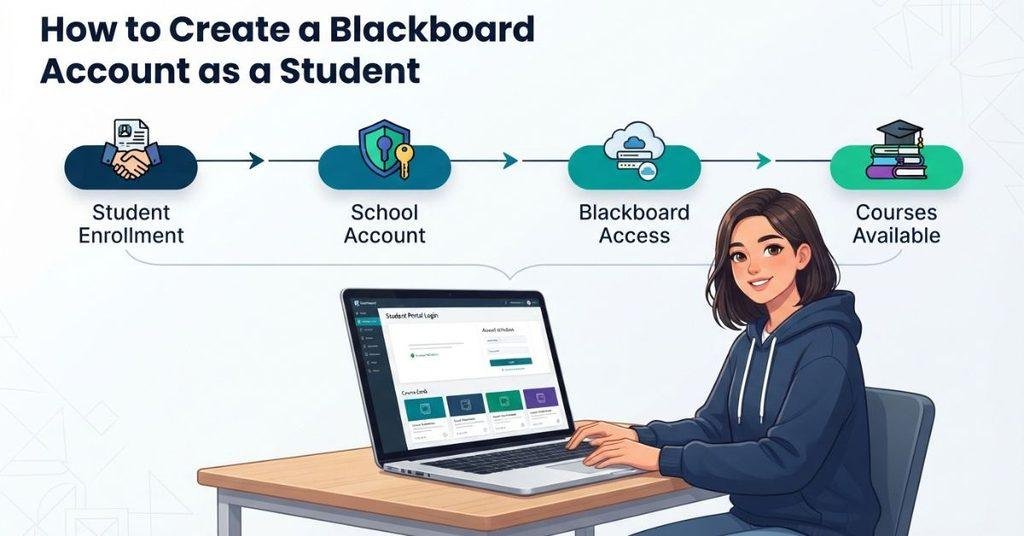
As a new student, you usually need to complete your school’s enrollment and account setup first. Blackboard access often connects to the student account managed by your college or university.
You may need the following:
- College or university enrollment: You generally need to be enrolled before your school can provide course access.
- Institutional student account: Your school may create an account for you during the enrollment process.
- School-provided username or email: Your institution may provide a student username or school email address.
- Password or account activation: You may need to create a password or activate your student credentials.
- Blackboard access: Your institution must make Blackboard available to your account.
After enrollment, your school may provision your Blackboard access automatically. However, the timing and setup process can vary between institutions.
Pro Tip
If you can log in but don’t see your courses, check your enrollment status first. Then contact your school’s Blackboard support team or help desk. Your courses may not be available until your enrollment information reaches Blackboard.
How to Make a Blackboard Account
If you’re searching for how to make a Blackboard account, the process is generally the same as creating one. The main difference is simply the wording people use when describing the setup process.
For most students, Blackboard account access is connected to their college or university account. You usually don’t create a separate Blackboard account independently. Instead, your institution manages your student credentials and Blackboard access.
Your school may create your account after enrollment or require you to activate your student account first. The exact steps depend on your institution’s Blackboard setup.
If you’re unsure what to do, check your school’s official student portal or contact the IT help desk. They can provide the correct Blackboard login and account activation instructions.
How to Set Up a Blackboard Account
Learning how to set up a Blackboard account becomes easier when you follow your school’s setup process in order. Your institution controls the exact steps, but this checklist covers the common process.
Activate Your Student Account
First, activate your college or university student account if required. Your school may provide instructions through an admissions email or student portal.
You may need to create a password, verify your identity, or complete an account activation step. Keep your student username and password secure.
Find Your University’s Blackboard Login
Next, find the Blackboard login provided by your university. Check your school’s website, student portal, or online learning page.
Avoid random Blackboard signup pages. Your institution may use a specific Blackboard portal for students.
Sign In for the First Time
Use your school-provided username or email and password to sign in. If your credentials don’t work, use your institution’s password recovery or IT support options.
Complete Any Required Profile or Security Setup
Your school may require additional security or account settings after your first login. Complete any required prompts before continuing.
These steps may include security verification, profile information, or password-related settings.
Check Your Blackboard Courses
After setup, open your Blackboard course list and check for your current classes. Course visibility can depend on enrollment, instructor settings, and your school’s system.
If your courses are missing, confirm your enrollment first. Then contact your school’s Blackboard support team if needed.
Do You Have to Create a Blackboard Account Yourself?
Usually, you don’t create a Blackboard account like an independent public account. Your college or university typically manages your Blackboard access.
Your institution may create or provision your Blackboard account after you enroll. You may then need to activate your student account or use your existing school credentials.
This means you might not see a “Create Account” button on the Blackboard login page. That’s normal when your school controls account creation.
Instead, check your school’s official website or student portal for Blackboard instructions. Your college may also send account activation details by email.
If you cannot find your Blackboard login information, contact your school’s IT help desk or Blackboard support team. They can tell you whether your account has been created and what steps you need to complete.
How to Get a Blackboard Account From Your College or University
Getting Blackboard access usually starts with your college or university enrollment. Your school then manages the account setup and provides the credentials you need.
The process commonly follows this path:
Enroll → Receive your institutional account → Blackboard access is enabled → Activate or sign in → Your courses appear
The exact timing can vary between schools. Some institutions may require additional account activation before Blackboard becomes available.
What If Your School Uses Blackboard?
Check your school’s website or student portal for its Blackboard information. Look for links labeled Blackboard, Online Learning, or Learning Management System.
Use the Blackboard login page provided by your institution. This helps ensure you’re using the correct portal.
What If You Don’t Have Blackboard Login Credentials?
First, check your school email, admissions messages, and student portal. Your institution may provide Blackboard instructions with your student account information.
If you still can’t find your credentials, contact your school’s IT help desk. Ask whether your student account and Blackboard access have been activated.
What If Your Blackboard Account Hasn’t Been Activated?
Your school may still be processing your enrollment or student account. Account provisioning can also depend on your institution’s systems and procedures.
Contact your school if you believe your account should already be active. Provide your student information and explain that you cannot access Blackboard.
What Do You Need to Create or Set Up a Blackboard Account?
The information needed for Blackboard setup depends on your college or university. Not every institution uses the same account activation process.
You may need some or all of the following:
- Student enrollment: Your school may need to confirm your enrollment before providing access.
- Institutional email or username: Your college may provide a school email address or username for Blackboard.
- School account credentials: You may use the username and password connected to your student account.
- Required verification or activation: Your institution may require identity verification or account activation.
- Blackboard access: Your school must provide or enable Blackboard access for your account.
You generally should not need to find a separate public Blackboard signup process. Your institution controls how students receive Blackboard access.
If you’re missing one of these items, check your student portal first. You can also contact your school’s IT or Blackboard support team for the correct next step.
How to Activate Your Blackboard Account for the First Time
If your school has already provided Blackboard access, you may only need to activate your student account. This process can be different from creating a new public account.
1. Locate Your Institution’s Blackboard Portal
Start by finding the Blackboard link on your college or university website. You can also check your student portal for online learning links.
2. Use the Credentials Provided by the School
Enter the username, student email, or other credentials provided by your institution. Your school may use the same credentials for several student services.
3. Follow Activation Instructions if Required
Some schools require students to activate their institutional account first. Follow the instructions provided by your college or university.
4. Sign In
After completing any required setup, return to your institution’s Blackboard portal. Enter your active credentials and sign in.
5. Verify Your Course List
Once you access Blackboard, check your course list for your current classes. If courses are missing, your enrollment or course availability may still be processing.
10. How to Log Into Blackboard After Creating Your Account
Once your Blackboard access is active, the next step is signing into your institution’s Blackboard portal. Use the credentials provided by your school and follow its login process.
For a complete walkthrough, see our guide on [How to Log Into Blackboard].
What If I Can’t Create a Blackboard Account?
Not finding a way to create a Blackboard account can be confusing. However, this does not always mean something is wrong with your Blackboard access.
Your school may manage account creation and access automatically. Several issues can prevent you from signing in or seeing your courses.
No “Create Account” Button
You may not see a “Create Account” button because your institution manages Blackboard accounts for students. Check your school’s official Blackboard instructions instead.
School Hasn’t Given Me Blackboard Access
Your institution may not have enabled Blackboard access for your student account yet. Contact your school’s IT help desk if you believe access should already be available.
Blackboard Says My Account Doesn’t Exist
First, make sure you’re using your school’s official Blackboard portal. Then verify your username or student email and check whether your institutional account is active.
If the problem continues, contact your school’s support team. They can confirm whether your Blackboard account exists.
I Can Log In but Can’t See My Courses
Successful login does not always mean your courses are immediately visible. Your enrollment may still be processing, or an instructor may not have made a course available.
Check your student enrollment status first. If everything looks correct, contact your school’s Blackboard support team for help.
What If I Forgot My Blackboard Password?
If you forgot your Blackboard password, don’t create another account. Your Blackboard login may use the same credentials as your school account.
Start with your institution’s password recovery process. Your school may provide a password-reset link through its student portal or IT support page.
If your Blackboard password is managed separately, follow the recovery instructions shown on your institution’s login page.
For detailed instructions, see [How to Reset or Change Your Blackboard Password].
What If My Blackboard Courses Aren’t Showing?
Logging into Blackboard doesn’t always mean your courses will appear immediately. Your course list depends on your school’s enrollment and course availability settings.
Several situations can cause missing courses:
- Enrollment is still processing: Your registration information may not have reached Blackboard yet.
- The course hasn’t opened: Your instructor or institution may set a specific course start date.
- The instructor hasn’t made the course available: A course can exist without being visible to students.
- Enrollment synchronization is delayed: Your school’s systems may still be updating Blackboard.
- You’re using the wrong account: Make sure you signed in with the student account connected to your enrollment.
If you recently registered for a class, give the school’s systems time to update. Contact your institution’s Blackboard support team if the course remains missing.
Can You Create a Blackboard Account Without a School?
For most students, Blackboard access comes through an organization that uses Blackboard for learning. Students generally don’t create an independent account for a school they aren’t connected with.
Your college, university, or other educational organization may provide access as part of its learning system. The organization controls how students receive credentials and course access.
However, Blackboard offers different products and configurations. Account options can therefore vary depending on the specific service or organization involved.
If you need Blackboard for a class, check whether your school provides access before trying to create a separate account.
Can You Create a Free Blackboard Student Account?
A personal account and school-provided Blackboard access are two different things. A student may have an account with an institution without independently signing up for that institution’s Blackboard environment.
Blackboard learning environments are typically provided through organizations that use the platform. The institution manages access, courses, enrollment, and related settings.
That means you shouldn’t assume you can simply sign up for the full Blackboard learning environment like a free consumer app. Whether an account or service is available depends on the specific Blackboard product and organization.
If you’re a student, start by checking whether your college or university already provides Blackboard access. This is usually the simplest route to your courses.
Blackboard Account vs. Blackboard Login
The terms Blackboard account and Blackboard login are related, but they describe different things.
Blackboard Account
Your account refers to the institutional access and credentials provided or managed by your college or university. These may include your student username, email, and password.
Blackboard Login
Your login is the process of using those credentials to enter your institution’s Blackboard portal. Your school may provide a specific login page for students.
Once your account is active, you can use your credentials to sign in to Blackboard.
For step-by-step instructions, see [How to Log Into Blackboard].
Once your Blackboard courses are available, you can use our [Blackboard Grade Calculator] to calculate your current course grade. You can also estimate how future assignments may affect your overall grade.
Conclusion
Creating access to Blackboard usually starts with your college or university, not a public signup form. We covered how to create a Blackboard account, activate your student credentials, find your school’s login portal, and troubleshoot common access problems.
Remember that each institution can use different account and enrollment procedures. If you cannot see your courses, check your enrollment status and confirm you’re using the correct school account.
Once your Blackboard access is active, you can sign in and start using your available courses. You can also use our Blackboard Grade Calculator to track your course grades.
If this guide helped you, share it with another student who needs Blackboard access. Explore our other Blackboard guides for more practical student help.
Most students receive Blackboard access through their college or university. Check your school’s website or student portal for the Blackboard login page. Follow your institution’s account activation instructions and sign in with your school-provided credentials.
Start by completing your college or university enrollment. Your school may then create or provision your student account and Blackboard access. Activate your institutional credentials if required, then use them to sign in to Blackboard.
“Make a Blackboard account” generally means the same thing as creating one. However, your school usually controls the account setup process. Check your institution’s Blackboard instructions instead of looking for a universal signup page.
First, activate your student account if your school requires it. Then find your institution’s Blackboard portal and sign in with your school credentials. Complete any required security or profile setup, then check your available courses.
Your school usually handles Blackboard access and course setup. You may need to activate your student credentials before signing in. Once you access Blackboard, check your course list and follow any instructions from your instructors.
Usually, students don’t create a separate Blackboard account independently. Their college or university typically provides or provisions Blackboard access. You may only need to activate your student account and use the credentials provided by your institution.
Blackboard is commonly used through colleges, universities, and other organizations. Students generally access a school’s Blackboard environment through that organization. Account options can vary because Blackboard offers different products and configurations.
You shouldn’t assume you can sign up for a full Blackboard learning environment like a free consumer app. Schools typically provide access through their own Blackboard setup. Check whether your college or university already provides Blackboard access.
Requirements vary by institution. You may need enrollment, a school-provided username or email, institutional credentials, and account activation or verification. Your school must also provide or enable Blackboard access for your account.
Your school may manage Blackboard account creation instead of allowing independent registration. You may also be using the wrong portal, or your student account may not be activated yet. Contact your school’s IT or Blackboard support team if you need help.
Your enrollment may still be processing, or the course may not be available yet. An instructor may also need to make the course available. Check that you’re using the correct student account and contact your school if the course remains missing.
Use the Blackboard portal provided by your college or university. Enter your school username or email and password, then complete any required verification. For detailed instructions, see our guide on How to Log Into Blackboard.

We are the Canvas Academic Team, a developer team focused on building simple and practical tools that help students succeed academically. This platform was created specifically for Canvas LMS students to make grade tracking, GPA calculations, exam planning, and academic management easier and more efficient.
Our focus is on creating fast, accurate, and student-friendly educational tools along with helpful learning resources that improve productivity and reduce academic stress.
Through CanvasGradeCalculator.com, our goal is to continue building useful resources that help students study smarter, stay organized, and achieve better academic results.