Table of Contents
Introduction
Have you ever copied text into Canvas and wondered, “Can my teacher actually see that?”
If you’re a student in the USA, this question can cause real stress. Canvas records different types of course activity, but that does not mean it automatically records every action on your device.
So, can Canvas see if you copy and paste? The answer depends on what Canvas feature is being used and whether other monitoring tools are involved. Understanding this difference can help you avoid confusion about what your instructor may actually see.
In this guide, we’ll explain what Canvas can track and what it does not necessarily reveal. You’ll also learn how assignment submissions, quizzes, page views, and plagiarism checkers fit into the picture.
We’ll separate Canvas’s built-in activity tracking from external tools. You’ll get a clear, beginner-friendly explanation without confusing technical terms.
While Canvas may track certain activity, students often also wonder whether their teacher can actually see when they copy and paste.
By the end, you’ll know what Canvas may record and what you should not automatically assume it can detect.
Can Canvas See If You Copy and Paste?
Can Canvas see if you copy and paste? Usually, you should not assume that Canvas records every copy or paste action. Canvas can record certain course activity and page-view data, but that is different from tracking each keyboard shortcut or clipboard action.
Copying text and Canvas recording activity are two separate things. For example, Canvas may record that you viewed a course page or interacted with an assignment. That does not automatically show that you pressed Ctrl+C, Ctrl+V, or another copy-and-paste shortcut.
Canvas also does not automatically give instructors access to everything you do on your computer. What instructors can see depends on the Canvas features available to them and any additional tools used by the school. Students should avoid assuming that every clipboard action becomes visible in Canvas.
Can Canvas See When You Copy and Paste?
Can Canvas see when you copy and paste? Not necessarily. Canvas may record an activity or page view around the same time, but that does not prove that a copy-and-paste action occurred.
For example, Canvas may show that you accessed a course page or opened an assignment. It may also record other available course activity. However, those records are different from a direct record of the exact moment you copied or pasted text.
This distinction matters because activity tracking does not automatically equal copy-and-paste detection. If a course uses separate monitoring, proctoring, or originality tools, those tools may provide additional information. Their capabilities depend on the specific software and settings.
Does Canvas Track Copy and Paste?
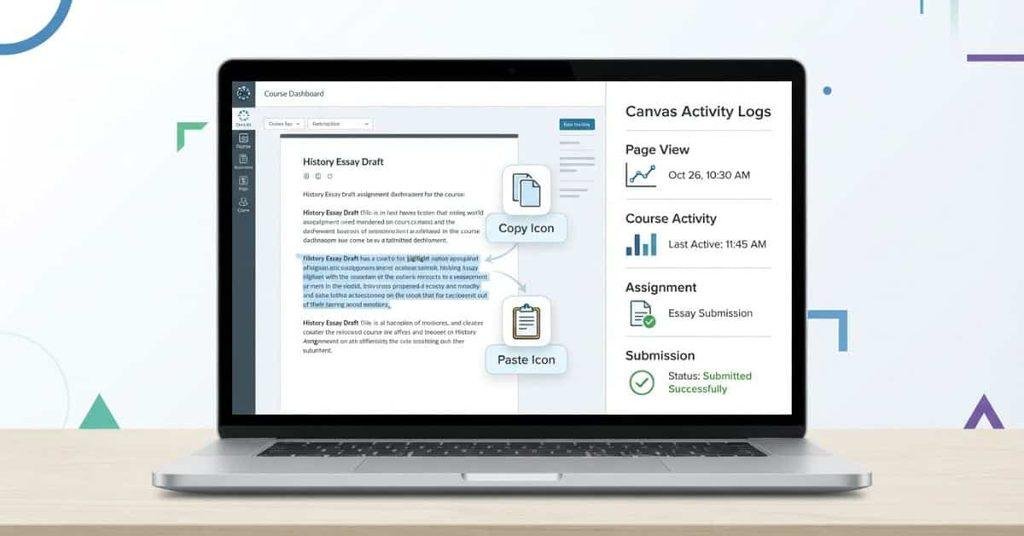
When people search for Canvas copy paste tracking, they often mean one simple thing: does Canvas record the act of copying or pasting? Canvas provides instructors with different types of course activity data, but that does not mean every clipboard action becomes a separate record. Canvas analytics can include information such as page views, course activity, participation, grades, and submissions.
So, can Canvas detect copy and paste? You shouldn’t assume that standard Canvas activity data proves a specific copy-and-paste action. A page view can show that you accessed content, while a submission can show what you submitted. Those records do not automatically explain every action you took before submitting your work.
The exact information available can also vary by Canvas feature, course setup, and instructor permissions. Additional tools may provide separate monitoring or originality information. That’s why Canvas activity tracking and copy-and-paste detection should not be treated as the same thing.
What Can Canvas Actually Track?
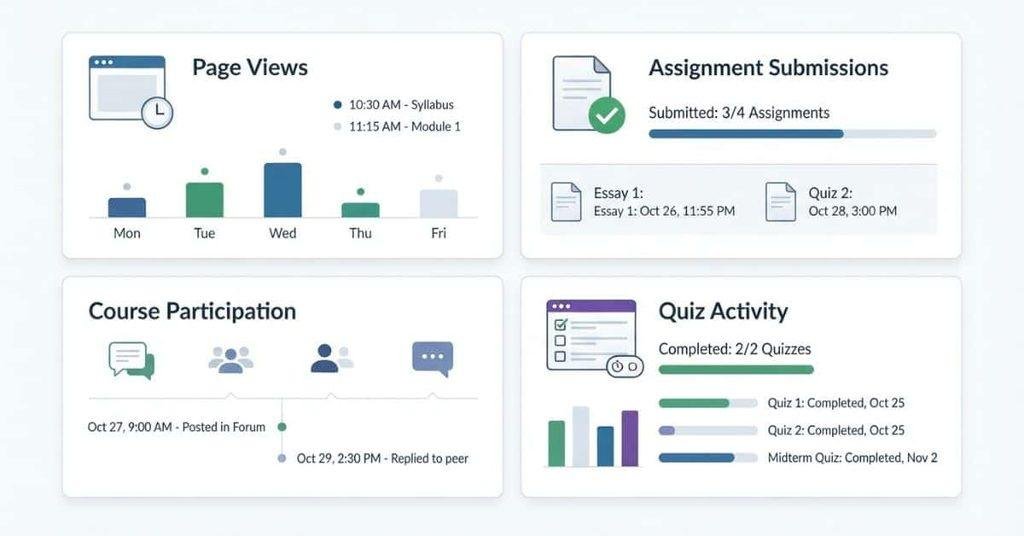
Understanding what Canvas can record gives you a clearer picture than a simple yes-or-no answer. Canvas provides several types of course activity information through its analytics and course tools.
If your main concern is what your instructor can see rather than what Canvas records, read our guide on whether teachers can see copy-and-paste activity on Canvas.
Page Views and Course Activity
Canvas can provide page-view and course-activity information when those analytics are available. This can help instructors understand how students interact with course materials.
For example, activity data may show that a student viewed a particular course page. It can provide useful information about interaction with Canvas content. However, a page view does not automatically reveal every action performed while viewing that page.
This distinction matters when discussing Canvas copy paste tracking. Seeing that you accessed a resource is different from seeing exactly what you copied from it.
Assignment Submissions
Canvas records information related to assignments and their submissions. Depending on the assignment setup, instructors can review submitted work, submission status, grades, and related activity.
The submitted content can therefore matter more than assumptions about how you entered the text. If an assignment uses an originality or plagiarism-checking tool, that tool may analyze the submitted work separately.
A submission record still shouldn’t be treated as automatic proof that you copied and pasted something. The available evidence depends on the tools and settings used for that assignment.
Course Participation
Canvas can provide participation and activity information through relevant analytics features. These tools help instructors understand student engagement within a course.
For example, available analytics may help instructors review interactions with course materials or assignments. The exact information depends on the Canvas features enabled for that course.
Participation data can provide useful context, but it doesn’t necessarily identify every action a student takes. A record of course activity is not automatically a record of every copy-and-paste action.
Login and Course Activity Data
Canvas can provide different types of activity information depending on the available features and permissions. Instructors may have access to different analytics than students.
This means you shouldn’t assume that every Canvas course provides the same activity information. Course configuration, available analytics, and institutional settings can affect what instructors can review.
For that reason, the safest explanation is simple: Canvas can track certain activity within its platform, but that doesn’t mean it automatically records every action on your device.
Can Canvas Tell If You Copied Text From Another Website?
Copying text from another website and detecting plagiarism are two different things. Canvas activity data may show that you accessed course content or interacted with an assignment. It does not automatically mean Canvas checks every piece of text you copy from another website.
Plagiarism or academic-integrity checking may involve separate tools or integrations. An instructor or school may use an originality checker with a particular assignment. That tool can compare submitted content against available sources, depending on its features and settings.
This creates an important distinction. Copying text is an action, while plagiarism detection evaluates submitted content. A similarity report may identify matching text, but that does not necessarily show how you entered the text.
So, students shouldn’t assume that normal Canvas activity tracking automatically detects everything they copy. The tools enabled for the course and assignment determine what information instructors can review.
Can Canvas Detect Pasted Text in an Assignment?
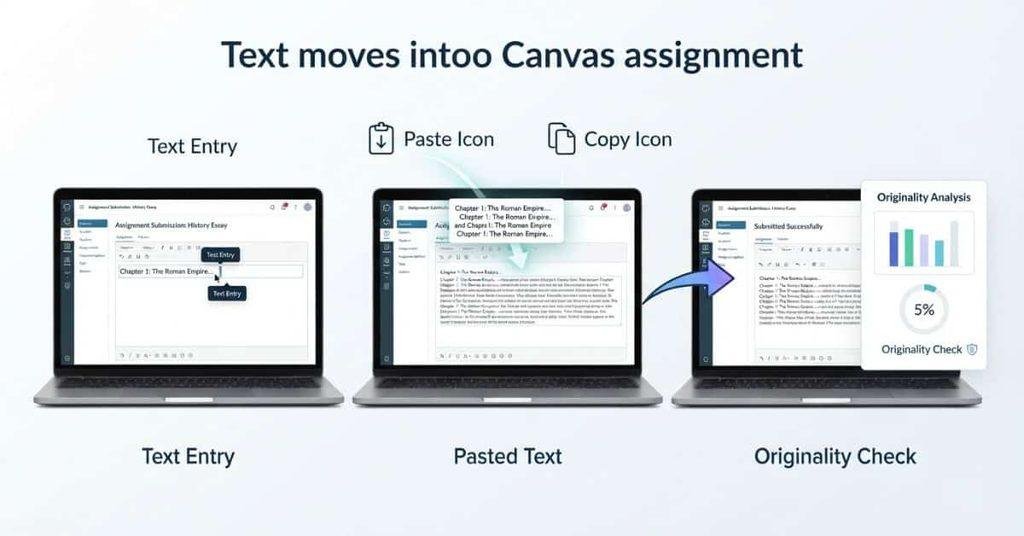
Can Canvas detect pasted text in an assignment? You should not assume that standard Canvas activity tracking identifies whether you typed or pasted the text. Canvas can record assignment-related information, including submissions, while separate tools may analyze the submitted content.
There is an important difference between how text enters an assignment and what happens after you submit it. You might type a sentence manually or paste it from another source. The submitted assignment contains the resulting text, but that alone doesn’t explain how you entered it.
If an assignment uses an external plagiarism or originality tool, the submitted work may receive additional analysis. Depending on the tool, it may identify similarities with sources or other submissions.
Instructor review can also add context. Teachers may consider the submitted work, assignment requirements, citations, and available course information together. Therefore, pasted text and plagiarism detection are not automatically the same thing.
Can Teachers See If You Copy and Paste on Canvas?
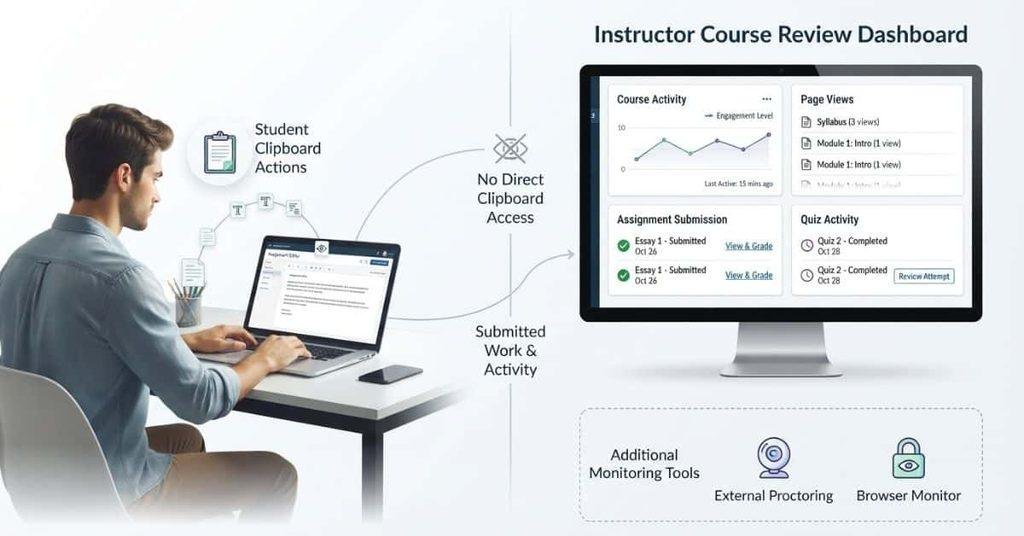
Teachers may see certain Canvas activity, but that doesn’t automatically mean they can see every copy-and-paste action. What an instructor can review depends on the Canvas features available and any additional tools used for the course.
For example, instructors may have access to assignment submissions, quiz activity, page views, or other available course analytics. Separate originality checkers or monitoring software may provide additional information. These tools can work differently from standard Canvas activity tracking.
The key point is that Canvas activity data isn’t the same as direct copy-and-paste detection. Students should check their course requirements and understand which tools their instructor uses.
For a deeper look at instructor visibility, see [Can Teachers See If You Copy and Paste on Canvas?].
Does Canvas Know If You Copy and Paste During a Quiz?
Quiz situations can raise different concerns because Canvas records information related to quiz attempts and activity. However, you shouldn’t assume that Canvas automatically detects every copy-and-paste action during every quiz.
Depending on the course setup, instructors may have access to information about quiz attempts and related activity. Some courses may also use browser restrictions, device controls, or other settings designed for assessments.
Schools can also use separate proctoring or monitoring software. These tools may provide capabilities that standard Canvas does not provide. Their features depend on the specific software, configuration, and institutional policies.
Therefore, Canvas quiz monitoring can vary between courses. A quiz using only standard Canvas features may provide different information than one using additional monitoring tools. The safest approach is to follow the quiz instructions and avoid assuming that all courses use the same tracking methods.
Can Canvas Detect Copy and Paste From Another Tab?
Switching to another browser tab does not automatically mean Canvas knows everything you do there. Canvas can record certain activity within its platform, but that differs from monitoring your entire browser.
For example, opening another page may result in different activity depending on whether that page belongs to Canvas. A Canvas page view can provide information about activity within Canvas, but it doesn’t automatically show every action performed on another website.
Browser monitoring and external proctoring tools work differently. Some institutions may use these tools during quizzes or exams to provide additional monitoring capabilities. Their features depend on the software and settings used by the school.
So, don’t treat switching tabs as automatic proof that Canvas detected a copy-and-paste action. Standard Canvas activity tracking and dedicated browser monitoring are separate things.
Does Canvas Track What You Do Outside Canvas?
Canvas can provide information about activity that happens within its own platform. This can include available page views, course interactions, assignment activity, and quiz or submission-related information.
However, students shouldn’t assume that Canvas automatically records everything happening on their device. Standard Canvas activity data does not mean instructors can automatically see every website you visit or every action you take elsewhere.
You also shouldn’t automatically assume that Canvas records every clipboard action. Copying text from another website, opening a different browser tab, or using another application are separate activities from interacting with Canvas.
External browser-monitoring or proctoring software can have different capabilities. If a school uses such software, its monitoring features may extend beyond standard Canvas activity data.
The important distinction is simple: Canvas can provide information about activity within Canvas, while separate monitoring tools may provide additional information.
Knowing what Canvas can detect is only part of the picture. You can also learn what information teachers may be able to see when students copy and paste on Canvas.
What About Turnitin and Other Plagiarism Checkers?
Turnitin and other originality tools serve a different purpose from standard Canvas activity tracking. They can analyze submitted text for similarities with sources or other available content, depending on the tool and assignment settings.
For example, an instructor may connect an originality checker to a Canvas assignment. After submission, the tool may generate a similarity or originality report. The instructor can then review the report alongside the student’s submitted work.
This doesn’t mean the tool automatically knows whether you typed or pasted every sentence. Its primary focus is the submitted content and its similarities, not simply the method used to enter that content.
Institution-specific integrations can also change how these tools work. Some assignments may use an originality checker, while others may not.
That’s why “Can Canvas see copy and paste?” and “Can Canvas detect plagiarism?” are different questions. Canvas activity data concerns course activity, while plagiarism tools focus on analyzing submitted work.
H2: Does Copying and Pasting Mean Canvas Will Flag You? Answer carefully. Explain that: Copy/paste itself ≠ automatic plagiarism finding. What matters can include: Submitted content Similarity/originality checking Assignment requirements Instructor review Course/institution policies This is a very useful student clarification. H2: How to Stay Safe With Copying and Pasting in Canvas Instead of giving students ways to hide copying, make this an academic-integrity section. Cover: Use sources properly Paraphrase in your own words Cite outside sources Follow assignment instructions Check whether an assignment requires original work Review your submission before submitting This keeps the article genuinely educational and suitable for your site. H2: Common Questions About Canvas Copy and Paste Use concise FAQ-style answers. H3: Can Canvas see if you copy and paste? H3: Can Canvas see when you copy and paste? H3: Can Canvas see if I copy and paste? H3: Can Canvas detect copied text? H3: Can teachers see if you copy and paste on Canvas? H3: Does Canvas track copy and paste? H3: Can Canvas detect copy and paste during a quiz? H3: Does Canvas know what you copy from another website?
Does Copying and Pasting Mean Canvas Will Flag You?
Copying and pasting text does not automatically mean Canvas will flag you for plagiarism. Canvas activity data and plagiarism detection are different things, and a specific course may use additional tools.
What happens after you paste the text can matter more. Instructors may consider the submitted content, similarity or originality reports, assignment requirements, and their own review.
Course and institutional policies also matter. Some assignments may require completely original work, while others may allow outside sources with proper citations.
The safest approach is to follow the assignment instructions carefully. Don’t assume that a similarity report or Canvas activity record automatically proves academic misconduct. Instructors and institutions may use several sources of information when reviewing academic-integrity concerns.
How to Stay Safe With Copying and Pasting in Canvas
Copying and pasting can be useful when working with research, notes, or source material. The important part is using that material according to your assignment’s rules.
Follow these practices:
- Use sources properly: Keep track of information that comes from outside sources.
- Paraphrase carefully: Express ideas in your own words when paraphrasing is allowed.
- Cite outside sources: Follow the citation style required by your instructor.
- Follow assignment instructions: Check whether outside material or copied text is allowed.
- Check originality requirements: Some assignments may require entirely original responses.
- Review your submission: Make sure your citations, quotations, and wording meet the assignment requirements.
These habits help you avoid confusion about plagiarism and academic-integrity rules. When you’re unsure, ask your instructor before submitting the assignment.
Conclusion
Canvas can record different types of course activity, but that doesn’t mean it automatically records every copy-and-paste action. We also covered page views, assignments, quizzes, originality tools, and external monitoring.
So, can Canvas see if you copy and paste? You shouldn’t assume that standard Canvas activity data proves a specific copy-and-paste action. What instructors can review depends on the Canvas features, course settings, and additional tools used.
For students in the USA, the safest approach is to follow assignment rules and cite outside sources properly. If you’re unsure about an assignment’s requirements, ask your instructor before submitting.
Have questions about Canvas activity or copy-and-paste tracking? Share your experience or explore more Canvas guides and calculators on our website.
Common Questions About Canvas Copy and Paste
Can Canvas see if you copy and paste?
Canvas can record certain course activity, but you shouldn’t assume it records every copy-and-paste action. Additional tools may provide different types of monitoring.
Can Canvas see when you copy and paste?
Canvas activity records don’t automatically prove the exact moment you copied or pasted something. Available information depends on the Canvas features and other tools being used.
Can Canvas see if I copy and paste?
Canvas may record activity related to an assignment or course page. That doesn’t automatically mean it can identify every clipboard action on your device.
Can Canvas detect copied text?
Canvas itself and external originality tools serve different purposes. An originality checker may analyze submitted text for similarities, depending on the assignment and integration.
Can teachers see if you copy and paste on Canvas?
Teachers may see available Canvas activity and submitted work. Whether additional information is available depends on the course features and monitoring tools.
Does Canvas track copy and paste?
Don’t assume standard Canvas analytics track every copy-and-paste action. Canvas can provide other activity information, such as available page views and course interactions.
Can Canvas detect copy and paste during a quiz?
Quiz activity can be recorded, but Canvas doesn’t automatically mean every quiz uses direct copy-and-paste detection. Browser restrictions or external proctoring can add different monitoring capabilities.
Does Canvas know what you copy from another website?
Standard Canvas activity data doesn’t mean it automatically sees everything you do on another website. Separate browser-monitoring or proctoring software may have additional capabilities.

We are the Canvas Academic Team, a developer team focused on building simple and practical tools that help students succeed academically. This platform was created specifically for Canvas LMS students to make grade tracking, GPA calculations, exam planning, and academic management easier and more efficient.
Our focus is on creating fast, accurate, and student-friendly educational tools along with helpful learning resources that improve productivity and reduce academic stress.
Through CanvasGradeCalculator.com, our goal is to continue building useful resources that help students study smarter, stay organized, and achieve better academic results.