
Instantly See How Removing Your Lowest Grade Can Improve Your Canvas Score
🚀 Powerful Features Built for Canvas Students
🎯 Automatic Lowest Grade Detection
📚 Quiz, Test & Assignment Support
- 📝 Quizzes
- 📖 Homework
- 🧪 Exams
- 📂 Projects
- 📊 Assignment Groups
📈 Before vs After Grade Comparison
- ✅ Original grade average
- ✅ Updated average after drop
- ✅ Percentage improvement
- ✅ Final grade impact
🎬 Unlimited What-If Scenarios
- 🔍 Which assignment hurts your grade the most
- 📈 How much can your score improve
- 🎯 Whether future assignments can recover your grade
📱 Mobile Friendly & Lightning Fast
- 📱 Phones
- 💻 Laptops
- 📲 Tablets
- 🎓 Canvas dashboards on the go
💡 Smart Grade Insights
- ⚠️ Grade improvement opportunities
- 🏆 Letter grade changes
- 📊 High-impact low scores
- 🎯 Best drop-score scenarios
Assignment Groups
🟢 How to Use the Canvas Drop Lowest Score Calculator
Using the Canvas Drop Lowest Score Calculator is simple and quick. Just enter your assignment scores, select the lowest grade to drop, and the calculator will instantly update your overall Canvas percentage. It helps you clearly see how removing a low score impacts your final grade without any manual calculations.
- Step 1
- Step 2
- Step 3
- Step 4
- Step 5
- Step 6
- Step 7
- Step 8
Step 1️⃣ — Add Your Assignment Groups
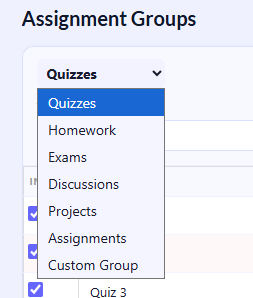
Start by creating assignment categories like:
- 📝 Quizzes
- 📖 Homework
- 🧪 Exams
- 📂 Projects
Each group can have its own grading weight, just like in Canvas.
💡 Pro Tip: Match your calculator setup with your actual Canvas course structure for the most accurate results.
Step 2️⃣ — Enter Group Weights
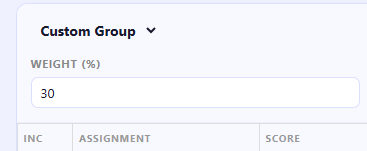
Add the percentage weight for each assignment group.
Example:
- Quizzes → 30%
- Homework → 30%
- Exams → 40%
The calculator uses these weights to simulate real Canvas weighted grading rules.
💡 Pro Tip: Your total group weights should equal 100% for accurate final grade calculations.
Step 3️⃣ — Add Assignment Scores
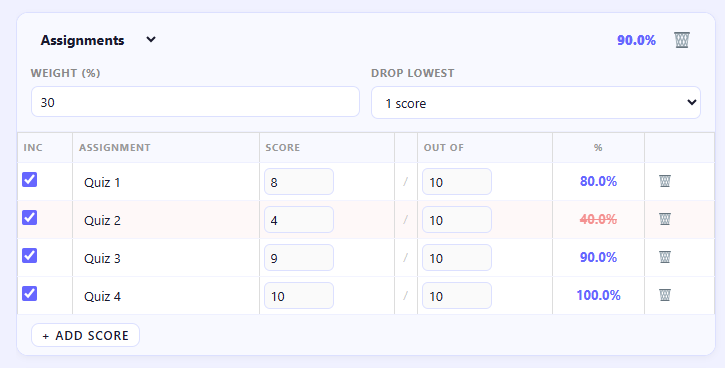
Now enter all your quiz, homework, and exam scores.
Example:
- Quiz 1 → 8/10
- Quiz 2 → 4/10
- Quiz 3 → 9/10
- Quiz 4 → 10/10
The calculator instantly converts scores into percentages automatically.
💡 Pro Tip: Add every assignment from Canvas to get the most realistic grade prediction.
Step 4️⃣ — Enable “Drop Lowest Score”
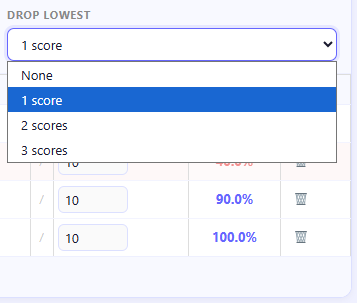
Choose how many scores you want to drop inside each assignment group.
Example:
- Drop 1 lowest quiz
- Drop 2 homework scores
- Keep exam scores unchanged
The calculator will automatically remove the lowest-performing grades.
💡 Pro Tip: Most Canvas courses apply drop rules separately within each assignment group.
Step 5️⃣ — Instantly View Grade Impact
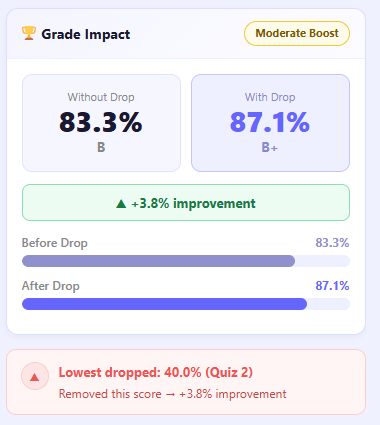
As soon as scores are entered, the calculator shows:
- 📊 Original grade
- 📈 Updated grade after dropping scores
- 🏆 Letter grade changes
- ▲ Total percentage improvement
Example:
- Before Drop → 83.3% (B)
- After Drop → 87.1% (B+)
💡 Pro Tip: One low quiz score can sometimes increase your final grade more than expected after removal.
Step 6️⃣ — Analyze Score Breakdown
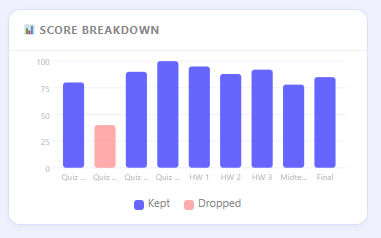
Use the score breakdown chart to see:
- ✅ Which scores are counted
- 🗑 Which scores are dropped
- 📉 Weak performance areas
- 📚 Strong assignment groups
This helps students understand which assignments affect their grade the most.
💡 Pro Tip: Large score differences inside one category usually create the biggest drop-score benefits.
Step 7️⃣ — Test “What If” Scenarios
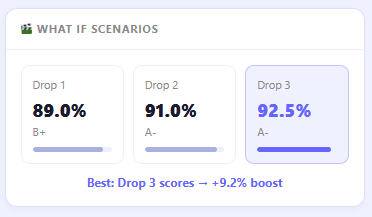
Experiment with multiple drop-score combinations to compare outcomes.
Example:
- Drop 1 score → 89.0%
- Drop 2 scores → 91.0%
- Drop 3 scores → 92.5%
This helps predict how future assignments may improve your grade.
💡 Pro Tip: Testing scenarios is one of the best ways to plan grade recovery strategies before finals.
Step 8️⃣ — Review Smart Insights
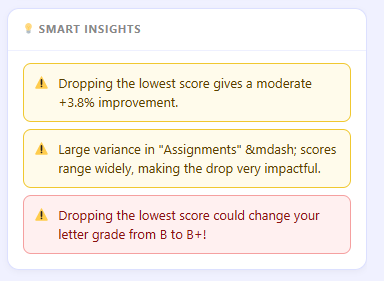
Finally, check the Smart Insights section for automatic analysis.
The calculator can highlight:
- ⚠️ High-impact low scores
- 📈 Potential grade boosts
- 🏆 Letter grade improvements
- 🎯 Best score-drop strategy
Example Insight:
“Dropping Quiz 2 increases your overall grade by +3.8% and changes your letter grade from B to B+.”
💡 Pro Tip: Use Smart Insights to identify which assignment groups need the most improvement during the semester.
Confused About Canvas “Drop Lowest Score” Rules?
- Which quiz or assignment score will be dropped?
- How much can their average improve after removing a low grade
- Whether one bad test score still hurts their final percentage
- How Canvas calculates dropped assignments and grading rules
- If missing assignments are included in the dropped score policy
How Canvas “Drop Lowest Score” Grading Works
Many instructors use Canvas grading rules that automatically remove the lowest quiz, homework, or assignment score from a student’s final grade calculation. This grading policy is designed to give students more flexibility and reduce the negative impact of one poor performance during the semester.
Canvas drop-lowest rules are commonly used to:
- ✅ Reward consistent academic performance
- 📉 Reduce the impact of one bad test or quiz
- 📝 Help students recover from missed assignments
- ⚖️ Create a more balanced and fair grading system
- 🎯 Encourage improvement throughout the course
Depending on how the instructor configures the course, Canvas may:
- 🗑 Drop the single lowest quiz score
- 📚 Remove multiple assignments automatically
- ⚠️ Ignore missing or excused grades
- 📊 Apply weighted assignment group calculations
- 🧮 Drop scores separately inside each assignment category
For example, a course may drop:
- One quiz from the quiz category
- Two homework assignments
- No exam scores at all
In weighted Canvas courses, dropping a low score can significantly improve the contribution of a specific assignment group to the final grade.
Because every instructor sets grading policies differently, many students struggle to understand how their actual grade is calculated. A Canvas Drop Lowest Score Calculator helps simplify these rules by instantly showing how removing low scores changes the final percentage, letter grade, and overall academic standing.
Common Situations Where This Calculator Helps
The Canvas Drop Lowest Score Calculator is useful in many real academic situations where students need to understand how removing a low score impacts their overall grade.
🎯 Dropping the Lowest Quiz Score
Perfect for weekly quizzes, online tests, and short assessments where one low score can significantly affect your average.
📝 Ignoring One Missed Assignment
Helpful when your instructor allows one homework or assignment to be excluded due to absence or missed submission.
📈 Final Grade Recovery Planning
Useful for predicting whether upcoming assignments can compensate for a low score and improve your final grade.
⚖️ Understanding Weighted Canvas Courses
Ideal for courses that use weighted assignment groups like quizzes, homework, and exams to calculate the final grade.
💡 Pro Insight:
Most students use this calculator before exams or finals to quickly see how much their grade can improve by dropping a low score and adjusting future performance strategies.
Why Students Use a Drop Lowest Grade Calculator
- 📉 Recover from one bad quiz or low test score
- 📚 Understand instructor grading and drop-score policies
- 🎯 Predict semester and final course grades
- 😌 Reduce stress and anxiety about low scores
- 📈 Plan future assignment performance more effectively
- 🏆 Improve GPA and overall academic strategy
- 🧮 Test multiple grade recovery scenarios instantly
- ⚡ See how much a dropped score improves their average
Stop guessing how much your lowest score is affecting your final Canvas grade.
Use the Canvas Drop Lowest Score Calculator to quickly:
- 🗑 Remove low grades instantly
- 📊 Predict your updated average in seconds
- 📚 Understand Canvas grading policies clearly
- 🎯 Plan smarter strategies for future assignments and exams
📌 Frequently Asked Questions :
What does “drop lowest score” mean in Canvas?
It means the lowest assignment, quiz, or test score is automatically removed from your final grade calculation, so it does not negatively affect your overall percentage.
Can Canvas automatically drop quiz grades?
Yes. Instructors can set up Canvas grading rules to automatically ignore the lowest quiz, assignment, or exam scores within an assignment group.
Does dropping the lowest grade improve my average?
In most cases, yes — especially if your lowest score is much lower than your other grades. Removing it often increases your overall percentage.
Can I drop multiple assignments?
Yes, but it depends on your course settings. Some Canvas classes allow dropping more than one lowest score, while others only drop one.
Does this work for weighted grades?
Yes. The Canvas Drop Lowest Score Calculator works with weighted grading systems by applying drops within each assignment group and recalculating the final weighted average accurately.
