
Canvas Extra Credit Impact Calculator – Instantly See Bonus Points & Grade Improvement

Unlock your potential in Canvas LMS by instantly understanding how bonus points, extra assignments, quizzes, and participation credit affect your overall course grade. Test different improvement scenarios and see your projected percentage in real time.

📊 Weighted Grade Support
Works with Canvas weighted assignment groups and percentage-based grading systems to deliver accurate and realistic grade impact results.
🎯 Scenario Testing (What-If Mode)
Compare different bonus points and extra credit situations before submitting assignments to see which actions actually improve your grade.
Instant Grade Estimates
Automatically calculates your updated percentage, grade increase, and final impact in real time without any manual calculations.
📱 Mobile-Friendly Design
Fully responsive and optimized for desktop, tablet, and mobile devices for smooth access anytime, anywhere.
🎓 Student-Focused Simplicity
Built specifically for Canvas LMS grading logic instead of generic calculators, ensuring more realistic and useful results for students.
🧮 Live Grade Preview System
See instant before-and-after comparisons including current score, updated score, and target grade tracking in one clean view.
📈 Real-Time Impact Analysis
Understand exactly how extra credit, bonus assignments, and participation points affect your overall Canvas course performance.
Easy Reset & Control Options
Quickly reset inputs or adjust values to test unlimited grade improvement scenarios within seconds.

🚀 Quick Value Points

✅ Instantly update your Canvas course percentage
✅ See real impact of bonus assignments and extra credit
✅ Test unlimited what-if grade scenarios
✅ Works with weighted Canvas grading systems
✅ Fast, free, and fully responsive on all devices

Why Extra Credit Is Difficult to Estimate in Canvas

Extra credit may affect Canvas grades differently depending on assignment groups, total points, grading methods, and bonus configurations.
Since each course setup varies, estimating the effect of extra credit on final grades can be challenging for students.
Students often want to know:
  • Will bonus points significantly improve my course percentage?
  • How do weighted categories affect extra credit assignments?
  • Can one extra assignment raise my letter grade?
  • How many points are needed to move from failing to passing?
  • Why do some bonus assignments barely change the final score?
Instead of manually testing percentages and grade formulas, this calculator enables students to quickly estimate possible outcomes, clearly see how extra credit changes grade calculations, and compare scenarios with improved clarity.
Canvas Extra Credit Impact Calculator

Canvas Extra Credit Impact Calculator

See how bonus points affect your Canvas grade — instantly.

Grade Setup

Enter your current standing

%

Before & After
Current 0.00%
With Bonus 0.00%

Target Goal

%
Set a target to track
New Grade Estimate
0.00% F
Low Impact

🧮 How to Calculate Your Canvas Grade With Extra Credit

Follow these simple steps to understand exactly how bonus points and extra credit affect your Canvas LMS grade in real time. Each step is designed to give you a clear, accurate, and realistic grade estimate.

🟢 Step 1: Enter Your Current Grade Setup
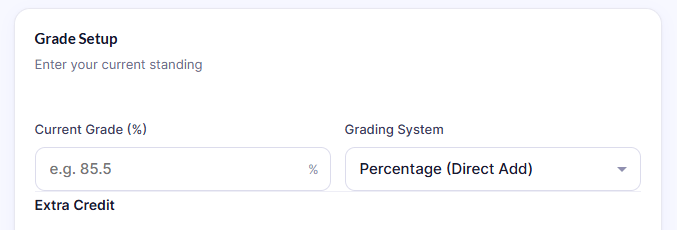
Step 1 Canvas LMS grade setup showing current course percentage and grading system input for extra credit calculator.

Start by adding your current academic standing in Canvas.

  • Enter your current course percentage (e.g. 85.5%)
  • Select your grading system (Percentage / Total Points / Weighted Categories)
  • This helps the calculator understand how your course is structured

👉 This step sets the base for all grade calculations.

🟡 Step 2: Add Your Course Details
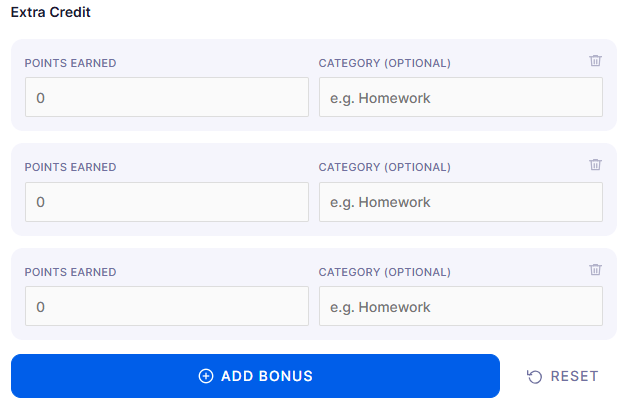
Step 2 entering course details in Canvas Extra Credit Calculator including total points and assignment scores.

Now input your actual grading components.

  • Total earned points so far
  • Assignment scores (homework, quizzes, exams)
  • Category-wise grades if applicable
  • Weighted category percentages (if your course uses weights)

👉 This ensures the calculator reflects your real Canvas setup.

🔵 Step 3: Enter Extra Credit or Bonus Points

Step 3 adding extra credit points and bonus assignments in Canvas LMS grade calculator to test grade improvement.

Now test your improvement scenario.

  • Add extra credit points earned
  • Add bonus assignments or participation scores
  • Include optional categories like homework or quizzes

👉 This step simulates how extra credit will affect your grade.

🟣 Step 4: Choose Grading Model
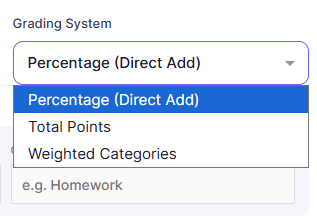
Step 4 selecting grading system in Canvas Extra Credit Impact Calculator including percentage and weighted categories.

Select how your Canvas course calculates grades:

  • Percentage (Direct Add)
  • Total Points System
  • Weighted Categories System

👉 This step ensures accurate calculation based on your instructor’s grading method.

🟠 Step 5: Add Optional Max Values (Advanced)

Step 5 advanced weighted category settings in Canvas LMS grade calculator with max points and percentage weights.

For deeper accuracy:

  • Add maximum points per category
  • Set weight percentage (e.g. 20%, 30%)
  • Define category limits if required

👉 This improves precision for complex Canvas grading systems.

⚪ Step 6: Run the Calculation
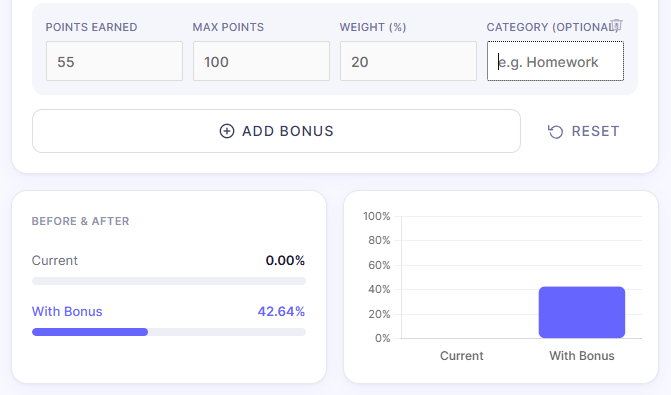
Step 6 running Canvas Extra Credit calculator showing updated grade estimate and bonus point impact results.

Click “Add Bonus” or run the calculator to see results.

You will instantly see:

  • 📊 Updated grade estimate
  • 📈 Percentage increase
  • 🎓 Possible letter grade change
  • ➕ Total bonus impact
  • ⚖️ Weighted grade adjustments


🔴 Step 7: Compare Before vs After Results
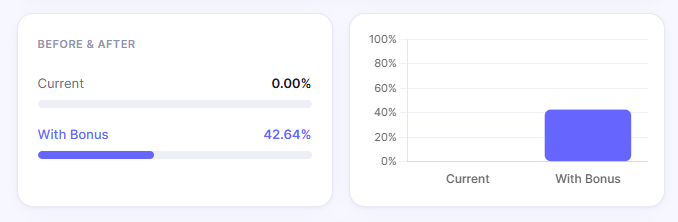
Before and after comparison of Canvas grade showing current score and improved grade after extra credit calculation.

Now analyze your improvement:

  • Current Grade (Before extra credit)
  • New Grade (After bonus points)
  • Target Grade tracking (e.g. 90%)

👉 This helps you understand whether extra credit is actually worth doing.

🟢 Step 8: Test What-If Scenarios
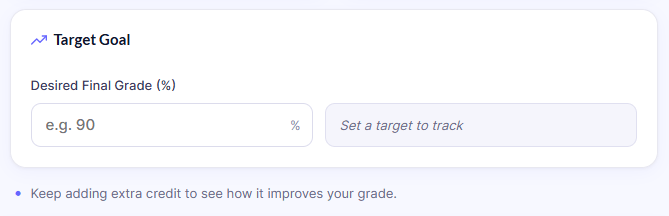
Step 8 testing different what-if scenarios in Canvas LMS grade calculator to simulate extra credit impact.

Try different combinations:

  • More bonus points
  • Different assignment scores
  • Alternative weighted setups

👉 This helps you plan your semester strategy before final grades.

🎯 Final Outcome

By following these steps, students can clearly understand:

  • how extra credit affects Canvas grades
  • whether bonus assignments are worth it
  • how close they are to passing or target grades
  • what changes are needed to improve results

Can Extra Credit Help You Pass a Class?

Extra credit can often mean the difference between passing or failing a course, especially when a student is near a grade threshold. Its actual effect depends on the course design, remaining assessments, and the instructor’s application of bonus points in Canvas LMS.
In certain cases, a few extra credit points can significantly raise your grade. In other instances, the impact may be negligible if the overall course weight is high or most scores are already finalized.
This calculator helps students estimate:
  • Whether bonus points can realistically recover a failing grade
  • How much overall improvement is possible based on current scores
  • If reaching the next letter grade is achievable
  • How close you are to your target percentage

Ideal for:

  • Final exam preparation and grade planning
  • Semester grade recovery strategies
  • Participation and attendance credit evaluation
  • Optional bonus assignment impact checks
  • Last-minute grade improvement decisions
Use it to accurately determine if extra credit is sufficient to alter your final grade before grades are submitted.

Common Grade Improvement Scenarios

Extra credit affects each student’s grade differently. These scenarios show their practical impact.

Scenario 1 — Bonus Quiz Impact

A student with an 84% wonders if a 10-point bonus quiz will raise their average closer to an A. The calculator confirms whether this boost significantly shifts their grade, showing the actual percentage change.

Scenario 2 — Passing Grade Recovery

A student just below the passing grade needs extra assignments or bonus points to reach it. This scenario clarifies if recovery is possible and shows the resulting grade after the boost.

Scenario 3 — Participation Credit Estimate

A student checks how attendance and participation points influence Canvas grades. The calculator shows how these contributions raise their average and clarifies their impact on overall grade outcomes.

Scenario 4 — Final Letter Grade Planning

A student compares multiple extra credit options to understand whether their grade could move from a B- to an A. A student compares extra credit options to see if their grade can move from a B- to a B or higher. The scenario indicates which bonus activities deliver enough points to change their final letter grade.

How Extra Credit Is Added in Canvas LMS

In Canvas LMS, instructors can apply extra credit in various ways based on their specific grading system. There is no single standard, so bonus point effects differ from course to course.

Common ways instructors add extra credit include:

  • Bonus or optional assignments
  • Participation and attendance credit
  • Extra or optional quizzes
  • Manual grade adjustments by instructors
  • Weighted bonus categories within assignment groups
  • Final exam extra credit opportunities
Each course uses its own grading structure, making it difficult for students to anticipate extra credit. A dedicated calculator offers a more accurate and efficient estimate of how bonus points affect your final Canvas LMS grade.

Why This Calculator Works Better for Canvas Students

General grade calculators rarely match Canvas grading, especially with weighted categories and extra credit. They give rough, unrealistic estimates that don’t reflect real courses.
This calculator helps Canvas LMS students by focusing on real grading behavior in actual courses.

Designed for:

  • Canvas LMS grading systems and structures
  • Weighted assignment categories and percentages
  • Extra credit and bonus assignment simulations
  • More realistic grade estimation outcomes
  • Semester and final grade planning
Unlike basic calculators, it helps students understand how their grade will change in real-world scenarios, rather than relying on rough or generic formulas. This makes it easier to make informed decisions about extra credit and academic performance throughout the semester.

Estimate How Much Extra Credit Could Improve Your Grade

Quickly calculate how extra credit impacts your Canvas LMS grade. Compare bonus point scenarios and see possible grade improvements.
View realistic outcomes for your grade based on current points and extra credit added.

What you can do with this tool:

  • Compare multiple bonus point scenarios.
  • Estimate possible grade recovery outcomes
  • Understand how extra credit affects your final percentage.
  • Test whether an improvement in letter grade is possible.

📌 Frequently Asked Questions :

How does extra credit work in Canvas LMS?

Extra credit in Canvas LMS depends entirely on how your instructor sets up the course. It may be added as bonus points, optional assignments, participation credit, or manual grade adjustments.

Yes, bonus assignments can improve your final percentage, but the impact depends on total course points, grading weights, and how the extra credit is applied.

Canvas does not “automatically” treat something as extra credit unless the instructor configures it that way in the grading settings.

It depends on your current grade, total course points, and grading scale. Even a small number of points can sometimes move you to the next letter grade in close cases.

Yes. In weighted grading systems, extra credit impact may vary depending on which category it is added to and how much weight that category carries.

Yes, participation and attendance points can increase your overall grade, especially when they are part of a weighted category or added as bonus credit.

It depends on how far below the passing threshold you are and how many points are available. In some cases it helps significantly, but not always.

The calculator provides an estimate based on standard Canvas grading logic, but final results may vary depending on instructor-specific grading setups.

Yes, you can simulate different bonus points and extra credit situations to see how your grade might change before submitting assignments.

Yes, if bonus quizzes are added to a weighted category, they can influence your overall grade based on that category’s percentage weight.

 
Scroll to Top