
Canvas Assignment Prioritizer & Planner – Decide What to Do First

Struggling with multiple deadlines? This smart assignment priority calculator is built for Canvas LMS students to organize coursework, rank tasks by urgency and grade weight, and focus on the assignments that matter most—without stress.

Quickly see which assignment to tackle first, factoring in deadlines, difficulty, and grade impact. Plan smarter, save time, and stay ahead.

• No signup required • Free to use • Works for all Canvas courses.

Key Features of the Canvas Assignment Planner

📊 Smart Priority Score Engine
Automatically prioritizes assignments by deadline, weight, difficulty, and hours.
📅 Deadline Timeline Visualization
View assignments on a timeline with “due soon” and “due today” labels.
📈 Workload Distribution Chart
See how your study time is divided and balance tasks efficiently.
🧠 Auto Study Plan Generator
Receive a customized daily plan based on hours and deadlines.
⚠️ Smart Alerts & Insights
Get warnings about busy weeks so you can plan ahead.
🎯 START HERE Recommendation
Identify your top assignment instantly to start quickly.
⏱ Available Hours Optimization
Set available hours. Planner distributes tasks automatically.
🧩 Quick Presets (Typical, Finals Week, Multiple Assignments)
Start faster with ready-made scenarios tailored for real student workloads.
📌 Multi-Factor Priority Logic
Factors like deadline, weight, difficulty, and time make smarter decisions.
📋 Easy Assignment Input System
Add assignments fast with deadlines, weight, difficulty, and hours.
📊 Dashboard, Charts & Schedule Views
Switch between views to visually analyze priorities, workload, and the study plan.
Canvas Assignment Prioritizer Decide what to work on first
Assignments
Quick presets:
Assignment Name Due Date Weight % Difficulty Hours Adv.
4h

Top Priority Assignment

Can’t Decide Which Assignment to Do First?

Managing multiple assignments in Canvas LMS can quickly become overwhelming. With overlapping deadlines, different grade weights, and limited study time, it’s easy to feel stuck and unsure where to start. Many students struggle because high-weight assignments often get delayed while smaller tasks take up time. Without a clear system, prioritizing coursework becomes confusing and stressful.
 
If you’ve ever wondered which assignment to do first in Canvas, you’re not alone. To prioritize effectively, first identify urgent deadlines, then consider each assignment’s grade weight, and finally assess how much time each task needs. This approach helps you confidently manage Canvas assignments.

Smart Canvas Assignment Priority Calculator

Stop guessing—this tool calculates assignment priority for Canvas LMS students by analyzing deadlines, grade weight, difficulty, and study hours to tell you what needs your attention first.
Get a clear, data-driven plan to focus on high-impact tasks and manage coursework efficiently.

Key Capabilities

  • 🎯 Assignment priority calculator for Canvas
  • ⏰ Deadline-based urgency analysis
  • 📊 Weight-based grade impact scoring
  • ⚖️ Study workload optimization
Designed to help students manage assignments smarter using the Canvas assignment priority calculator approach.

📘 How Canvas Assignment Prioritizer Works – Step-by-Step Guide

Follow this simple step-by-step process to use the Canvas Assignment Prioritizer & Planner and instantly find out what to do first in your coursework.

🧩 Step 1: Select Your Study Mode
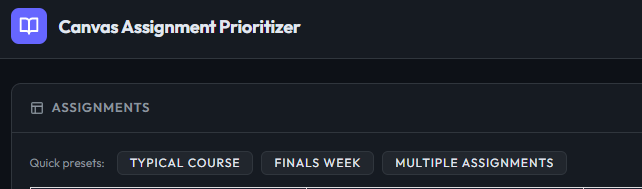
Canvas LMS assignment prioritizer selecting study mode

Choose the preset that matches your workload:

  • 📘 Typical Course (regular assignments)
  • 🔥 Finals Week (exam pressure mode)
  • 📚 Multiple Assignments (busy schedule mode)

💡 Pro Tip: Start with Typical Course if you’re unsure — it gives the most balanced results.

📝 Step 2: Enter Your Assignments
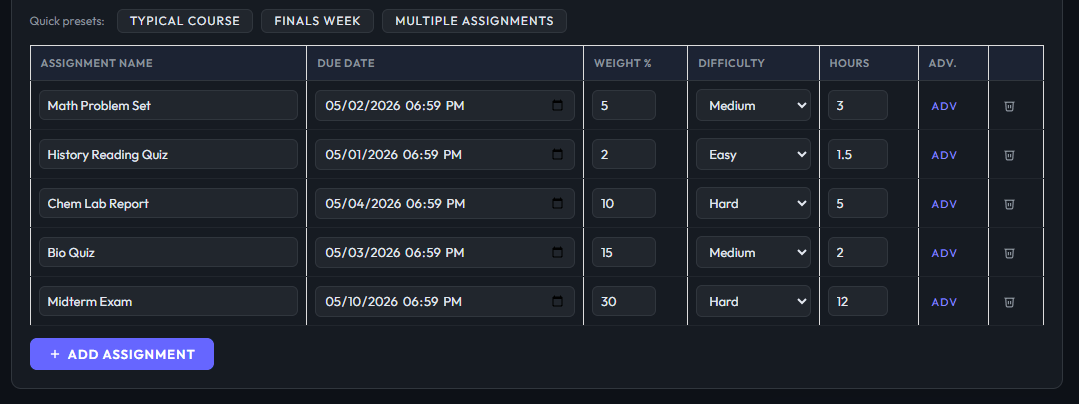
adding assignments in canvas assignment planner tool

Add all your assignments one by one with full details:

  • Assignment Name
  • Due Date & Time
  • Weight (%)
  • Difficulty Level
  • Estimated Hours

💡 Pro Tip: Enter every assignment at once to get the most accurate priority ranking.

⚙️ Step 3: Set Assignment Details Properly
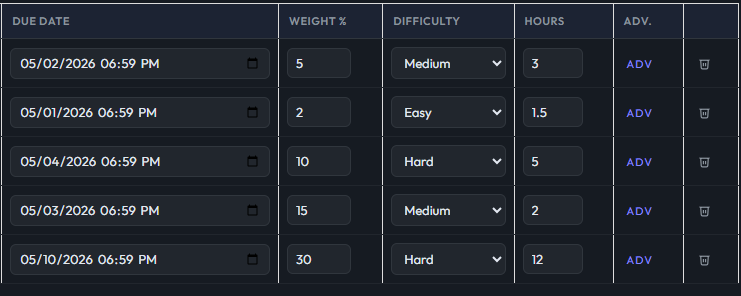
assignment details input canvas planner weight difficulty hours

Make sure each task has accurate information:

  • 📅 Due Date (deadline)
  • ⚖️ Grade Weight (%)
  • 🧠 Difficulty (Easy / Medium / Hard)
  • ⏱ Required Study Hours

💡 Pro Tip: Don’t guess difficulty—be realistic for better priority scores.

⏱ Step 4: Enter Available Study Hours
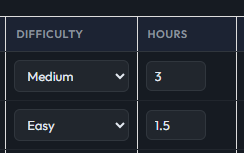
available study hours input canvas assignment planner

Tell the tool how much time you have today (e.g. 4h, 6h, 8h).

This helps the system balance your workload efficiently.

💡 Pro Tip: Be honest with your time — overestimating reduces planning accuracy.

🏆 Step 5: Get Your Top Priority Assignment
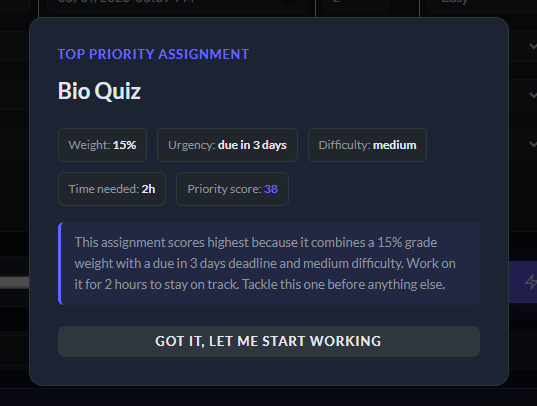
top priority assignment result canvas planner priority score

The tool instantly shows:

  • 🏆 Highest Priority Task
  • 📊 Priority Score (e.g. 38)
  • ⏰ Deadline urgency
  • 🧠 Difficulty + time breakdown

💡 Pro Tip: Always start with the highest score — it gives maximum grade impact per hour.

📊 Step 6: View Dashboard Overview
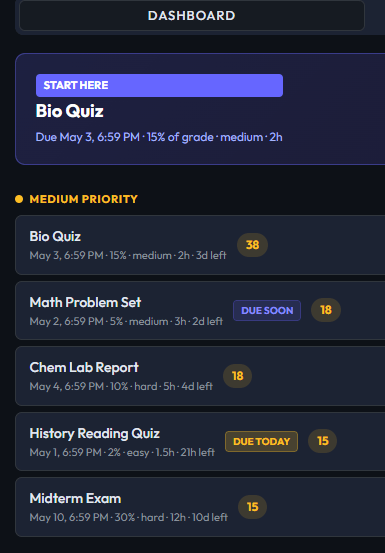
canvas assignment planner dashboard priority list tasks

Check your full assignment list in ranked order:

  • 📌 Priority ranking list
  • 🚨 Due today / due soon tags
  • 📊 Score comparison

💡 Pro Tip: Check dashboard daily to stay ahead of deadlines.

📈 Step 7: Analyze Charts & Insights
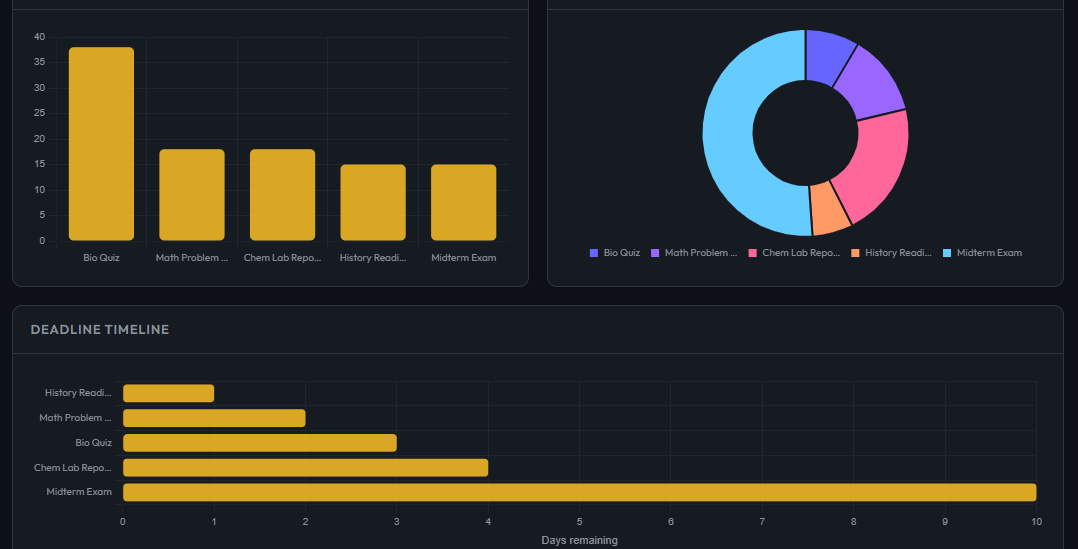
canvas assignment planner charts workload distribution timeline

Visual breakdown of your workload:

  • 📊 Priority Scores Chart
  • ⚖️ Workload Distribution
  • 📅 Deadline Timeline

💡 Pro Tip: Use charts to detect overload before it becomes stressful.

📅 Step 8: Follow Your Study Schedule
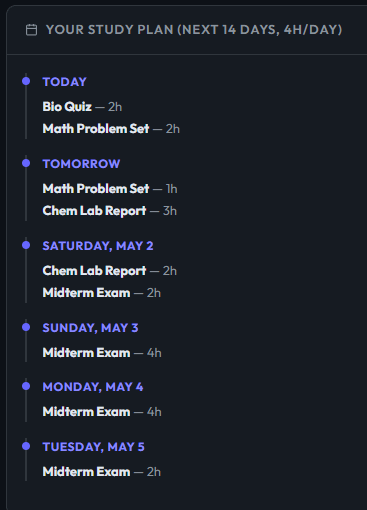
canvas assignment study schedule 14 day planner dashboard

Get a full study plan:

  • 📆 Day-by-day breakdown
  • ⏱ Time allocation per task
  • 🧠 Balanced workload strategy

💡 Pro Tip: Stick to daily hours strictly — consistency beats cramming.

Auto-Generated Study Plan for Canvas Students

Turn your assignments into a clear, day-by-day action plan. This smart study planner ensures you stay organized and on track by automatically creating a structured schedule based on your deadlines, priority scores, and available study hours—so you always know exactly what to do next.
Avoid cramming at the last minute and follow a balanced, realistic plan that keeps you consistent, productive, and stress-free throughout your course.

What You Get

  • 📅 7–14 day structured study plan
  • ⚖️ Balanced daily workload distribution
  • 🚫 Prevents last-minute stress and overload
  • ⏱ Optimized based on your available study hours

Why Students Use This Canvas Assignment Prioritizer

Students using Canvas LMS often struggle with managing multiple deadlines and assignments efficiently. This smart prioritizer helps you organize tasks, focus on what matters most, and take charge of your coursework.

Benefits You’ll Experience

  • ⏳ Save Time & Reduce Stress :  Instantly know what to work on first, eliminating guesswork.
  • 📈 Improves Academic Performance
    Get better grades by prioritizing high-impact assignments.
  • 🚫 Avoid Missed Deadlines: Stay ahead with urgency indicators and smart planning.
  • 🧭 Gain Clear Daily Direction
    Always know your next step with a structured plan.
Use this tool to plan assignments quickly and effectively. Manage your schedule with less effort.

When to Use This Tool

This Canvas Assignment Prioritizer is designed for real student workload situations where planning and time management are critical.

Best Use Cases

  • 🔥 Finals week planning when exams and assignments overlap

  • 📚 Multiple assignment deadlines due at the same time

  • 📖 Heavy coursework management across difficult subjects

  • 📅 Daily study scheduling to stay consistent and organized

Start Prioritizing Your Assignments Now

Take control of your deadlines and stop guessing what to do next. Use the Canvas Assignment Prioritizer & Planner to instantly organize your workload and focus on what matters most.

📌 Frequently Asked Questions :

How do I decide which assignment to do first?

The tool ranks assignments using deadline urgency, grade weight, difficulty, and required time to show the most important task first.

It is a smart planner that helps Canvas LMS students organize and prioritize assignments automatically.

Yes, it is designed specifically to help Canvas students manage deadlines, reduce stress, and plan coursework efficiently.

The score is based on weighted logic (deadline, difficulty, and grade impact), making it highly reliable for study planning.

Yes, you can add assignments from multiple courses and the tool will prioritize everything together in one unified plan.

Scroll to Top