
Quickly calculate your Canvas letter grade, explore grade boundaries, and see how close you are to the next grade. Use this free calculator to understand your grading scale and plan the score you need to reach your target grade.
🚀Key Features
Powerful Canvas Grade Analysis in One Tool
🎛️ Smart Input System:
Easily enter your current percentage and choose a grading scale that matches your course. Use preset grading systems or build a custom Canvas grading scale based on your syllabus.📊 Automatic Letter Grade Detection:
The calculator automatically determines your Canvas letter grade based on your score and grading scale.📉 Next Grade Distance:
Instantly see how close you are to the next grade. Example: “You are 0.5% away from B+.”📈 Grade Spectrum Visualization:
A visual grade spectrum bar (0–100) displays your current score along the grading scale.🧠 Grade Boundary Table:
View the complete grading scale with minimum and maximum percentages for every letter grade.⚙️ Optional Weighted Grade Support:
Include components like a final exam to see how your scores affect your overall grade.
Canvas Grade Boundary Calculator
| Grade | Min % |
|---|
Course Presets
Grade Spectrum
Grade Boundaries
Hover grade for details| Grade | Min % | Max % | Status |
|---|
How to Use the Canvas Grade Boundary Calculator (Step-by-Step)
Knowing your exact grade position in Canvas can help you plan smarter and avoid surprises at the end of the semester. This calculator makes it easy to understand your letter grade, grading scale, and how close you are to the next grade boundary.
Follow these simple steps to analyze your Canvas grade in seconds.
- Step 1
- Step 2
- Step 3
- Step 4
- Step 5
- Step 6
- Step 7
Enter Your Current Canvas Percentage
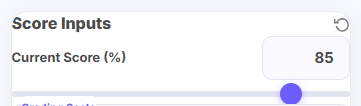
Choose the Grading Scale Used in Your Course
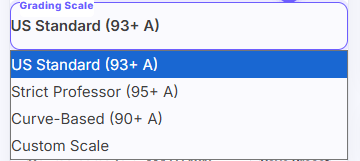
Next, select the grading scale that matches your course grading system.
Many courses follow the standard US grading scale, where 93% and above equals an A, but some professors use stricter or curved grading scales.
The calculator allows you to either:
- Select a preset grading scale
- Create a custom grading scale based on your syllabus
This ensures the calculator reflects the exact grading rules used in your class.
Pro Tip:
Your course syllabus usually lists the grading scale. Using the correct scale will give you the most accurate letter grade result.
Add Weighted Grades (If Your Course Uses Them)
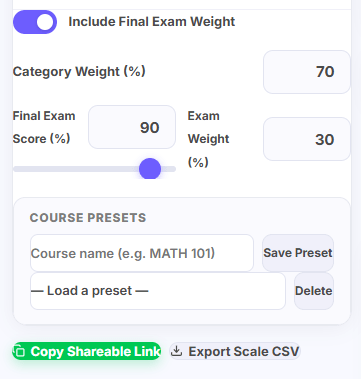
Some Canvas courses calculate grades using weighted categories, such as assignments, quizzes, and final exams.
If your course includes a final exam or weighted categories, enable the Include Final Exam Weight option.
Then enter:
- Current category weight
- Final exam score
- Final exam weight
The calculator will automatically compute your weighted overall grade.
Pro Tip:
Many students forget that final exams often carry 20–40% of the total grade, which can significantly impact the final result.
Instantly See Your Canvas Letter Grade
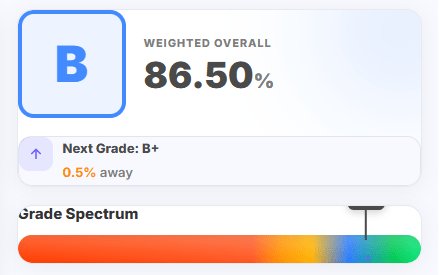
After entering your information, the calculator immediately converts your percentage into a letter grade based on the selected grading scale.
For example:
86.5% = B
This saves you from manually checking grading tables and helps you quickly understand your academic performance.
Pro Tip:
Canvas sometimes shows only percentages. Converting them into letter grades makes it much easier to track your progress toward your target grade.
Check How Close You Are to the Next Grade
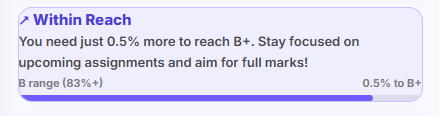
One of the most useful insights the calculator provides is the Next Grade Distance indicator.
For example, the calculator may show:
“You are 0.5% away from B+.”
This helps you understand whether a small improvement in upcoming assignments could push your grade into the next bracket.
Pro Tip:
If your grade is within 1–2% of the next letter grade, improving just one assignment score could make a noticeable difference.
View the Grade Spectrum Visualization

The calculator also displays a visual grade spectrum bar ranging from 0 to 100%.
Your score appears as a marker on this spectrum, allowing you to clearly see where your grade falls between different letter grade cutoffs. This visual representation makes it easier to understand your exact position within the grading scale.
Pro Tip:
If your score sits near the upper end of a grade range, you may be very close to reaching the next letter grade.
Review the Full Grade Boundary Table
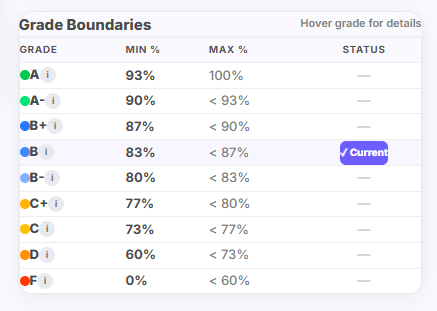
Finally, the calculator displays a complete grade boundary table showing the minimum and maximum percentage required for each letter grade.
This table helps you see the full grading structure, including ranges for:
- A
- A-
- B+
- B
- and other grades
By reviewing the full grading scale, you can better understand what score is needed to reach your desired grade.
Pro Tip:
Use the boundary table to set a realistic target grade for upcoming assignments and exams.
What This Calculator Does – Understand Your Canvas Grade Boundaries Instantly
The Canvas Grade Boundary Calculator helps students see exactly where their current percentage falls in their course grading scale. Many Canvas courses display only a percentage, leaving students unsure of their letter grade or how close they are to the next grade.
Key Benefits:
See your current Canvas letter grade instantly
Identify the distance to your next grade boundary
View a full grading scale table
Explore a visual grade spectrum bar
Optional weighted grade calculation for courses with exams and assignments
With this information, you can quickly determine if you’re close to moving from B to B+, or from A- to A, and plan your study strategy accordingly.
How the Canvas Grade Boundary Calculator Works – A Real Example
To see how the Canvas Grade Boundary Calculator analyzes grades, let’s walk through a real scenario.
Imagine a student checking their Canvas course grade with the following details:
- Current course percentage: 85%
- Current category weight: 70%
- Final exam score: 90%
- Final exam weight: 30%
By entering these numbers into the Canvas Grade Boundary Calculator, the tool instantly calculates the weighted overall grade.
Calculating the Weighted Overall Grade
The calculation works step by step:
Current coursework contribution:
85 × 0.70 = 59.5
Final exam contribution:
90 × 0.30 = 27
Total weighted grade:
59.5 + 27 = 86.5%
So, the student’s weighted overall grade becomes 86.5%.
Determining the Letter Grade
Based on a standard Canvas grading scale:
Grade | Percentage Range |
A | 93–100% |
A- | 90–92% |
B+ | 87–89% |
B | 83–86% |
B- | 80–82% |
Since 86.5% falls between 83% and 87%, the Canvas Grade Boundary Calculator determines the student’s current letter grade is:
B ✅
This eliminates the need for manual comparison with grading tables.
How Close Is the Student to the Next Grade?
The calculator also shows the exact distance to the next grade boundary:
- Next grade cutoff: B+ = 87%
- Student score: 86.5%
- Distance to next grade: 87 − 86.5 = 0.5%
This means the student is only 0.5% away from reaching a B+.
Why This Insight Matters
Small differences near grade boundaries can significantly impact final grades. Without a calculator, students often struggle to know whether they are close to the next letter grade.
The Canvas Grade Boundary Calculator helps students:
- Understand their true grade standing
- Identify if they are close to a higher grade
- Focus on improving upcoming assignments
Plan their study strategy effectively
Want to know your current letter grade and how close you are to the next one?
- Your letter grade
- Distance to the next grade boundary
- A full grading scale breakdown
- A visual grade spectrum
📌 Frequently Asked Questions (FAQ) :
What percentage is an A in Canvas?
The percentage required for an A depends on the grading scale set by your instructor. Many courses use 93% or higher for an A.
Does this calculator work for weighted courses?
Yes. You can enable weighted grading to include components such as final exams or major assignments.
Can I use a custom Canvas grading scale?
Yes. The calculator allows you to use preset grading scales or create your own based on your syllabus.
Why is knowing grade boundaries important?
Understanding grade boundaries helps you see exactly how close you are to the next grade and whether small improvements can increase your final letter grade.
