
Canvas Point Grade Calculator

Calculate your course performance with our free Canvas Point Grade Calculator.
Designed for students using Canvas LMS, it lets you quickly calculate your grade percentage, track earned vs total points, see your automatic letter grades, and even convert scores to GPA, all in real time.

Check assignments, quizzes, homework, or plan for your final exam with ease. This smart tool shows exactly where you stand and what score you need to reach your goals.

✅ No sign-up required
📊 No spreadsheets needed
⚡ Instant, accurate results at your fingertips

Canvas Point Grade Calculator

Canvas Point Grade Calculator

Assignments

Assignment Name Earned Total %

Final Exam "What-If"

Course Summary

0%
-
GPA GPA is calculated using a standard US 4.0 grading scale commonly used in Canvas LMS. 0.00
Points 0 / 0

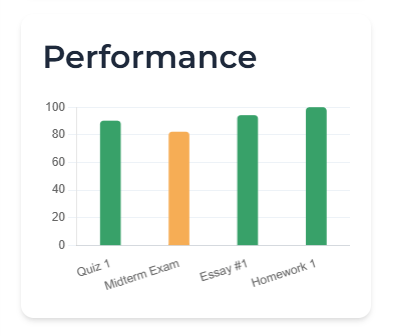
Performance

How to Use Canvas Point Grade Calculator

Our Canvas Point Grade Calculator helps students quickly calculate percentages, letter grades, and GPA using the same point-based system as Canvas LMS. Follow these steps to track your grades, predict final exam outcomes, and stay in control throughout the semester.

Enter Your Assignments
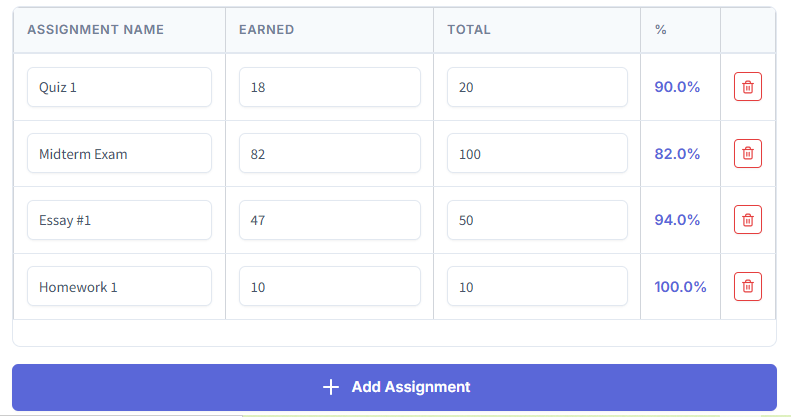
Canvas Point Grade Calculator assignments table showing earned and total points

Add each graded item to the Assignments table:

  • Assignment name
  • Earned points
  • Total points possible

The calculator instantly computes the percentage for each row and updates totals in real time.

Add All Course Work
Add Assignment button inside Canvas Point Grade Calculator interface

Click Add Assignment to include quizzes, homework, projects, labs, participation, or exams.
Adding all items ensures the most accurate course percentage. Missing scores may lower accuracy, so copy values directly from your Canvas gradebook.

Drop the Lowest Score (If Allowed)

Drop Lowest Score option enabled in Canvas Point Grade Calculator

Enable Drop Lowest Score if your instructor allows it.
The system automatically removes your weakest score and recalculates totals. Useful for courses with:

  • Dropped lowest quizzes
  • Extra credit replacing low grades
  • Flexible grading policies

Use Final Exam “What-If” Mode
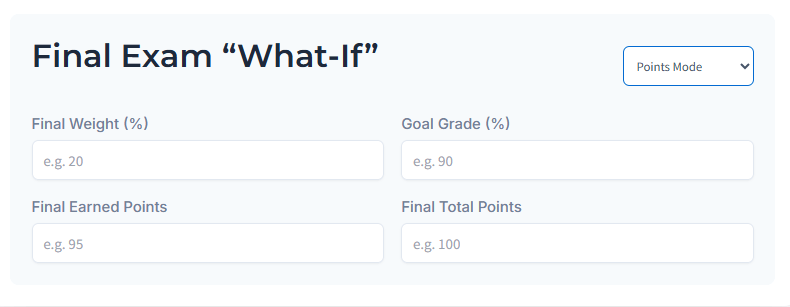
Final Exam What-If prediction inputs for weight, goal, and points in Canvas Point Grade Calculator

Plan ahead with the Final Exam prediction section:

Enter:

  • Final weight (%)
  • Goal grade (%)
  • Expected earned points
  • Final total points

The calculator instantly shows:

  • Overall percentage
  • Letter grade
  • GPA
  • Required score to reach your target

This helps you study smarter, knowing exactly what you need instead of guessing.

Review Your Course Summary
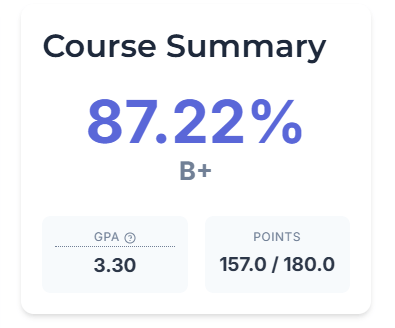
Course summary showing percentage, letter grade, GPA, and total points in Canvas Point Grade Calculator

Results appear automatically in the Course Summary panel:

  • Current percentage
  • Letter grade (A–F)
  • GPA (4.0 scale)
  • Earned vs total points
  • Final course grade including exam

All calculations update live as you edit scores—no spreadsheets needed.

Calculate & Monitor Progress Regularly
Calculate button for updating performance in Canvas Point Grade Calculator

Click Calculate anytime to refresh totals.
Update grades weekly to:

  • Catch problems early
  • Set realistic targets
  • Prioritize difficult subjects
  • Reduce last-minute stress

Consistent tracking leads to better academic decisions.


Export, Print, or Save Your Results
Export, print, share, and save session options in Canvas Point Grade Calculator

You can:

  • Export CSV for Excel or Google Sheets
  • Print your summary
  • Share results
  • Save your session for later
  • Reset to start again

Saving sessions is useful for long semesters—you don’t need to re-enter data each time.

Helpful Tips for Accurate Results

Enter exact points from your Canvas LMS gradebook
Double-check exam weights from your syllabus
Update scores after each assignment
Small, regular updates keep predictions accurate and prevent surprises before finals.


✅ Pro Tips for Better Accuracy

Enter exact scores from Canvas gradebook
Update after every assignment
Use Final “What-If” before major exams
Save sessions to avoid losing data
Check exam weights from syllabus
Small, consistent updates = more reliable predictions.


✅ Quick Example (Real Student Scenario)

Sarah has:
4 quizzes
1 midterm
1 final worth 20%

She enters her scores, enables Drop Lowest Score, and uses the Final What-If tool.

Result: She only needs 72% on the final to keep a B+. Instead of stressing, she studies smarter and focuses on weak topics. That’s the power of planning with a grade calculator.

Why Use Our Canvas Point Grade Calculator

Accurate Point-Based Calculations – Enter your earned and total points for precise grade percentages.

📊 Automatic Letter Grades (A–F) – Instantly see your Canvas LMS course grade without manual calculations.

🎓 GPA Conversion (4.0 Scale) – Know your GPA quickly without extra tools.

📋 Unlimited Assignments – Add quizzes, homework, projects, and exams with ease.

📝 Drop Lowest Score Option – Automatically remove your weakest grade to see your best possible outcome.

🔮 Final Exam “What-If” Mode – Predict how your final exam will affect your overall course grade.

🎯 Goal Grade Calculator – Find out the score you need to hit your target grade.

💾 Export, Print & Share – Download results as CSV or save them for easy reference.

📱 100% Free & Mobile Friendly – Works seamlessly on phones, tablets, and desktops.

Who Is This For

High School Students: Quickly track grades and plan study time.

College & University Students: Stay on top of assignments and GPA.

Online Course Learners: Easily monitor progress in any virtual course.

Anyone Using Canvas LMS: Designed specifically for Canvas points and grading.

Students Tracking Point-Based Grading Systems: Works for all courses that use points.

If your course uses points, this calculator works for you—no matter your level or subject.

Benefits for Students

Know Your Current Course Percentage Instantly: See exactly where you stand without waiting for Canvas LMS updates.

Plan Smarter for Finals and Major Exams: Focus your study time where it matters most.

Test “What-If” Scenarios: Predict grades before submitting assignments or exams.

Avoid Manual Math Mistakes: Let the calculator handle the numbers for you.

Save Time Compared to Spreadsheets: Input once, get instant results.

Reduce Stress with Clear Grade Insights: Know your standing at a glance.

Stay Organized Throughout the Semester: Track every assignment in one place.

Students use this tool daily to stay ahead instead of guessing their grades.

What Our Students Say


Students trust this calculator to track grades accurately and plan their studies with confidence.

Hear from students just like you who track grades and plan smarter with the Canvas Point Grade Calculator.

“I was always stressed about my grades, but this calculator showed me exactly what I needed to score on finals. It’s a lifesaver!”

— Emily Carter, New York, USA

“Tracking my assignments used to take forever in spreadsheets. Now I just enter points, and everything updates instantly. So simple!”

— Jake Thompson, Texas, USA

“I love the ‘what-if’ feature! I could see how my final exam would affect my grade, which helped me study smarter instead of panicking.”

— Sophia Nguyen, California, USA

“As a college student with multiple courses, this tool keeps me organized. I know my percentage and GPA without any math mistakes.”

— Liam Rodriguez, Florida, USA

“Finally, a free calculator that actually works on my phone. I can check my grades on the go and plan study sessions efficiently.”

— Ava Patel, Illinois, USA

“The Drop Lowest Score option saved me a lot of stress. I could see how one bad quiz affected my grade and adjust accordingly.”

— Noah Williams, Washington, USA

“Using this calculator made me feel in control of my grades for the first time. I know exactly what I need to get an A.”

— Mia Johnson, Oregon, USA

Ready to see your Canvas LMS grade in seconds? Add your assignments, enter your points, and instantly calculate your grade percentage, letter grade, and GPA.

📌FAQs

How do I calculate my grade percentage in Canvas?

Enter your earned points and total points for each assignment in the calculator. The tool instantly computes your percentage and updates totals as you add more assignments. This prevents manual errors common in spreadsheets.

Yes! You can add unlimited quizzes, homework, projects, labs, and exams. Make sure you enter all scores from your Canvas gradebook for accurate results. Missing points can affect predictions.

If your instructor drops a quiz or assignment, enable Drop Lowest Score. The calculator automatically removes the lowest score and recalculates totals, so you see your best possible grade without manual math.

Use this feature to predict your final exam’s impact on your overall grade. Enter your exam weight, goal grade, and expected points. The calculator tells you exactly what you need to score to hit your target. This helps with smart study planning.

Absolutely! It converts your Canvas grades into GPA on a 4.0 scale instantly. Combine this with percentage tracking to monitor overall academic performance easily.

Small discrepancies usually happen if:

  • Some assignments aren’t entered
  • Extra credit isn’t accounted for
  • Canvas uses weighted categories differently

Always enter exact points and double-check assignment weights for accurate calculations.

Yes! You can:

  • Export as CSV for Excel or Google Sheets
  • Print your summary
  • Share results with parents, tutors, or classmates
  • Save your session to avoid re-entering data

This solves the common problem of losing progress or manually tracking grades.

Scroll to Top