Table of Contents
Introduction
Have you ever checked Canvas and wondered why your A doesn’t match your GPA? Many students in the USA face this confusion every semester. Understanding the difference between your course grade and GPA can save stress, improve planning, and help with scholarships or academic standing.
In Canvas GPA vs. Course Grade Explained, we break down exactly what each number means. You’ll learn how Canvas calculates grades, why your transcript GPA may differ, and how to use tools like a Canvas GPA calculator or Canvas final grade calculator to plan smarter. We’ll also cover essential concepts like weighted vs. unweighted grades and Canvas letter grade conversion, so you know what really counts toward your academic record.
By the end, you’ll clearly see the gap between your Canvas course grades and official GPA. You’ll feel confident tracking progress, setting realistic goals, and understanding exactly how your efforts translate into academic performance. No more surprises at the end of the semester—just clear, actionable insight.
What is a course grade in Canvas?
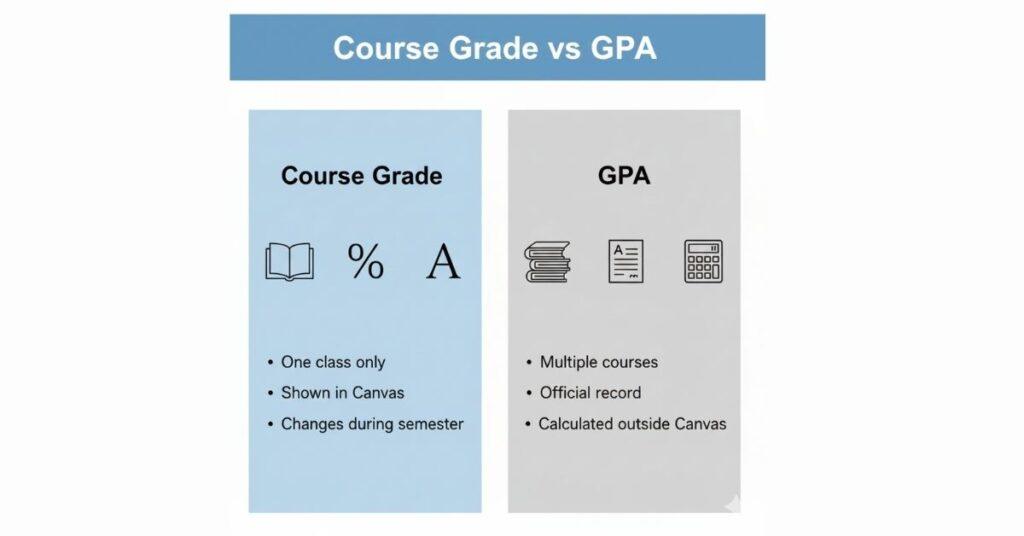
In Canvas GPA vs. Course Grade Explained, the course grade is often the first number students notice. It shows how you’re doing in one specific class, not your overall academic performance. Many students mix this up with GPA, which leads to confusion during finals or grade reviews.
Here’s how a Canvas course grade actually works and what it represents.
Definition: Percentage or Letter Grade in a Specific Class
A course grade in Canvas reflects your performance in one course only. It usually appears as a percentage, a letter grade, or both.
This grade updates as your instructor posts scores. Canvas calculates it using the grading rules set for that class. It does not compare you with other courses or semesters.
Key points to remember:
- It applies to a single subject.
- It does not equal your GPA.
- It can change until all grades post.
For example, an 88% in biology affects only that course. It won’t update your GPA on its own. Tools like a Canvas GPA calculator use course grades later to estimate GPA, but Canvas doesn’t do that step.
How Canvas Displays It (With Examples)
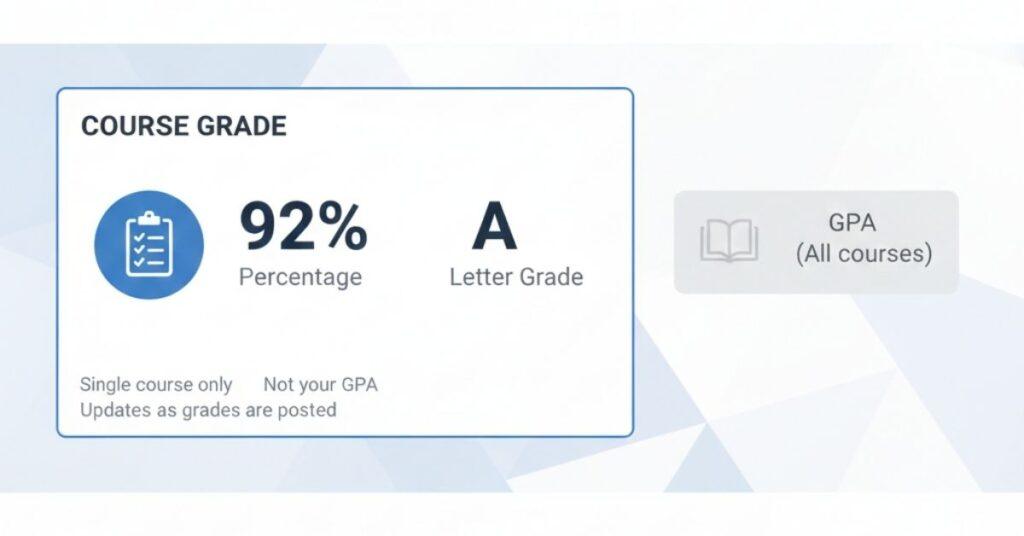
Canvas shows your course grade at the top of the Grades page. You may see:
- A percentage (like 92%)
- A letter grade (like A)
- Both, depending on settings
Example:
- 92% = A
- 85% = B
- 78% = C+
This uses your school’s Canvas letter grade conversion scale. Some schools include plus or minus grades. Others don’t.
If you want to predict your final grade, a Canvas final grade calculator helps estimate your outcome before grades lock.
Impact of Assignments, Quizzes, Participation, and Finals
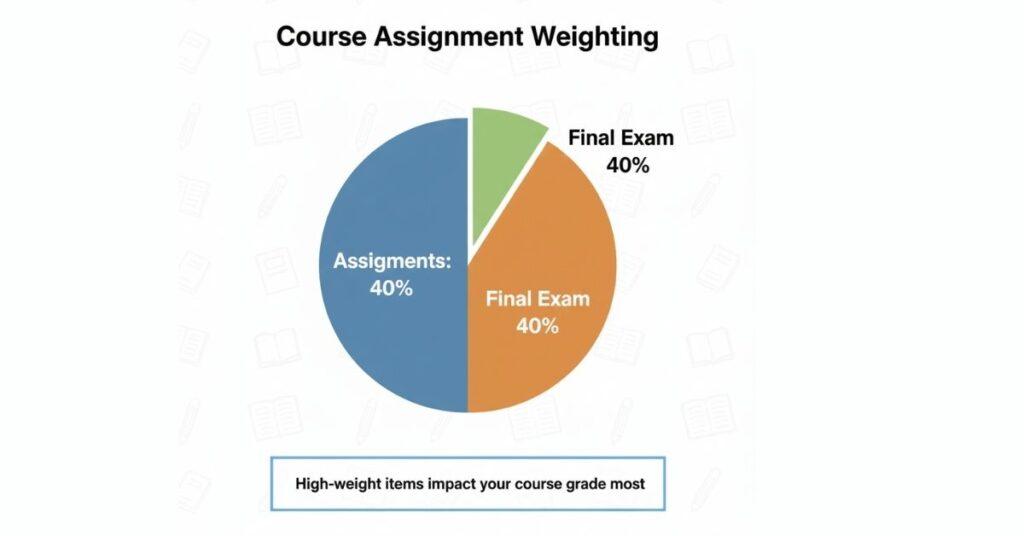
Your course grade depends on how Canvas weights each activity. This is where weighted vs. unweighted grades matter.
Common grade components include:
- Assignments
- Quizzes
- Participation
- Midterms and finals
Example weighting:
- Assignments: 40%
- Quizzes: 20%
- Final exam: 40%
A low final can drop a strong average fast. That’s why checking your Canvas course grade often matters. It also explains how Canvas calculates GPA indirectly—by first calculating each course grade.
What Is a GPA?
In Canvas, GPA vs Course Grade Explained, GPA stands for Grade Point Average. It measures your academic performance across multiple courses, not just one class. Schools use GPA to summarise how well you perform over a term or your entire program. Unlike a Canvas course grade, a GPA appears on official records, such as transcripts.
Here’s how GPA works and why it matters more than a single class grade.
GPA Definition: Cumulative Performance Across Multiple Courses
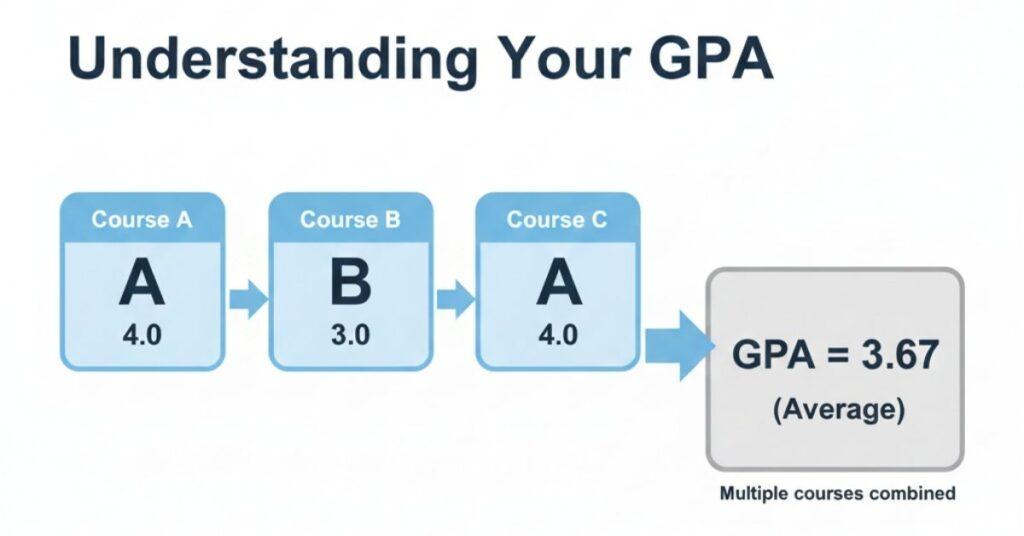
GPA combines grades from all your completed courses into one number. Each course grade is converted to grade points and averaged.
A simple example:
- Course A: A = 4.0
- Course B: B = 3.0
- Course C: A = 4.0
Your GPA reflects the average, not the highest grade. This explains why one low grade can lower your GPA, even if other classes look strong in Canvas.
Canvas shows individual results, but it does not calculate the official GPA. Students often use a Canvas GPA calculator to estimate their final grades before they are posted.
Weighted vs Unweighted GPA Explained (Theory Only)
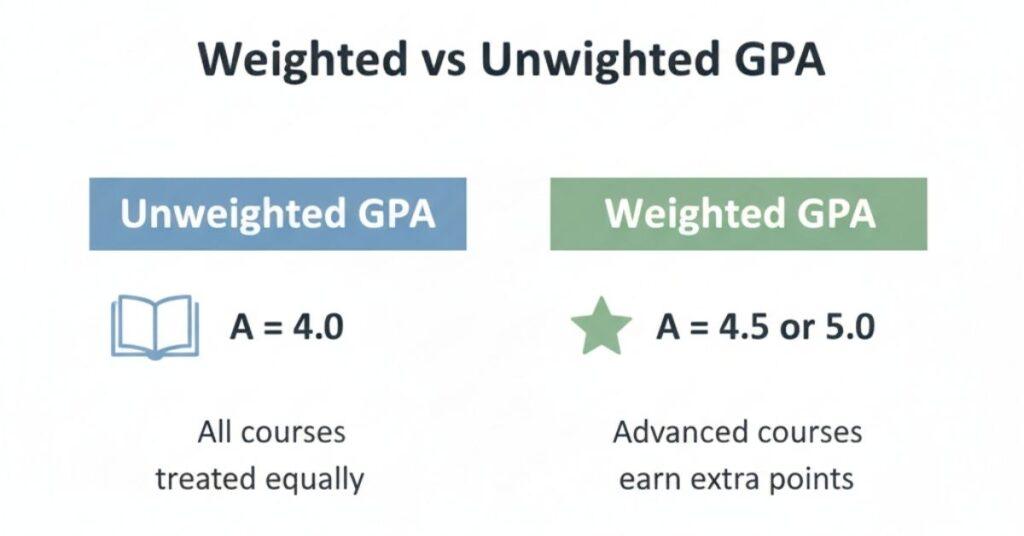
An unweighted GPA treats all courses equally. An A usually equals 4.0, no matter the class difficulty.
Weighted GPA gives extra points for more challenging courses, such as honours or advanced classes. An A might count as 4.5 or 5.0, depending on the school.
Key difference:
- Unweighted = same scale for all classes
- Weighted = higher value for advanced courses
Canvas does not decide this. Your school sets the rule.
Why GPA Matters More Than a Single Course Grade
GPA affects long-term academic decisions. Schools use it for:
- Scholarships
- Academic standing
- Graduation checks
A strong canvas course grade helps, but GPA reflects consistency across time. That’s why GPA carries more weight than one class result.
Why GPA and Course Grade Differ
In Canvas GPA vs. Course Grade Explained, many students ask one question: Why do these numbers not match? You may see an A in Canvas, yet your GPA looks lower. This happens because Canvas and GPA systems follow different rules.
Here’s why a strong Canvas course grade does not always equal a high GPA.
Extra Credit or Bonus Points
Extra credit often boosts your course grade in Canvas. Instructors may add bonus points to assignments or exams.
However, GPA usually does not account for extra credit. GPA systems convert your final letter grade into grade points. They don’t count how you earned it.
Example:
- Canvas course grade: 91% after extra credit
- Letter grade: A
- GPA value: 4.0 only, not higher
This is why a Canvas GPA calculator may show limits, even with bonus points.
Dropped Assignments or Missing Grades
Canvas may drop your lowest score or hide ungraded work. This can raise your visible percentage.
GPA calculations work differently:
- They use the final posted grade
- They don’t see dropped work
- Missing grades can lower results until finalized.
This gap often confuses students who rely only on Canvas.
Rounding Rules and Grading Scales
Schools follow strict GPA scales:
- A = 4.0
- B = 3.0
- C = 2.0
Canvas may show 89.6% as an A, but GPA conversion may still count it as 3.7. These canvas letter grade conversion rules vary by school.
Example: A Course Grade but a Lower GPA
Imagine this:
- Course grade in Canvas: A
- GPA result: 3.7
This happens because of weighted vs. unweighted grades or school-specific rounding. Canvas tracks progress. GPA records performance officially.
How Canvas Handles Grades vs GPA
In Canvas GPA vs. Course Grade Explained, this is where most confusion happens. Canvas is a learning management system, not an official GPA authority. It tracks class progress but does not calculate your real GPA.
Understanding this difference helps you avoid surprises at the end of the term.
Canvas Shows Course Grades Only
Canvas displays course-level results, not overall performance. Each class shows its own percentage or letter grade.
What Canvas does well:
- Tracks assignments, quizzes, and exams
- Updates grades in real time
- Shows your canvas course grade clearly
What it does not do:
- Combine grades across courses
- Apply GPA scales officially
Even if you see all A’s in Canvas, it still shows separate course grades, not a GPA.
GPA Is Calculated Outside Canvas
Your official GPA comes from your school’s registrar or academic system. That system:
- Converts final letter grades into points
- Applies credit hours
- Follows school-specific rules
This process explains how Canvas calculates GPA—it doesn’t. Students often use a Canvas GPA calculator to estimate results, but those numbers remain unofficial.
“Canvas GPA” Is Not Your Official GPA
Many tools use the phrase “Canvas GPA,” which can be confusing. Canvas itself does not publish GPA.
Important reminder:
- Canvas grades = progress tracking
- GPA = official academic record
A final-grade canvas calculator helps with planning, but only your transcripts show your actual GPA.
Role of a Canvas GPA Calculator (For Estimation Only)
In Canvas GPA vs. Course Grade Explained, a Canvas GPA calculator plays a helpful but limited role. It does not replace official systems. Instead, it helps students estimate outcomes before final grades are posted.
Used correctly, it supports planning, not record-keeping.
Why Students Use Canvas GPA Calculators
Students use a Canvas GPA calculator to predict where they might land. Canvas shows course grades, but it doesn’t combine them into a GPA.
Common reasons students rely on these tools:
- To estimate semester or cumulative GPA
- To test “what-if” grade scenarios
- To reduce anxiety before finals
These calculators pull data from your Canvas course grade and apply standard GPA scales. The result helps you plan, not certify performance.
Academic Benefits: Planning and Goal Setting
A GPA calculator supports smarter decisions. It helps you see how future grades may affect your standing.
Practical benefits include:
- Setting realistic grade targets
- Prioritising high-impact courses
- Understanding weighted vs unweighted grades
For example, you can check how improving one final might raise your average. A final grade calculator for Canvas works well alongside GPA tools for this purpose.
Key Limitation: Not a Replacement for Transcript GPA
These tools are estimates only. They:
- Don’t reflect official rounding rules
- Can’t apply school-specific policies
- Ignore registrar adjustments
Only your transcript shows your real GPA. Use calculators for guidance, not confirmation.
Common Confusions Students Face
In Canvas GPA vs. Course Grade Explained, confusion often comes from mixing similar terms. Canvas shows helpful data, but it doesn’t explain how schools officially record grades. This gap leads students to wrong assumptions about their academic standing.
Let’s clear up the most common misunderstandings.
Course Grade in Canvas ≠ GPA on Your Transcript
A Canvas course grade reflects performance in one class. Your transcript GPA combines grades from multiple courses.
Key difference:
- Canvas grade = class progress
- Transcript GPA = official average
Seeing an A in Canvas does not mean your GPA automatically rises. Tools like a Canvas GPA calculator only estimate what might happen later.
Semester GPA vs Cumulative GPA
Semester GPA covers one term only. Cumulative GPA includes all completed semesters.
This often confuses when:
- A strong semester doesn’t fix past low grades
- A weak term lowers the overall average
Canvas shows current results, not your full academic history.
Weighted vs Unweighted GPA Mismatch
Some students expect Canvas to adjust their GPAs based on course difficulty. It doesn’t.
Schools decide:
- Which classes are weighted
- How many extra points do they earn
This mismatch between weighted and unweighted grades explains why GPA numbers may differ from expectations.
Misunderstanding Letter Grade Conversion
Letter grades convert to fixed points:
- A = 4.0
- B = 3.0
Canvas percentages may round up, but GPA systems may not. These canvas letter grade conversion rules vary by institution.
Academic Tips to Improve Both GPA and Course Grade
In Canvas GPA vs. Course Grade Explained, improving results takes more than checking grades at the end. Small, consistent actions can raise both your Canvas course grade and your long-term GPA. Canvas helps with tracking, while GPA planning tools guide decisions.
Here are practical tips that actually work.
Stay Updated With Canvas Grades
Check Canvas often, not just before exams. Early awareness gives you time to fix issues.
Best habits:
- Review grades weekly
- Watch for missing or ungraded work
- Read instructor feedback
Catching a low score early protects your course grade and reduces GPA damage later.
Focus on Weighted Assignments
Not all work carries the same value. Finals and major projects often weigh more.
Smart strategy:
- Identify high-weight tasks first
- Allocate more study time to them
- Avoid over-focusing on low-impact work
This approach improves outcomes in both weighted and unweighted grade systems.
Understand Your School’s GPA Conversion Scale
Each school sets its own rules for converting grades to points. An 89% may equal different values.
Know:
- Letter grade cutoffs
- Plus/minus impact
- Rounding policies
This helps you predict outcomes more accurately than guessing.
Track Progress Using Both Tools
Use Canvas for daily tracking. Use a Canvas GPA calculator for planning.
A Canvas final grade calculator helps estimate final course results. Together, these tools give a clearer academic picture without surprises.
Conclusion
In this guide, we explain the difference between course grades and GPA on Canvas. You now understand how Canvas tracks Canvas course grades, why official GPA may differ, and the role of weighted vs. unweighted grades in calculations. We also covered tools such as the Canvas GPA and final grade calculators for planning and goal-setting.
Remember, Canvas is a great tool to monitor progress, but your GPA is the official academic measure. Check grades regularly, use calculators wisely, and stay informed about Canvas’s letter-grade conversion rules.
If this article helped you, share it with classmates or leave a comment about your experience tracking grades in Canvas. Explore more resources on our site to stay on top of your academic goals!

Hi, I’m Zohaib Ali, a BS-IT student at the University of Engineering and Technology. 🎓 I created CanvasGradeCalculator.com to make grade and GPA calculations simple, accurate, and stress-free for students, teachers, and parents. Passionate about tech and education, Helping learners plan smarter, study better.