Introduction
Ever checked your grade and wondered, “Wait… how did that percentage turn into this letter grade?”
Many students using Canvas LMS feel confused when scores shift from percentages to letters or GPA. One quiz can drop your average, yet the math feels hidden. Beginners across the USA often ask the same things: Does 89.5 round up? How do weights affect totals? How do you calculate a letter grade or GPA without mistakes?
This guide explains how Canvas Converts Percentages into Letter Grades in clear, simple steps. You’ll learn the formulas, see real examples, and understand weighted vs unweighted grading. We’ll also show how a canvas overall grade and GPA calculator can save time and reduce stress.
By the end, you’ll know exactly where every point goes and how to predict your final result. And if manual math feels slow, you can use our free Canvas Grade Calculator below for instant answers.
Quick Answer – How Canvas Converts Grades (Fast Summary Table)
Need the fast version? Here’s how Canvas LMS converts your percentage into a letter grade and GPA points. Let’s break down the process for clarity.
Most courses follow a simple grading scale. Your final percentage maps to a letter, then to a GPA value. Teachers can adjust ranges, but this table matches many U.S. classes and gives a reliable starting point.
| Percentage | Letter Grade | GPA |
|---|---|---|
| 90–100 | A | 4.0 |
| 80–89 | B | 3.0 |
| 70–79 | C | 2.0 |
| 60–69 | D | 1.0 |
| Below 60 | F | 0.0 |
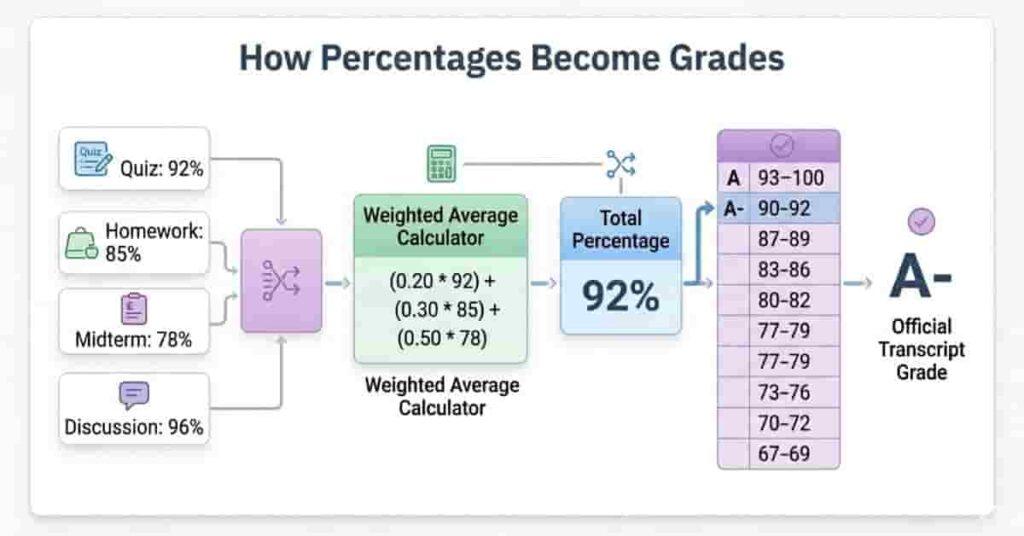
Specifically, Canvas first calculates your final percentage from assignments and weights. It then matches that number to a letter band. Finally, the letter converts to GPA points for transcripts or averages. This stepwise conversion streamlines grade reporting.
Takeaways
- Percentage decides everything.
- Letter grades follow fixed ranges.
- GPA comes directly from the letter, not raw points.
Pro Tips
- Always check your instructor’s custom grading scheme, as they may set unique rules that differ from standard conversions.
- Small differences like 89.5 vs 90 can change your GPA.
- Use a grade calculator to test “what-if” scores quickly.
“You can also explore how the Canvas What-If Grade Calculator predicts your outcomes before exams.”
Percentage vs Letter Grades in Canvas (Basics Explained)
If you see 87% in your gradebook, what does it really mean? Is it a B or still a C?
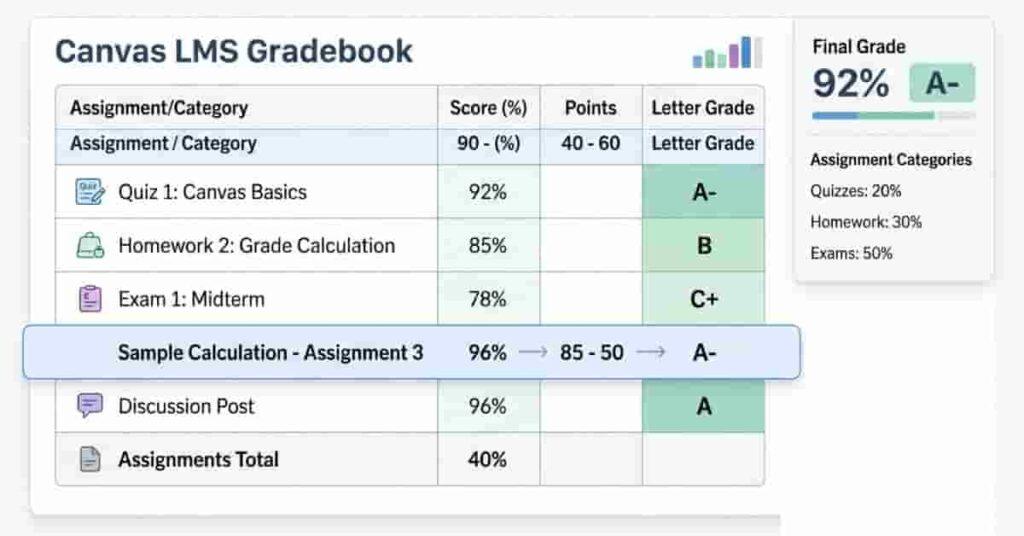
This confusion is common, especially for those new to Canvas LMS. While Canvas often shows percentages first, schools typically report letter grades and GPA. This difference can create stress for students, especially near finals, as they try to interpret their standing.
To understand how grades are displayed, let’s start with percentage grading.
Percentage grading shows the exact score you earned out of 100. It comes from points or weighted categories.
For example, 85 out of 100 equals 85%. This method feels precise and easy to track. You can see small changes after each quiz or homework.
Teachers like percentages because they show detail. Students can quickly measure progress and spot weak areas.
Next, let’s look at letter grading and how it works.
Letter grading groups percentages into ranges. These ranges usually look like A, B, C, D, and F.
Instead of 85%, you see a B. Colleges and transcripts use letters because they are simple and standard. GPA also depends on letters, not raw percentages.
Why do instructors use one or both
Some instructors show only percentages for daily work. Others convert everything to letters at the end. Many use both together.
Percentages help during the semester. Letters make final results easier to report.
How grading schemes work inside Canvas
Canvas uses a grading scheme, which matches specific percentage ranges with letter grades according to the course’s setup.
For example: 90–100 = A 80–89 = B
Instructors can adjust these cutoffs to fit their course. For example, one class might use 89.5% as the lowest A, while another sets it at 90%. Always check your own course’s grading scheme for details.
Takeaways
- Percentages show precision.
- Letters simplify reporting.
- Canvas converts percentage to letter using a grading scheme.
- Cutoffs may change by instructor.
Pro Tips
- Open your syllabus and review the grading scale first.
- Don’t assume every class uses the same ranges.
- Test your scores with a grade calculator to avoid surprises.
How Canvas Calculates Your Final Percentage
Your final grade in Canvas LMS always starts with one number: your percentage.
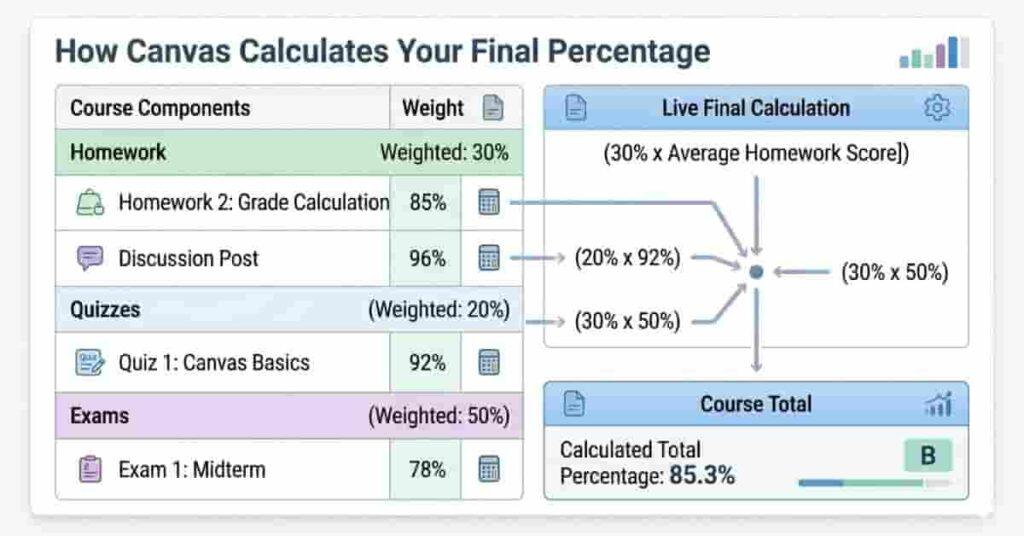
Canvas adds your scores, applies weights if needed, and converts these into a percent, which becomes your letter grade and GPA. Understanding this process lets you manage your results instead of guessing.
Now let’s look at the two main grading approaches you’ll encounter: unweighted points and weighted categories.
Unweighted Grading Formula
Earned ÷ Total × 100
Unweighted grading treats every point the same. A 10-point quiz and a 100-point exam both add directly to your total.
Divide your earned points by the total possible, then multiply by 100.
Example:
You earned 420 points out of 500.
420 ÷ 500 × 100 = 84%
Your current grade is 84%, which usually equals a B.
This method feels fair and easy to track. Each assignment adds straight to your total.
Weighted Grading Formula
(Score × Weight) + (Score × Weight)
Weighted grading gives some categories more importance. Exams might count more than homework. This setup reflects real course priorities.
Canvas multiplies each category score by its weight and adds the results.
Example weights:
- Homework = 30%
- Quizzes = 20%
- Exams = 50%
If you score higher on exams, your overall grade improves faster. If exams drop, your grade falls quickly.
Always check weights in your syllabus or grade settings.
Practical Example
Here’s a simple weighted course:
| Category | Score | Weight |
|---|---|---|
| Homework | 90% | 30% |
| Quizzes | 80% | 20% |
| Exams | 85% | 50% |
Calculation:
(90 × 0.30) + (80 × 0.20) + (85 × 0.50) = 85.5%
Final percentage = 85.5%
Takeaways
- Unweighted = all points equal
- Weighted = categories matter differently.
- Canvas always ends with one final percentage.
Pro Tips
- Focus effort on high-weight exams first.
- Track categories weekly, not just totals
- Double-check missing assignments
👉 Instead of doing these calculations manually, you can instantly compute your final percentage using our Canvas Grade Calculator.
How Canvas Converts Percentage into Letter Grade
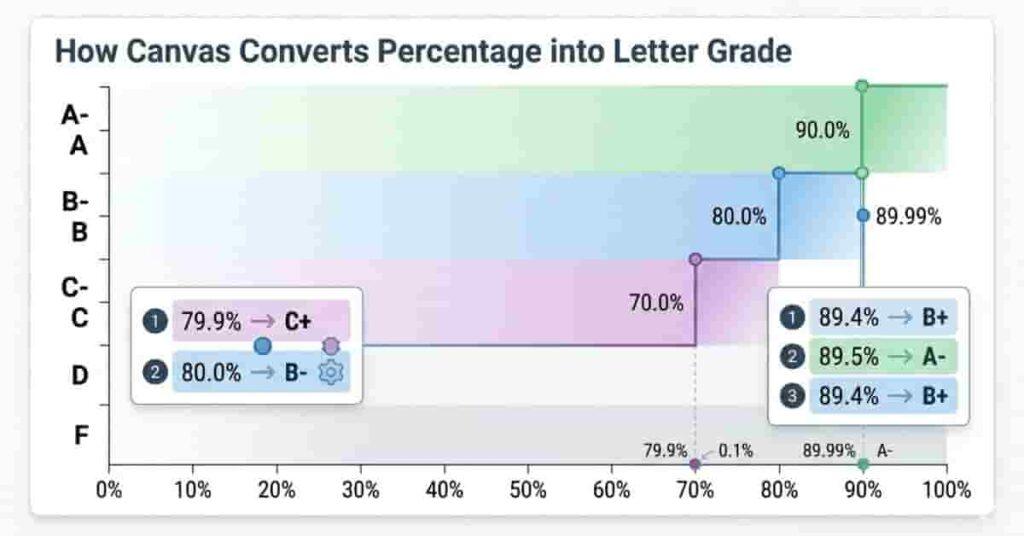
After Canvas calculates your final percentage, it assigns a letter. Even small decimals matter.
Half a point can shift your grade—for example, from B to A. That affects your GPA and transcript. Know these rules so you aren’t surprised later.
Canvas uses set cutoffs, rounding choices, and instructor settings to decide your final grade.
Grade Boundaries
Grade boundaries are set percentage ranges for each letter. Most U.S. courses use a standard scale.
Common example:
- 90–100 → A
- 80–89 → B
- 70–79 → C
- 60–69 → D
- Below 60°F
Canvas matches your final percentage to a band. For example, 85% means a B.
These boundaries help you know exactly where you stand.
Rounding Rules
Rounding causes confusion. Some instructors round, others don’t.
For example, 89.6 may round up, but 89.4 may not. Check your course policy.
Canvas does not set a rounding rule. The instructor decides how rounding works.
Near a cutoff, a fraction of a point can matter.
Instructor Custom Grading Scales
Canvas lets teachers set their own grading schemes. They decide grade cutoffs.
One class may set an A at 93. Another may start at 90. Some schools use plus/minus grades like B+ or A-.
That’s why two classes can treat the same percentage differently. Never assume all your courses use the same scale.
Example Scenarios
Small differences can change your letter grade fast.
Scenario 1: 89.4 vs 89.5
- 89.4 → usually stays B
- 89.5 might round to 90 → A
Scenario 2: 79.9 vs 80
- 79.9 → C
- 80 → B
These small gaps may change your GPA.
Takeaways
- Percentages map to letter ranges.
- Rounding rules vary by instructor.
- Custom grading schemes change cutoffs
- Tiny decimals can impact GPA.
Pro Tips
- Track your grade weekly near boundaries.
- Ask your instructor about rounding early.
- Use a calculator to test “what-if” scores.
“If automatic calculation is disabled, refer to tips from Canvas Grade Calculation Disabled?
How Canvas Calculates GPA (Step-by-Step)
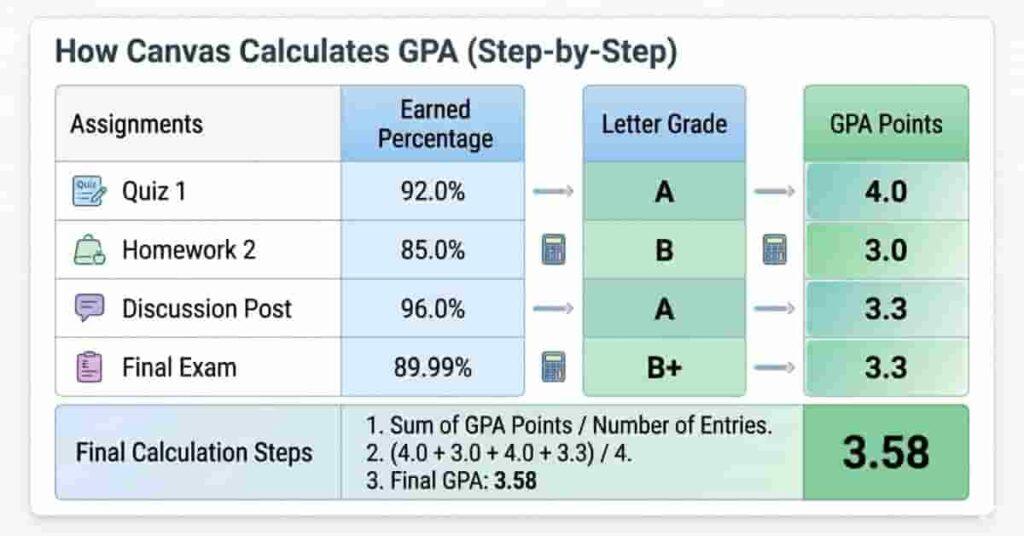
After Canvas LMS converts your percentage into a letter grade, the next step is GPA. Schools in the U.S. use GPA to measure overall performance across courses.
GPA seems complex, but each letter becomes a number, and then you average those numbers. Knowing this helps you predict results and plan for finals.
Now that you understand the basics, let’s walk through the calculation step by step with clear examples.
Letter → GPA Points Chart
Canvas links each letter grade to GPA points. Most schools follow the standard 4.0 scale.
Here’s the common setup:
| Letter Grade | GPA Points |
|---|---|
| A | 4.0 |
| B | 3.0 |
| C | 2.0 |
| D | 1.0 |
| F | 0.0 |
Some schools add plus or minus grades. For example, B+ might equal 3.3. Check your syllabus to confirm.
Canvas uses these points to average your GPA across courses.
Takeaways
- Letters convert to numbers first.
- GPA is just an average of those numbers
- Always verify your school’s exact scale.
Pro Tips
- Track GPA points weekly, not only percentages.
- Don’t guess cutoffs near A or B.
Single Course Example
Let’s say your course has three graded parts.
- Midterm → B → 3.0
- Project → A → 4.0
- Final → B → 3.0
Add the points: 3.0 + 4.0 + 3.0 = 10
Divide by 3 assignments: 10 ÷ 3 = 3.33 GPA
Your course GPA is about 3.3.
This method works when each part counts equally. It gives a quick snapshot of performance.
Multiple Course Cumulative GPA Example
Now, imagine you take four classes in one semester.
- Math → A → 4.0
- English → B → 3.0
- Science → A → 4.0
- History → C → 2.0
Add points: 4 + 3 + 4 + 2 = 13
Divide by 4 courses: 13 ÷ 4 = 3.25
Your GPA is 3.25.
Colleges use this number for transcripts, honors, and scholarships. Even one low grade can lower the average, so every class counts.
Takeaways
- GPA averages all courses together
- One weak class affects the full semester.
- Consistency matters more than one perfect score.
Pro Tips
- Protect high-credit courses first.
- Improve low grades early before finals.
Weighted GPA vs Unweighted GPA Explained
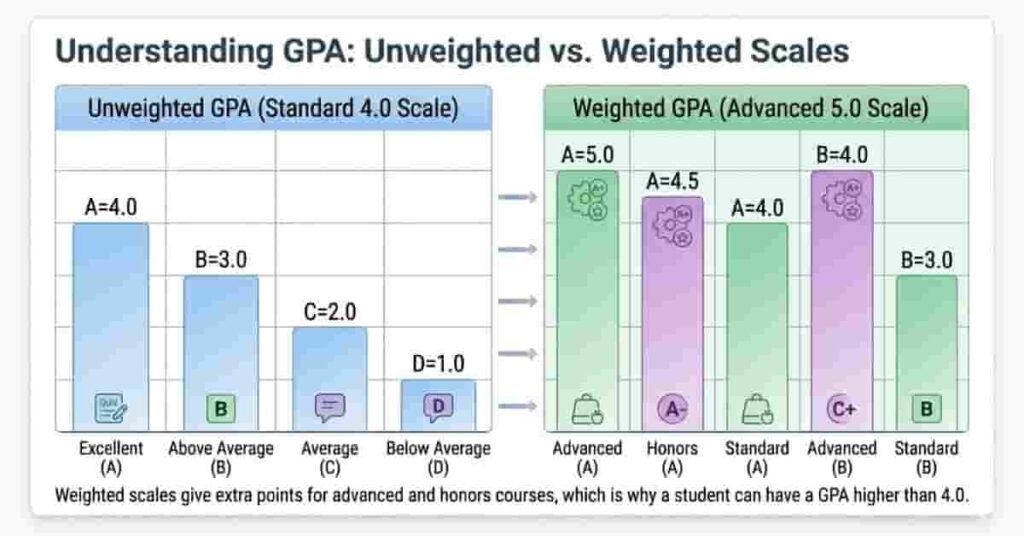
Some schools use a weighted GPA for advanced classes. Honors or AP courses may give extra points.
Unweighted GPA uses the standard 4.0 scale for every class. An A always equals 4.0.
With a weighted GPA, extra points are awarded for specific courses. For example, an A in a standard class equals 4.0, but an A in an advanced class could be worth 4.5 or 5.0, depending on your school’s scale.
Weighted systems reward tougher classes but can inflate numbers. Always check which system your school reports to.
👉 Want to instantly convert all your course grades into GPA? Try our Canvas GPA Calculator.
Using a Canvas Grade Calculator (Practical Working Guide)
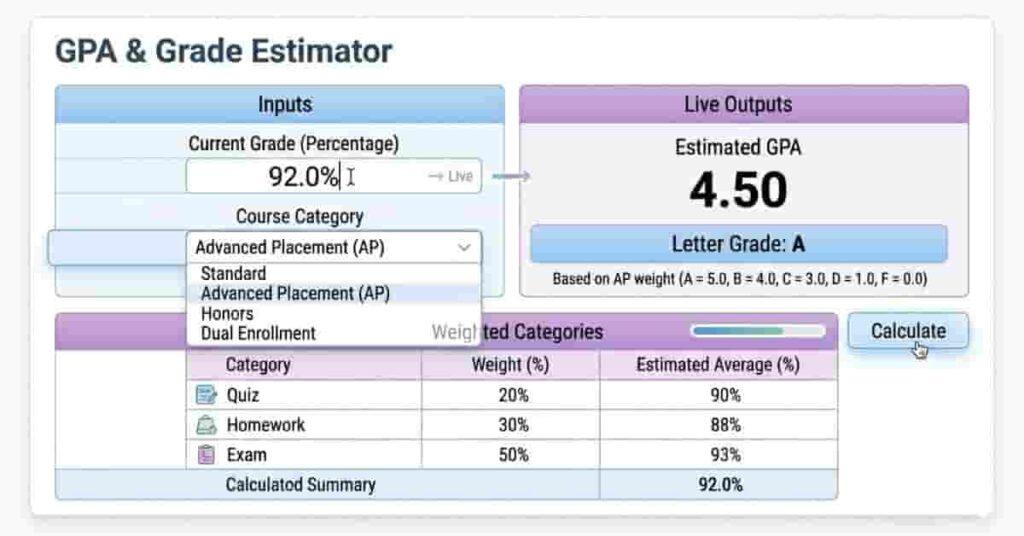
Manual math works, but it takes time and often causes mistakes. One wrong number can change your final grade. That’s why many students use a calculator instead.
With Canvas LMS, a grade calculator tracks your percentages, letter grades, and GPA instantly—just enter your scores.
This approach feels faster, clearer, and less stressful during midterms or finals week. It also lets you test “what-if” scenarios before exams.
With that in mind, here is how you can use a Canvas Grade Calculator step by step.
Step 1: Enter Assignments
Start by adding every graded item from your course.
Include:
- Homework
- Quizzes
- Projects
- Exams
- Extra credit (if allowed)
Enter earned points and total points correctly. Small errors can throw off results.
Try to copy numbers directly from your Canvas gradebook to stay accurate.
Step 2: Add Weights
Next, add category weights if your course uses weighted grading.
Common examples:
- Homework = 30%
- Quizzes = 20%
- Exams = 50%
The calculator multiplies each category by its weight automatically. You don’t need to calculate anything by hand.
If your course is unweighted, you can skip this step.
Step 3–5: See Percentage, Letter Grade, and GPA
After entering your data, the calculator displays your results instantly.
You’ll see:
- Final percentage
- Letter grade
- GPA points
This matches how Canvas converts your percentages to letter grades without manual formulas.
Now you know exactly where you stand in the course.
What-If Prediction Example
Let’s say your current grade is 88%, and the final exam is worth 30%.
You want an A.
Enter your possible final exam scores, such as 85%, 90%, or 95%. With each entry, the calculator updates your projected final grade, showing exactly how each possible exam score affects your overall result. This way, you immediately see what exam score you need to achieve your desired grade.
This feature helps you set realistic goals and study smarter.
Takeaways
- Enter scores once and get instant results.
- Works for both weighted and unweighted courses
- Shows percentage, letter, and GPA together
- “What-if” tools help you plan ahead.
Pro Tips
- Update weekly after each assignment.
- Double-check weights before finals.
- Test target scores to reduce exam stress
👉 Instead of guessing, use our Canvas Grade Calculator to compute your percentage, letter grade, and GPA instantly.
Predict Your Required Score with a Point-Based Calculator
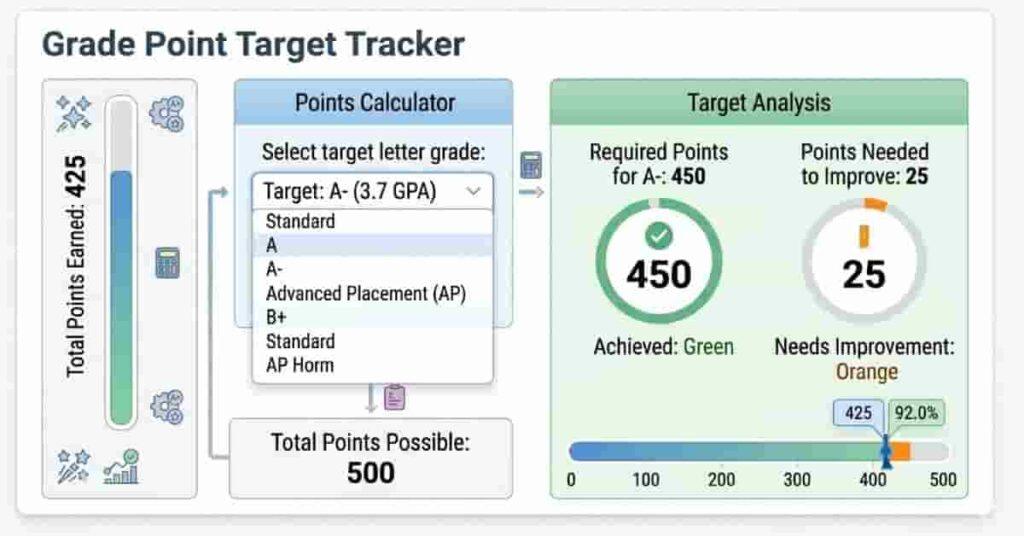
Some courses use points, not percentages. Every assignment has a set point value, and your grade depends on how many points you earn. Figuring out how many points you need on a final or project can be confusing.
A point-based calculator quickly solves this. Enter your current points, total possible points, and final exam points, and the tool shows the score needed for your target grade or GPA.
How to Calculate Needed Points on a Final Exam
- First, add up all the points you have earned so far in the course.
- Next, find out the total possible points available in the course by adding up all assignments, quizzes, and exams.
- Then, determine the point total that matches your target grade. For example, for an A (90%), multiply total possible points by 0.9.
- Subtract your current earned points from your target points to find the points needed on the final exam or project.
- The answer you get is the exact number of points you must earn on the final to reach the grade you want.
Example:
- Current points: 820
- Total course points: 1000
- Desired grade: 90% (900 points)
- Points needed on final: 900 – 820 = 80 points
Now you know exactly what to aim for.
Takeaways
- Point-based courses require tracking totals, not percentages.
- Calculating manually is error-prone, especially with multiple categories.
- A point calculator makes it simple to plan your study goals.
Pro Tips
- Include extra credit or bonus points when calculating targets.
- Update points weekly to stay on track.
- Use the calculator to test “what-if” scenarios before exams.
Take charge of your points now—try our Canvas Point Grade Calculator and set yourself up for success!
Common Grade Conversion Mistakes Students Make
Even small mistakes can lower your grade unexpectedly. Many students don’t realize how errors in handling weights, dropped scores, rounding, or grading schemes affect percentages, letters, and GPA. Knowing these pitfalls helps you avoid surprises on your transcript.
Forgetting Weights
Some students think every assignment is worth the same, but Canvas often groups work into categories that count for different parts of your grade. For example, homework could be 20% and tests 50%. Ignoring these groups can make your grade estimate wrong. Always check your syllabus or online gradebook.
Ignoring Dropped Scores
Many classes drop your lowest quiz or homework score. If you forget this, your grade estimate can be too low. Canvas drops scores for you, but people often forget this when they add up grades themselves.
Misunderstanding Rounding
Teachers round grades in different ways. For example, 89.5 might round up to 90, but 89.4 usually stays a B. Don’t guess—always check how your teacher rounds grades.
Not Checking the Grading Scheme
Canvas can use different grading scales. In one class, 80 might mean a B-; in another, a B. If you don’t check, you may guess your grade wrong. Always see the cutoff grades in your class settings.
Takeaways
- Weights, dropped scores, and rounding matter.
- Custom grading schemes vary by course.
- Small mistakes can affect GPA and letter grades.
Pro Tips
- Review your syllabus and grading settings early.
- Update your grade calculations weekly.
- Use a Canvas Grade Calculator to avoid human error.
Final Thoughts
Understanding how Canvas converts percentages into letter grades can make a huge difference in your academic planning. We covered how percentages turn into letters, how GPA is calculated, and how weighted versus unweighted grades affect your final score. You also learned practical tips, common mistakes to avoid, and step-by-step guides using calculators.
Grasping these conversions reduces stress and helps you plan smarter for exams or assignments. Tools like a Canvas Grade Calculator, GPA Calculator, or Point Grade Calculator make tracking your progress fast and accurate.
👉 Don’t leave your grades to guesswork—try our calculators to see your current standing instantly. Share your experience in the comments or explore more resources to master your grades confidently.

Hi, I’m Zohaib Ali, a BS-IT student at the University of Engineering and Technology. 🎓 I created CanvasGradeCalculator.com to make grade and GPA calculations simple, accurate, and stress-free for students, teachers, and parents. Passionate about tech and education, Helping learners plan smarter, study better.